PilotEdit logo

PilotEdit 21.0.0

  • User Rating:
    ★★★★★
    ★★★★★
    0.0 0Votes
  • Requirements:
    Windows
  • Version: 21.0.0
  • Latest updated: 1 week ago
  • License: Freeware  
  • Publisher: PilotEdit
  • Size: 27 MB
× app stores

PilotEdit is an advanced text and hex editor built for users who work with large files, complex text processing tasks, and FTP-based workflows. It combines powerful editing capabilities, scripting support, file comparison tools, and FTP integration in a lightweight Windows application.

Overview

PilotEdit is designed to handle files that exceed the limitations of many traditional text editors. With support for files larger than 4GB and virtually unlimited file sizes, it caters to developers, system administrators, data analysts, and power users who regularly work with massive datasets or log files. Beyond standard text editing, PilotEdit includes a hex editor, advanced search and replace functions, scripting automation, file comparison tools, FTP file management, and AES encryption. Its combination of performance and functionality makes it a versatile solution for both text editing and file management tasks.

Features of PilotEdit

  • Supports editing files larger than 4GB with no practical file size limit
  • Advanced text editor and hex editor in a single application
  • Multi-line search and replace functionality
  • Regular expression (Regex) support
  • FTP client for opening, editing, downloading, and uploading files
  • 256-bit AES encryption and decryption
  • ANSI, UTF-8, UTF-16, and UTF-16 Big Endian encoding support
  • Automatic text encoding detection and conversion
  • DOS, UNIX, and MAC file format support
  • Customizable syntax highlighting and keyword highlighting
  • Column editing mode
  • Unlimited undo and redo operations
  • Word wrap for viewing long lines
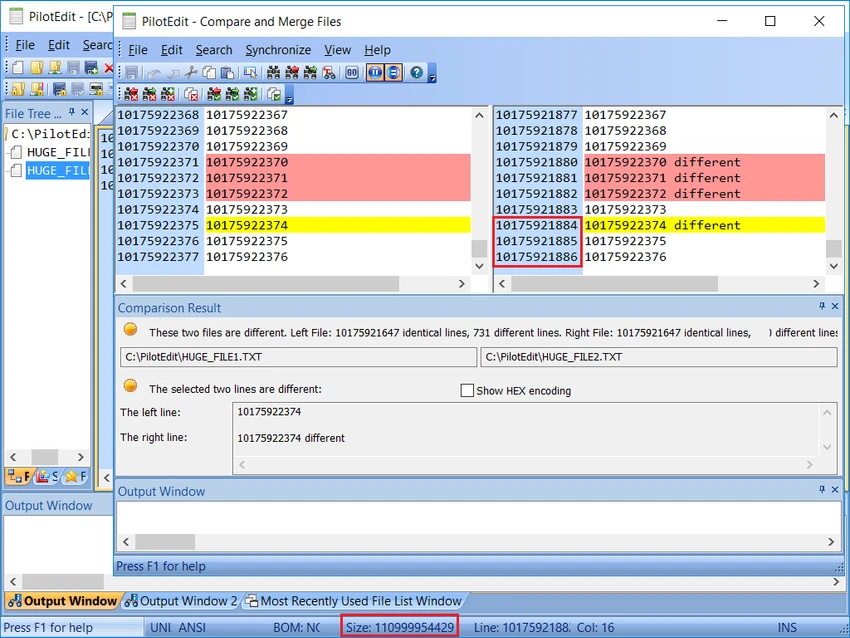
  • File and directory comparison tools
  • Script execution and automation capabilities
  • Find and remove duplicate lines
  • String extraction and collection tools
  • Search and replace across multiple files and directories
  • Line sorting functionality
  • Custom string tables for inserting predefined text

User Experience

During use, PilotEdit feels more like a professional-grade editing suite than a basic text editor. The interface is organized into multiple panels, allowing quick access to files, editing tools, and output information without becoming overwhelming. One of its biggest advantages is handling extremely large files while maintaining low memory usage. Navigating through large datasets, logs, or source files remains responsive, making it particularly useful for technical users.

The ability to switch between text and hex modes adds flexibility when working with binary data. Features such as column editing, multi-file search and replace, and regex support streamline complex editing tasks that would be difficult in simpler editors. FTP integration is another strong point. Being able to edit files directly on a server, then upload changes without switching applications, can significantly improve workflow efficiency. Although the interface is functional rather than modern, it prioritizes productivity and exposes a wide range of tools within a single workspace.

Who Should Use PilotEdit?

  • Developers working with large source code files
  • System administrators managing logs and configuration files
  • Data analysts handling large text datasets
  • Web developers editing files directly on FTP servers
  • Power users who require advanced search, scripting, and automation tools
  • Anyone needing both text and hex editing capabilities

Conclusion

PilotEdit stands out as a powerful editor for users who regularly work with large files, advanced text processing, and FTP-based workflows. Its combination of unlimited file-size support, hex editing, scripting, encryption, and search tools makes it much more capable than a typical text editor.

Pros & Cons

Pros

  • Handles extremely large files efficiently
  • Integrated text and hex editing modes
  • Powerful multi-line and regex search capabilities
  • Built-in FTP client with upload and download support
  • Supports multiple text encodings and file formats
  • Unlimited undo and redo functionality
  • File and directory comparison tools
  • Includes scripting and automation features
  • Low memory consumption even with large files

Cons

  • Interface prioritizes functionality over modern design
  • Feature set may feel overwhelming for beginners
  • Primarily targeted at advanced and technical users

Frequently Asked Questions

What is PilotEdit used for?

PilotEdit is used for editing large text files, hex editing, scripting, file comparison, FTP file management, and advanced search and replace operations.

Can PilotEdit open very large files?

Yes. PilotEdit supports files larger than 4GB and is designed to handle virtually unlimited file sizes while maintaining low memory usage.

Does PilotEdit support FTP editing?

Yes. It includes a built-in FTP client that allows users to open, edit, download, and upload files directly from FTP servers.

Does PilotEdit support different text encodings?

Yes. It supports ANSI, UTF-8, UTF-16, and UTF-16 Big Endian formats and allows easy encoding conversion.

Can PilotEdit compare files and folders?

Yes. The software includes tools for comparing both files and directories.

Which operating systems are supported?

PilotEdit supports Windows 7, Windows 8, Windows 10, and Windows 11.

Recommended apps [Freeware]:
  • AnyTXT Searcher 1.3.3173 AnyTXT Searcher logo fast desktop search tool that indexes and searches full-text content across documents, PDFs, emails, and more
  • Viber for Windows 28.2.0 Viber for Windows logo make free calls, send messages, and sync chats across devices via WiFi or 3G
  • SponsorBlock 6.1.6 SponsorBlock logo browser extension that automatically skips YouTube sponsorships, intros, outros, and other non-essential video segments
  • WindowTop 5.32.3 WindowTop logo Manage desktop windows with WindowTop using Picture-in-Picture, transparency, dark mode, and always-on-top features
  • Media Player Classic Black Edition 1.9.0 Media Player Classic Black Edition logo a free media player with a modern dark interface and YouTube playback
  • DoesNotBelong 11.6.3 DoesNotBelong logo free malware removal and Windows repair tool that complements antivirus software with on-demand scanning and system cleanup
Recommended apps [Shareware]:
  • Teorex FolderIco 9.3.0 Teorex FolderIco logo Change folder colors or icons in one click and organize your files visually, so you can find everything instantly
  • TweakNow WinSecret Plus 9.5.4 TweakNow WinSecret Plus logo Windows optimization, hidden tweaks, PDF tools, image conversion, and system utilities
  • Centurion Setup 51.0 Centurion Setup logo Windows installer builder that creates compressed, self-contained executables with multilingual support
  • Password Depot 19.2.0 Password Depot logo a secure password manager with AES encryption, auto-fill, and cloud sync support for Windows users
  • VovSoft PDF to Text Converter 1.5 VovSoft PDF to Text Converter logo convert PDF files to editable TXT documents offline with batch processing
  • MathType 7.11.1.462 MathType logo a powerful equation editor for creating mathematical formulas in Word, LaTeX, and more