


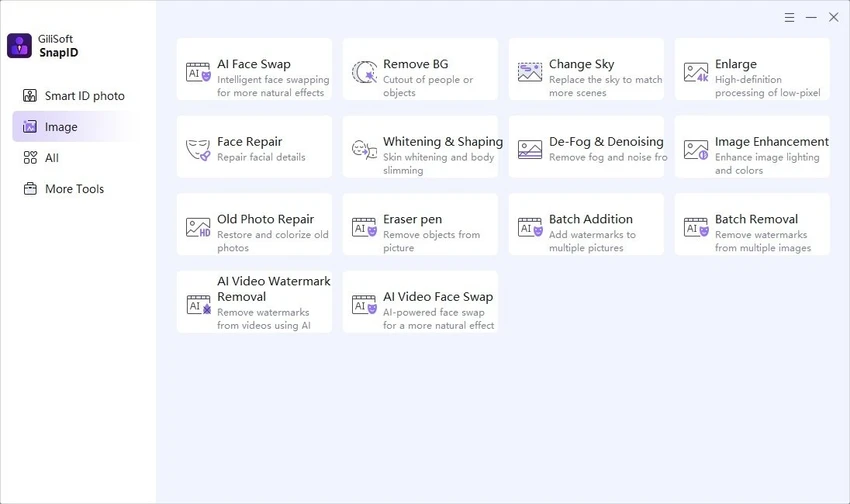

Gilisoft SnapID is a versatile image editing application designed for users who want to enhance, retouch, and transform photos without the complexity of professional-grade design software. The software combines essential editing tools with creative effects, portrait enhancement features, collage creation, and batch processing capabilities. Whether you're improving personal photos, creating social media content, or working on larger image collections, Gilisoft SnapID provides a broad set of tools suitable for both beginners and experienced users.
Features of Gilisoft SnapID
- Advanced image cropping tools
- Precise image resizing without significant quality loss
- Image rotation and flipping options
- Color correction and enhancement controls
- Brightness and contrast adjustment tools
- Saturation management for color intensity control
- Wide selection of filters and creative effects
- Object removal functionality
- Portrait retouching tools
- Collage creation with customizable layouts
- Batch image processing support
- Text insertion with font customization options
- Layer-based editing capabilities
- Multiple blending modes
- Histogram display for image analysis
- Zoom and pan controls for detailed editing
- Unlimited undo and redo functionality
- Save images in multiple formats including JPEG, PNG, and TIFF
- User-friendly editing interface
User Experience
After using Gilisoft SnapID, the software presents itself as an accessible yet capable image editing solution. The interface is designed to keep commonly used tools within easy reach, allowing users to start editing without a steep learning curve. Basic tasks such as cropping, resizing, and color correction are straightforward. The software performs well for everyday photo enhancement, providing enough control to improve image quality while remaining approachable for casual users.
One of the highlights is the collection of filters and effects. Users can quickly apply stylistic changes to photos or experiment with different creative looks without needing advanced editing knowledge. The object removal feature also adds practical value by helping clean up distracting elements within images. Portrait retouching tools offer useful options for improving facial features, smoothing skin, and enhancing overall portrait quality. For users creating content for social media, family albums, or personal projects, these features can significantly improve results with minimal effort.
Who Should Use Gilisoft SnapID?
- Casual photographers
- Content creators and social media users
- Bloggers and digital marketers
- Students and hobbyists
- Users creating photo collages and visual projects
- Anyone seeking a user-friendly image editing application
System Requirements
- Operating System: Windows 7, Windows 8, Windows 10, Windows 11
Conclusion & Recommendation
Gilisoft SnapID successfully balances simplicity and functionality, offering a wide range of image editing tools within an accessible interface. From basic photo corrections to creative effects, portrait retouching, and collage creation, the software covers many common image editing needs.


