


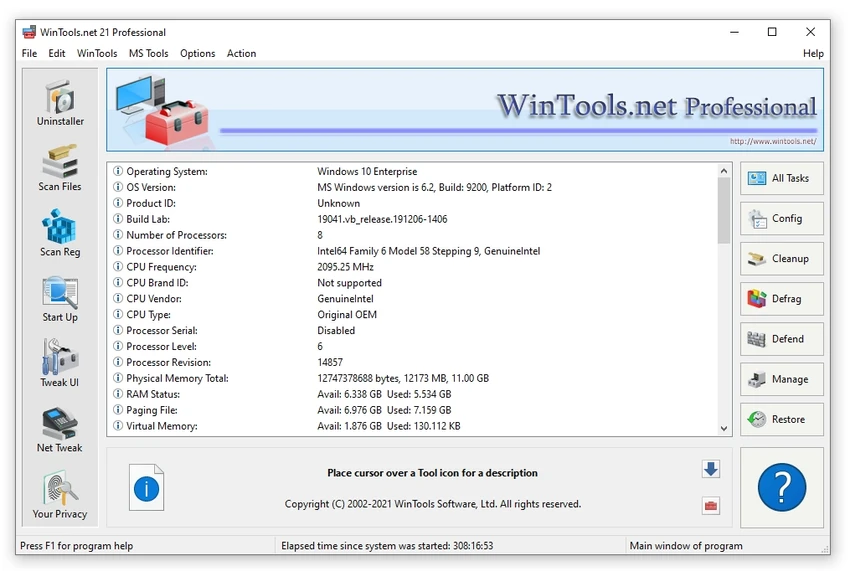

XtraTools is an all-in-one Windows optimization and maintenance utility designed to help users manage, clean, and fine-tune their systems from a single application. Instead of relying on separate programs for registry adjustments, junk file cleanup, process management, and system customization, XtraTools combines these functions into one toolkit.
The software focuses on improving the overall Windows experience by providing access to system tweaks, unnecessary file removal, resource monitoring, and privacy-related cleanup tools. Users can adjust selected operating system settings, remove temporary files and outdated logs, manage running processes, and control system resources through a centralized interface.
XtraTools is aimed at users who want more control over their Windows environment without manually searching through advanced system menus. Its collection of maintenance tools can help address common issues such as slow startup times, excessive background processes, and accumulated system clutter. The suite also includes tools for secure file deletion, memory management, and removing traces stored in the system. With features covering both performance tuning and system cleanup, XtraTools provides a practical solution for users who prefer having multiple Windows utilities available in one package.
Features of XtraTools
- System Tweaker: Adjust hidden Windows settings to customize system behavior and improve responsiveness.
- Scan Folders: Remove temporary files, old logs, and unnecessary data that may take up storage space.
- Process Monitoring: View, manage, and stop processes that consume excessive system resources.
- File Shredder: Securely delete files to make them harder to recover.
- RAM Saver: Manage memory usage to support smoother multitasking.
- Objects Eraser: Remove recent registry traces and activity records for improved privacy.
- System Tune-up Module: Access tools for managing service autoloads, adjusting task priorities, and modifying network settings.
Interface and Usability
XtraTools provides a centralized interface where multiple Windows maintenance functions are grouped together. The layout is focused on giving users access to system cleanup, optimization, and management tools without requiring several separate applications.
The software is particularly useful for experienced Windows users who want direct control over system settings and background activity. Features such as process monitoring and system tweaking provide deeper customization options compared with basic cleanup utilities.
However, the interface may feel dated compared with newer optimization suites. Users who are unfamiliar with advanced Windows settings may also need time to understand some of the available tools, as several functions are designed for users who want more technical control over their system. The availability of a portable version is useful for technicians and administrators who need a flexible maintenance tool that can be used across different Windows systems.
Who Should Use XtraTools?
- Windows users who want multiple maintenance utilities in one application
- Advanced users who like adjusting system settings manually
- Technicians and administrators who need a portable troubleshooting toolkit
- Users looking for tools to clean temporary files and manage system resources
Conclusion
XtraTools is a comprehensive Windows system utility suite for users who want more control over PC maintenance and optimization. By combining cleanup tools, system tweaks, process management, and privacy features in one application, it reduces the need to install multiple separate utilities.
The software is most valuable for experienced users, technicians, and anyone who prefers manually managing Windows performance settings. While the interface may not feel as modern as some newer alternatives, its broad toolkit makes it a practical option for maintaining and customizing a Windows system.


