DivX logo

DivX 11.15.0

  • User Rating:
    ★★★★★
    ★★★★★
    0.0 0Votes
  • Requirements:
    Windows
  • Version: 11.15.0
  • Latest updated: 4 days ago
  • License: Freemium  
  • Publisher: DivX
  • Size: 21.4 MB
× app stores

DivX Pro is a comprehensive multimedia application that combines a high-quality video player, video converter, and media streaming capabilities into one package. Designed for Windows and macOS, it supports popular video formats such as DivX, AVI, MKV, MP4, and HEVC, including playback of videos up to 4K resolution. In addition to media playback, DivX Pro offers HD video conversion, basic video editing features, and the ability to stream media across compatible DLNA devices, making it a versatile solution for home entertainment and video management.

Features of DivX Pro

High-Quality Video Playback

  • Play videos in up to 4K resolution
  • Supports DivX, AVI, MKV, MP4, HEVC, and other popular formats
  • Smooth fast-forward and rewind navigation
  • Chapter point support for quick scene access

Video Conversion

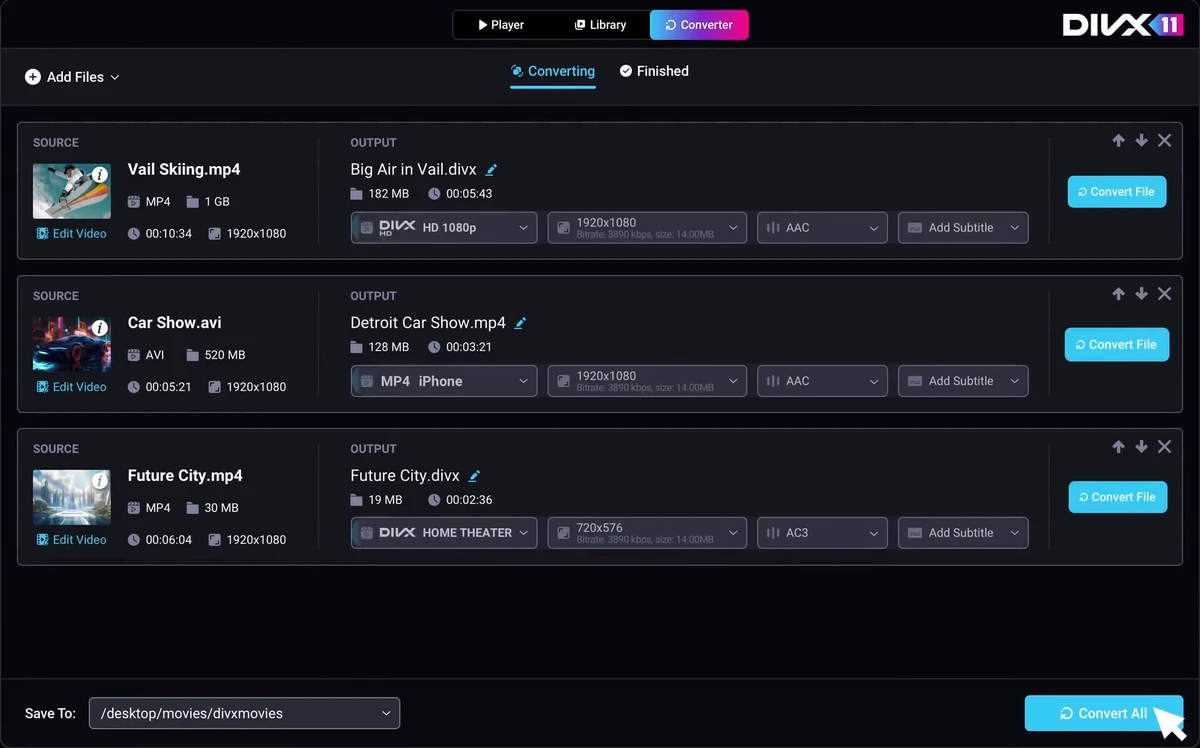
  • Convert videos to HD formats
  • Convert MPEG-2 and VC-1 videos to DivX, MKV, and MP4
  • Maintain high video quality during conversion

Video Editing & Enhancement

  • Combine multiple videos into one file
  • Adjust video brightness and image quality
  • High-quality audio playback

Media Streaming

  • Built-in DLNA media server
  • Stream videos, music, and photos to compatible devices
  • Supports devices such as Xbox, PlayStation, Samsung Galaxy devices, and Chromecast

Audio Features

  • DFX Audio Enhancer for improved sound quality
  • DTS-HD plug-in support for playback and conversion of DTS-HD audio

User Experience

After using DivX Pro, the software feels like a complete multimedia suite rather than just a video player. Playback is smooth across supported formats, and 4K videos perform well with responsive controls for seeking and chapter navigation. The integrated video converter is straightforward to use, making it easy to convert videos into supported formats without requiring separate conversion software. Basic video enhancement options, such as brightness adjustments and video quality improvements, add extra flexibility for everyday use.

The built-in DLNA media server is particularly useful for users who want to stream media throughout their home network. Sharing videos, music, and photos with compatible smart TVs, gaming consoles, or streaming devices requires minimal setup.

Audio quality is another strong point, especially with support for DFX Audio Enhancer and DTS-HD, providing an improved listening experience when supported formats are used. Overall, DivX Pro delivers a well-rounded multimedia experience by combining playback, conversion, and streaming into a single application.

Who Should Use DivX Pro?

  • Users who frequently watch high-resolution videos
  • Home media enthusiasts
  • People converting videos between common formats
  • Users who stream media across DLNA-compatible devices
  • Anyone looking for an all-in-one media playback and conversion solution

Conclusion

DivX Pro combines reliable 4K video playback, efficient HD video conversion, and convenient media streaming features into a single multimedia application. Its support for numerous video formats and home network streaming makes it a practical choice for users who want more than just a standard media player.

Pros & Cons

Pros

  • Supports 4K video playback
  • Wide compatibility with popular video formats
  • Built-in HD video conversion tools
  • DLNA media server for home streaming
  • Smooth navigation with chapter support
  • High-quality audio enhancement features
  • Combines player, converter, and streaming functions

Cons

  • Advanced audio features require additional plug-ins
  • Basic editing tools are limited compared to dedicated video editors
  • Some premium functionality is available only in the Pro edition

Frequently Asked Questions

What is DivX Pro used for?

DivX Pro is used for playing, converting, and streaming videos in multiple formats, including 4K content.

Does DivX Pro support 4K playback?

Yes. It supports playback of videos in resolutions up to 4K.

Which video formats are supported?

It supports DivX, AVI, MKV, MP4, HEVC, and other popular video formats.

Can DivX Pro convert videos?

Yes. It converts videos to HD formats and supports conversion from MPEG-2 and VC-1 to DivX, MKV, and MP4.

Can DivX Pro stream media to other devices?

Yes. Its built-in DLNA media server can stream videos, music, and photos to compatible devices such as smart TVs, game consoles, and Chromecast.

Is DivX Pro a video editor?

It includes basic video editing and enhancement features, but it is primarily a media player and video converter rather than a full-featured video editing application.

Recommended apps [Freeware]:
  • DriversCloud 12.1.6 DriversCloud logo scan system hardware, update drivers, monitor performance, and analyze blue screen errors (BSODs) on Windows.
  • TreeSheets 3223 TreeSheets logo combines spreadsheets, outlines, notes, and mind mapping into a lightweight data organization tool
  • Subtitle Edit 5.0.0 Subtitle Edit logo a free subtitle editor for creating, syncing, translating, and fixing subtitles on Windows
  • Urban VPN 5.2.1 Urban VPN logo virtual private network tool designed to help users protect their identity and privacy while browsing the internet
  • SoundVolumeView 2.52 SoundVolumeView logo displays, manages, saves, and restores Windows audio settings with powerful profile and command-line support
  • GLview 7.4.4 GLview logo displays detailed OpenGL, Vulkan, DirectX, and GPU information, helping users analyze graphics hardware and driver capabilities
Recommended apps [Shareware]:
  • AVG Driver Updater 26.5.10990.0 AVG Driver Updater logo automatically scan and update outdated drivers to improve PC performance and stability on Windows.
  • FileCenter 12.5.36 FileCenter logo organize documents, scan files, manage PDFs, and build an efficient digital filing system
  • TweakNow Gallery 1.3.1 TweakNow Gallery logo a fast Windows photo viewer and organizer with slideshow and built-in image conversion tools
  • Classroom Spy Pro 5.6.6 Classroom Spy Pro logo Monitor, control, and manage student computers remotely with Classroom Spy Pro for Windows classrooms
  • Movavi Video Editor 26.18.0 Movavi Video Editor logo easy video editing tool with AI subtitles, effects, transitions, and color correction for creators
  • Asset Manager 2026 v4.10.3001 Asset Manager logo track assets, manage inventory, use barcodes, and maintain service histories efficiently