


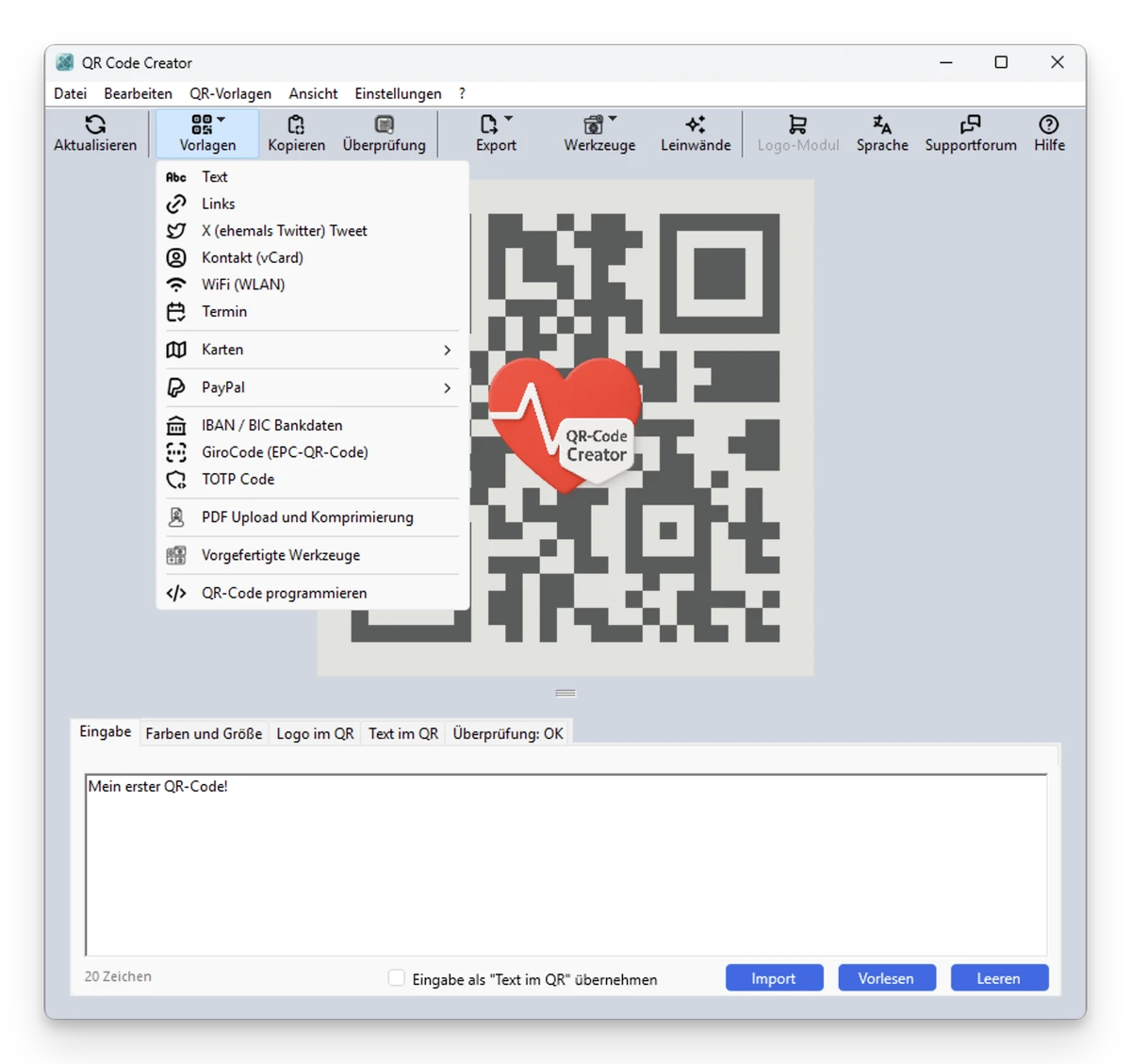

QR codes have become an everyday way to share information, from website links and contact details to payments, Wi-Fi access, and digital profiles. QR-Code Creator provides a simple way to generate customized QR codes directly on a Windows computer while keeping the entire process offline. The software allows users to create QR codes for many different purposes, adjust their appearance with custom colors and sizes, and export them in multiple image formats. With support for a wide range of QR code types and local processing, it is designed for users who want flexibility and privacy when creating QR codes.
Overview
QR-Code Creator is a free Windows application for generating QR codes for personal, business, and technical uses. It supports many data formats, including text, URLs, contact information, social profiles, payment details, Wi-Fi connections, calendar events, and more. Unlike online QR generators that require uploading information to external services, QR-Code Creator creates all QR codes locally on the user's computer. This offline approach provides additional privacy, especially when generating codes containing personal or sensitive information.
Users can customize QR code size, colors, backgrounds, and matrix designs. The generated codes can be copied directly to the Windows clipboard, printed, or saved in several image formats.
Features of QR-Code Creator
- Create QR codes directly on Windows
- Fully offline QR code generation
- Customize QR code size and appearance
- Change background and matrix colors
- Create colored QR codes
- Export QR codes as:
- JPEG
- PNG
- TIFF
- BMP
- GIF
- Copy QR codes directly to the Windows clipboard
- Print generated QR codes
- Create many different QR code types, including:
- Single-line text
- Multi-line text
- Phone numbers
- SMS messages
- Microsoft Teams chats
- Email addresses
- Internet links
- Facebook profiles
- X (formerly Twitter)
- Tumblr
- About.ME
- Google Play Store apps
- Google Play Store developer profiles
- Telegram contacts
- GitHub links
- YouTube videos, channels, and users
- Vimeo
- SoundCloud
- Mixcloud
- ME Card business cards
- Wi-Fi connections
- Geographic locations
- vCalendar and vEvent schedules
- PayPal payments and donations
- Longitude and latitude coordinate links
- vCard 4.0 contact cards
- IBAN and BIC information
- PayPal.Me links
- TOTP codes
- X posts
- Threads
- Support custom QR code programming
- Google Maps and Apple Maps navigation support
- OpenStreetMap geocoding support
- Optional logo module with additional export formats
- 40 logo templates available with logo module
- Bilingual interface (German and English)
- Includes prompt generator and canvas features
- Compatible with Windows 10 and Windows 11
User Experience
QR-Code Creator focuses on making QR generation accessible while still offering plenty of customization options. The interface provides a broad selection of QR code templates, allowing users to choose the type of information they want to encode instead of manually formatting content.
Creating a QR code is straightforward: select the desired category, enter the information, customize the appearance, and generate the final result. The ability to modify colors and backgrounds adds useful flexibility for users who want QR codes that match branding materials, presentations, or printed designs. The offline generation approach is one of the application's strongest points. Since QR codes are created directly on the computer, users do not need to send their information to an online service. This is particularly useful when generating contact cards, payment information, Wi-Fi credentials, or other private data.
Export options are also extensive. Users can save QR codes as common image formats or copy them directly into other applications. With the optional logo module, additional formats such as SVG, EPS, HDR, Base64, and PDF become available. The large number of supported QR code types makes the software suitable for both everyday users and more specialized requirements. Whether creating a simple website QR code or a detailed digital business card, the application provides a flexible workflow.
Who Should Use QR-Code Creator?
- Small businesses creating QR marketing materials
- Users creating digital business cards
- Event organizers
- Professionals sharing contact information
- Users generating Wi-Fi QR codes
- Developers and technical users working with custom QR data
- Anyone who prefers offline QR generation
Conclusion
QR-Code Creator is a versatile QR generation tool that combines ease of use with extensive customization options. Its ability to create many different QR code formats, adjust visual designs, and generate everything locally makes it a practical alternative to web-based QR generators.


