


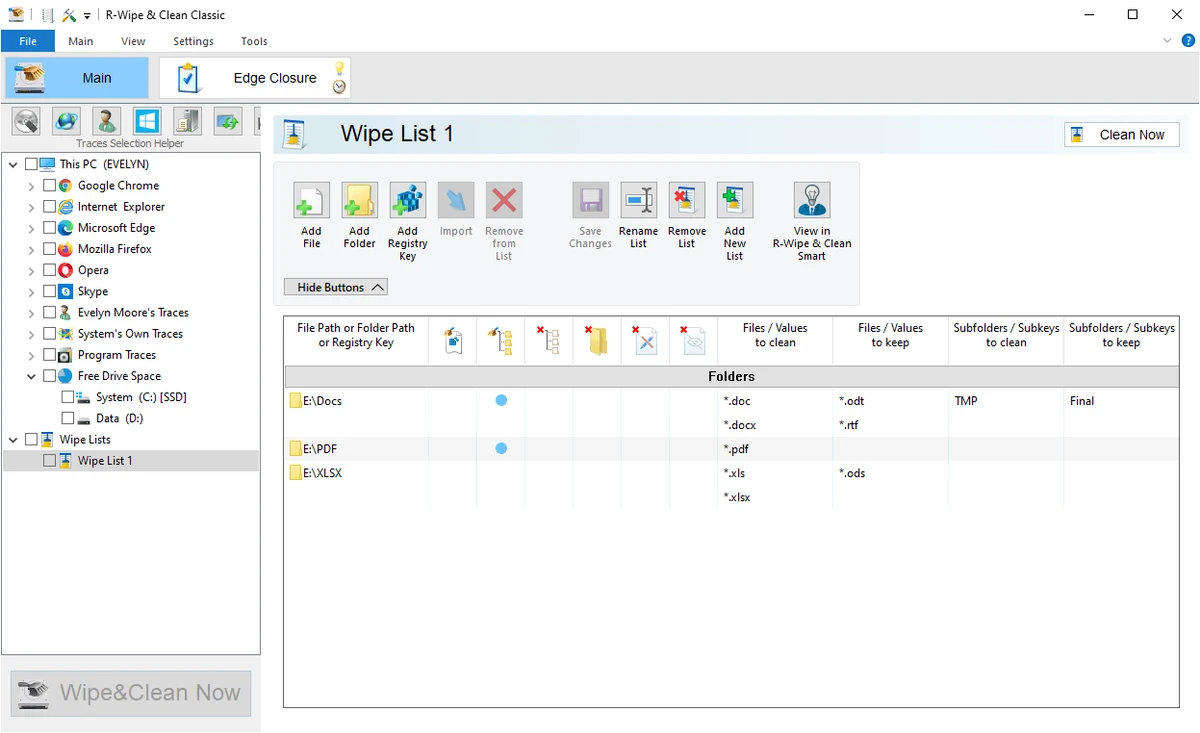

Over time, Windows accumulates temporary files, browser histories, application caches, and other traces that consume storage space and may expose personal information. R-Wipe & Clean is designed to address both concerns by combining comprehensive system cleanup with secure data wiping. Unlike basic disk cleanup utilities, R-Wipe & Clean goes beyond deleting temporary files. It provides tools for securely erasing sensitive data, cleaning privacy traces from hundreds of applications, and automating maintenance tasks through scheduling and system event triggers.
Overview
R-Wipe & Clean is a Windows utility that helps users remove unnecessary files, erase privacy-related traces, and securely wipe sensitive data from storage devices. It supports cleaning information generated by Windows, web browsers, communication software, and numerous third-party applications. The software also includes advanced wiping capabilities for files, folders, free disk space, registry items, and NTFS metadata. Users can combine multiple cleaning and wiping operations into automated tasks that run manually or according to schedules and system events. Designed with modern storage devices in mind, R-Wipe & Clean recognizes SSDs and adjusts wiping behavior to avoid unnecessary wear while still securely removing appropriate data.
Features of R-Wipe & Clean
Privacy & System Cleaning
- Remove internet browsing history and cookies
- Clean traces from modern web browsers and communication applications
- Remove download history and recently opened document lists
- Delete temporary files, caches, and log files
- Clean Windows registry traces
- Remove system history and operating system traces
- Clean data from hundreds of third-party applications
- Create custom cleaning lists for unsupported applications
- Traces Selection Helper for quick cleanup configuration
- Perform cleaning in the background
- Automatically shut down the computer after cleaning
Secure Data Wiping
- Securely erase files and folders
- Wipe free disk space
- Supports SSD-aware wiping to reduce unnecessary drive wear
- Multiple erase algorithms, including DoD-approved methods
- Supports FAT, exFAT, and NTFS file systems
- Wipe alternate data streams
- Wipe cluster tips (unused portions of file clusters)
- Wipe records stored in the NTFS Master File Table (MFT)
- Erase files directly from Windows File Explorer
- Wipe free space from Windows shortcut menus
- Wipe multiple drives using a single task
- Create reusable wipe lists for files, folders, and Registry keys
Advanced Features
- Combine cleaning and wiping into automated tasks
- Schedule operations by time or system events
- Trigger tasks at:
- System startup
- System shutdown
- User logon
- User logoff
- Browser closing
- Detailed trace analysis
- Comprehensive operation logs
- Hide unwanted cleanup items
- Deep Windows integration
- Password protection
- R-Wipe & Clean Smart for advanced wipe list management
- Command-line support
- Boss Key for quickly closing a web browser
- Stealth mode
- Prevent standby or hibernation during lengthy operations
- Startup Renaming for locked files and folders
User Experience
R-Wipe & Clean offers significantly more functionality than a typical PC cleaning utility. While many cleanup applications focus mainly on browser history and temporary files, this software extends its coverage to system traces, registry data, application caches, file system metadata, and secure data destruction.
The interface presents cleaning and wiping as separate but complementary functions, making it easier to organize maintenance tasks. The Traces Selection Helper simplifies choosing commonly cleaned items, while advanced users can create highly customized cleaning and wipe lists. One of the standout features is task automation. Multiple cleanup and secure erase operations can be grouped into a single task and scheduled to run automatically at specific times or during events such as system startup, shutdown, or browser closure. This reduces the need for manual maintenance.
Secure wiping capabilities are particularly comprehensive. The software supports multiple erase methods, direct integration with Windows File Explorer, and SSD-aware behavior that minimizes unnecessary writes while maintaining secure deletion practices. Detailed logging and password protection provide additional confidence for users who regularly perform privacy maintenance or manage multiple systems.
Who Should Use R-Wipe & Clean?
- Privacy-conscious users
- Power users
- IT professionals
- Users who regularly delete sensitive files
- Anyone looking to automate Windows cleanup
- Users who want more advanced secure wiping capabilities than standard Windows tools provide
Conclusion
R-Wipe & Clean combines extensive privacy protection, disk cleanup, and secure data wiping into a single maintenance solution. Its ability to remove traces from Windows, browsers, communication software, and hundreds of third-party applications makes it considerably more comprehensive than many basic cleanup tools.


