StaticDesktopRuler logo

StaticDesktopRuler 1.04

  • User Rating:
    ★★★★★
    ★★★★★
    0.0 0Votes
  • Requirements:
    Windows
  • Version: 1.04
  • Latest updated: 1 day ago
  • License: Freeware  
  • Publisher: Nenad Hrg
  • Size: 0.2 MB
× app stores

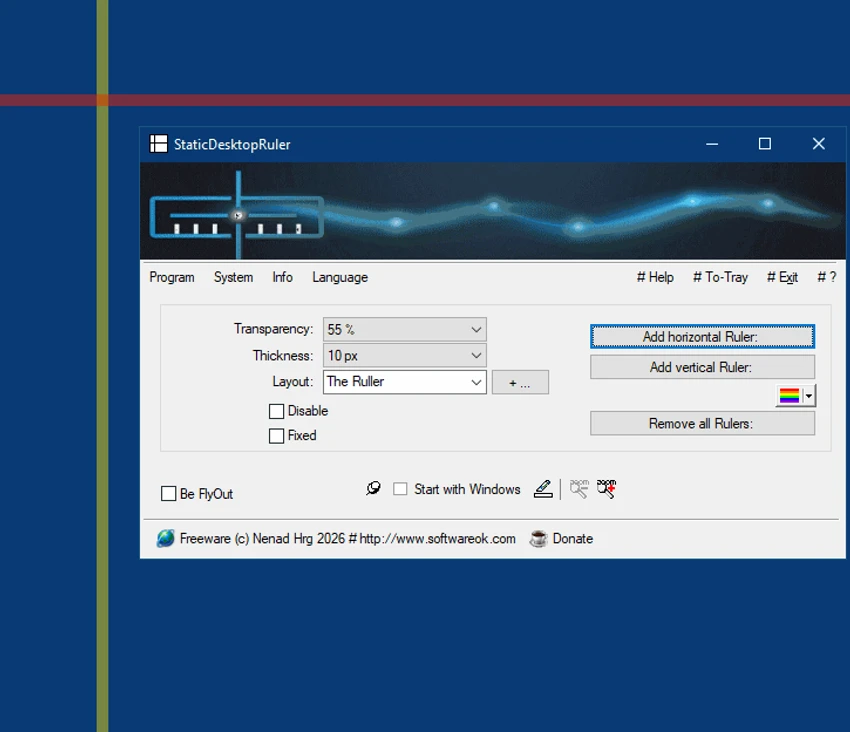
StaticDesktopRuler is a Windows desktop utility designed to improve visual orientation and precision when working on large or multi-monitor setups. It allows users to place multiple customizable rulers directly on the screen to assist with alignment, spacing, and visual tracking across wide digital workspaces. Unlike traditional ruler tools, StaticDesktopRuler functions as a persistent but non-intrusive overlay, helping users maintain focus and structure when working with complex layouts, spreadsheets, design work, or data-heavy applications.

Features of StaticDesktopRuler

  • Add multiple rulers to the desktop simultaneously
  • Customize each ruler individually:
    • Color
    • Thickness (width)
    • Transparency
  • Supports large multi-monitor and high-resolution displays
  • “Ghost technology” enables click-through interaction
  • Rulers remain non-intrusive during normal workflow
  • Portable mode available via executable renaming
  • Lightweight and always accessible overlay system
  • Can be used for alignment and visual reference tasks

Use Cases

  • Accounting and finance for aligning wide spreadsheets
  • Software development for UI alignment and spacing checks
  • Data analysis and document comparison
  • Archiving and digital content review
  • Gaming and streaming layout positioning

User Experience

StaticDesktopRuler is designed with productivity in mind, especially for users working on large monitors where maintaining visual orientation can become challenging. Once activated, rulers can be placed anywhere on the screen and customized to fit the user's workflow. The ability to adjust transparency and thickness ensures that rulers do not obstruct visibility while still providing a reliable reference point. This makes it easier to track columns in spreadsheets, align interface elements, or compare data across wide screens.

One of its standout features is its “ghost mode,” which allows users to click through the rulers without disrupting their interaction with other applications. This ensures that the tool remains passive and does not interfere with workflow, which is particularly valuable in fast-paced or detail-heavy environments. The portable mode option also adds flexibility for users who want to carry and use the tool across different systems without installation.

Overall, the experience is focused on subtle assistance rather than active control, making it a useful companion for precision-based tasks.

Who Should Use StaticDesktopRuler?

  • Users with large or ultra-wide monitors
  • Data analysts and finance professionals
  • UI/UX designers and developers
  • Users working with spreadsheets or structured layouts
  • Streamers and gamers organizing screen overlays
  • Anyone needing precise on-screen alignment tools

Conclusion

StaticDesktopRuler provides a unique and practical solution for maintaining visual structure on modern high-resolution displays. By offering customizable, non-intrusive rulers that blend seamlessly into the desktop environment, it enhances productivity without disrupting workflow.

Pros & Cons

Pros

  • Supports multiple on-screen rulers at once
  • Highly customizable appearance (color, size, transparency)
  • Lightweight and non-intrusive overlay design
  • Click-through “ghost technology” improves usability
  • Portable mode available
  • Useful for large monitors and multi-window workflows
  • Enhances visual alignment and productivity

Cons

  • Limited use outside specialized workflows
  • No advanced measurement or design tools
  • Primarily useful for niche productivity scenarios
  • Requires user adaptation for optimal use

Frequently Asked Questions

What is StaticDesktopRuler used for?

StaticDesktopRuler is used to place customizable rulers on the desktop to help with alignment, spacing, and visual organization on large screens.

Can I use multiple rulers at the same time?

Yes. You can place and customize multiple rulers simultaneously.

Does StaticDesktopRuler interfere with clicking?

No. Its “ghost technology” allows you to click through rulers without affecting other applications.

Is StaticDesktopRuler portable?

Yes. It includes a portable mode that can be activated by renaming the executable file.

Who should use StaticDesktopRuler?

It is ideal for users working on large monitors, spreadsheets, UI design, data analysis, or any task requiring precise screen alignment.

Recommended apps [Freeware]:
  • Sandboxie-Plus 1.17.9 Sandboxie-Plus logo a Windows sandboxing tool that isolates programs to prevent system changes and improve security.
  • SoftPerfect RAM Disk 26.6 SoftPerfect RAM Disk logo creates high-speed virtual drives in memory to boost performance and reduce disk wear
  • ToDoList 9.2.0 ToDoList logo customizable task manager for Windows with subtasks, reminders, notes, tracking, and project tools
  • AVG Clear 26.6.11050 AVG Clear logo completely removes AVG antivirus products, files, settings, and registry entries from Windows systems
  • MuPDF 1.28.0 MuPDF logo a lightweight, no-frills PDF and XPS viewer designed for fast document viewing with minimal system usage
  • Media Player Codec Pack 5.1.2.625 Media Player Codec Pack logo enables smooth playback of audio and video formats on Windows by adding essential codecs and filters.
Recommended apps [Shareware]:
  • Wondershare AllMyTube 7.4.9.2 Wondershare AllMyTube logo download and convert videos from YouTube and 100+ sites into multiple formats for offline viewing.
  • Any video Converter 9.2.3 Any video Converter logo video conversion tool that supports multiple formats, editing features, and device-ready output profiles
  • ViewCompanion Pro 17.03.0.1203 ViewCompanion Pro logo View, convert, annotate, and compare PDF, DWF, CAD, and technical drawing files with powerful batch tools
  • EF Duplicate Files Manager 26.05 EF Duplicate Files Manager logo finds and removes duplicate files by name, size, or content to reclaim storage space.
  • DaVinci Resolve 21.0.1 DaVinci Resolve logo a professional video editor with advanced color grading, AI tools, and high-end post-production features.
  • Bandicam 8.3.1.2537 Bandicam logo Record your screen, gameplay, and streaming videos with Bandicam, a fast screen recorder for Windows with high-quality compression