Dup Scout logo

Dup Scout 18.2.38

  • User Rating:
    ★★★★★
    ★★★★★
    0.0 ★ 0Votes
  • Requirements:
    Windows
  • Version: 18.2.38
  • Latest updated: 3 weeks ago
  • License: Free Trial  
  • Publisher: Flexense
  • Size: 21 MB
× app stores

DupScout is a duplicate file search and removal solution designed to help users identify and manage duplicate files across local disks, directories, network shares, and NAS storage devices. The software provides tools for scanning storage locations, reviewing duplicate files, generating detailed reports, and performing cleanup actions such as deleting, moving, compressing, or replacing duplicates with shortcuts or hard links. DupScout supports multiple reporting formats, including HTML, PDF, Excel, text, CSV, and XML, making it suitable for both personal and professional environments. Advanced versions provide command-line automation, server-based management, scheduled searches, and centralized reporting capabilities. With support for Windows desktop and server operating systems, DupScout is designed for users and organizations that need better control over storage usage and duplicate file management.

Features of DupScout

  • Duplicate file searching: Scan disks, directories, network shares, and NAS storage devices to identify duplicate files.
  • Duplicate file removal: Delete, move, compress, or replace duplicate files with shortcuts or hard links.
  • Detailed reports: Generate reports in HTML, PDF, Excel, text, CSV, and XML formats.
  • Storage analysis: Review duplicate file distribution and generate charts showing duplicate disk usage.
  • Network and NAS scanning: Discover network servers and NAS devices and search duplicate files across shared storage.
  • Advanced search options: Customize duplicate file searches based on specific requirements and hardware configurations.
  • Command-line automation: Automate duplicate file searches and removal tasks through command-line tools.
  • SQL database export: Export reports to a centralized SQL database for history analysis.
  • Server versions: DupScout Server and Enterprise editions provide background services and network-based management.
  • Batch operations: Run duplicate file searches across multiple servers and NAS devices simultaneously.
  • Web-based management: DupScout Enterprise provides browser-based control for managing servers and reports.

Interface and Usability

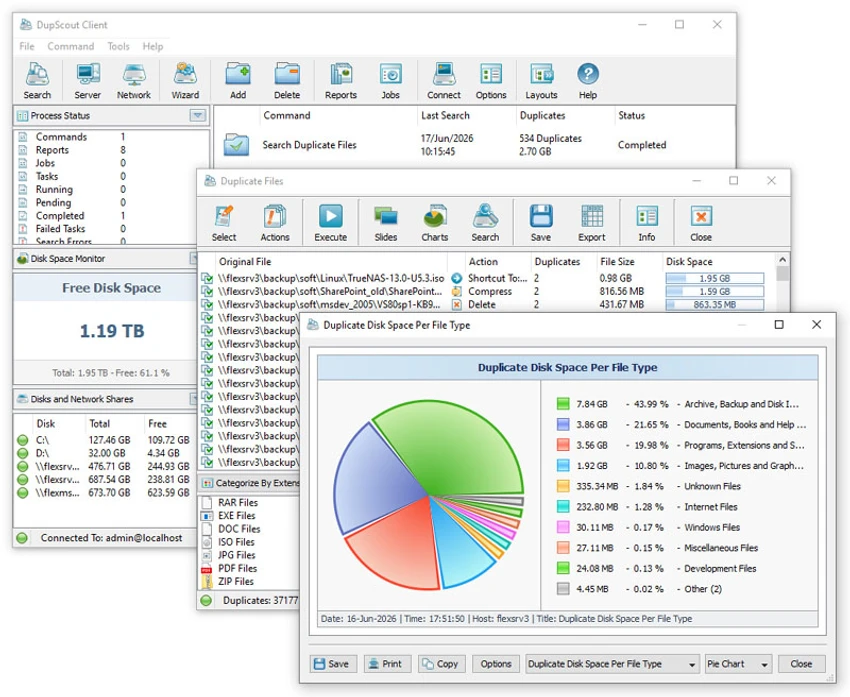
DupScout provides a structured interface for scanning storage locations, reviewing duplicate files, and managing cleanup operations. The desktop application allows users to select disks, folders, network shares, or NAS devices and start duplicate file analysis from a central workspace. The reporting tools make it easier to understand storage usage by presenting duplicate file information in different formats. Users can review results, generate charts, and choose appropriate actions for detected duplicates.

For advanced users and IT professionals, the command-line utility and server editions provide additional automation and remote management options. These features make DupScout suitable for both individual storage maintenance and larger network environments.

Who Should Use DupScout?

DupScout is suitable for home users, IT administrators, businesses, and organizations that need to manage large amounts of stored data. It can help users recover storage space by identifying unnecessary duplicate files across computers, servers, and network storage systems. The software is particularly useful for IT environments managing multiple servers, NAS devices, or shared storage locations where manual duplicate detection would be difficult.

Conclusion

DupScout is a powerful duplicate file management solution designed for users who need more control over storage organization. With support for local drives, network servers, NAS devices, reporting tools, and automated operations, it provides a comprehensive approach to finding and managing duplicate data.

Pros & Cons

✓

Pros

  • Searches duplicate files across local and network storage
  • Supports NAS and server environments
  • Provides multiple report formats
  • Includes file removal and management options
  • Offers command-line automation tools
  • Supports scheduled and batch duplicate searches
  • Provides server and enterprise management features
✕

Cons

  • Advanced features may be more than needed for basic personal use

Frequently Asked Questions

What is DupScout?

DupScout is a duplicate file search and removal tool that helps users find, analyze, and manage duplicate files stored on computers, networks, and NAS devices.

Where can DupScout search for duplicate files?

DupScout can search local disks, directories, network shares, network servers, and NAS storage devices for duplicate files.

Can DupScout delete duplicate files?

Yes. DupScout allows users to remove duplicate files by deleting, moving, compressing, or replacing them with shortcuts or hard links.

Does DupScout generate reports?

Yes. DupScout can create reports in formats including HTML, PDF, Excel, text, CSV, and XML.

Can DupScout scan network servers and NAS devices?

Yes. DupScout can discover network servers and NAS storage devices, scan accessible shares, and perform duplicate file searches across network environments.

Which versions of Windows does DupScout support?

According to the available system requirements, DupScout supports Windows XP, Vista, Windows 7, Windows 8, Windows 10, Windows 11, and various Windows Server versions including Server 2003 through Server 2025.

Recommended apps [Freeware]:
  • Bulk Crap Uninstaller 6.2 Bulk Crap Uninstaller logo a free Windows tool that quickly removes multiple applications and cleans leftover files
  • Password Safe 3.72.1 Password Safe logo encrypted password manager for Windows to store, organize, and generate secure passwords
  • Avast Free Antivirus 26.6.11050 Avast Free Antivirus logo real-time malware protection, phishing defense, and scam detection with minimal impact on Windows performance
  • Tagman 2025.11.03 Tagman logo Organize MP3 music libraries easily with Tagman using fingerprint technology and fast ID3 tag editing tools
  • Shutter Encoder 20.2 Shutter Encoder logo free multimedia tool for converting, editing, compressing, and processing video, audio, and image files with advanced batch features
  • MailStore Home 26.3.0.24111 MailStore Home logo Archive, back up, and search emails from multiple accounts and applications with a reliable personal email management tool.
Recommended apps [Shareware]:
  • VovSoft Audio to Lyrics Converter 1.2 VovSoft Audio to Lyrics Converter logo offline AI tool to transcribe audio into LRC, SRT, VTT, and text files.
  • MailWasher Pro 8.0.119 MailWasher Pro logo blocks spam, scams, and unwanted emails before download with advanced filtering tools
  • Soda PDF 15.0.12.24792 Soda PDF logo all-in-one PDF tool to edit, convert, compress, secure and manage documents on Windows
  • Revo Uninstaller Pro 5.5.0 Revo Uninstaller Pro logo Remove unwanted programs completely, clean leftover files, and manage Windows applications with an advanced software uninstall utility.
  • Actual File Folders 1.15.5 Actual File Folders logo Speed up folder navigation and access frequently used locations faster with a Windows tool designed for file dialogs.
  • Muziza YouTube Downloader Converter 9.5.7 Muziza YouTube Downloader Converter logo Download online videos, convert media files, extract audio, manage playlists, and optimize videos for multiple devices.