VidMasta logo

VidMasta 30.7

  • User Rating:
    ★★★★★
    ★★★★★
    0.0 0Votes
  • Requirements:
    Windows
  • Version: 30.7
  • Latest updated: 1 week ago
  • License: Open Source  
  • Publisher: ALGwares
  • Size: 134 MB
× app stores

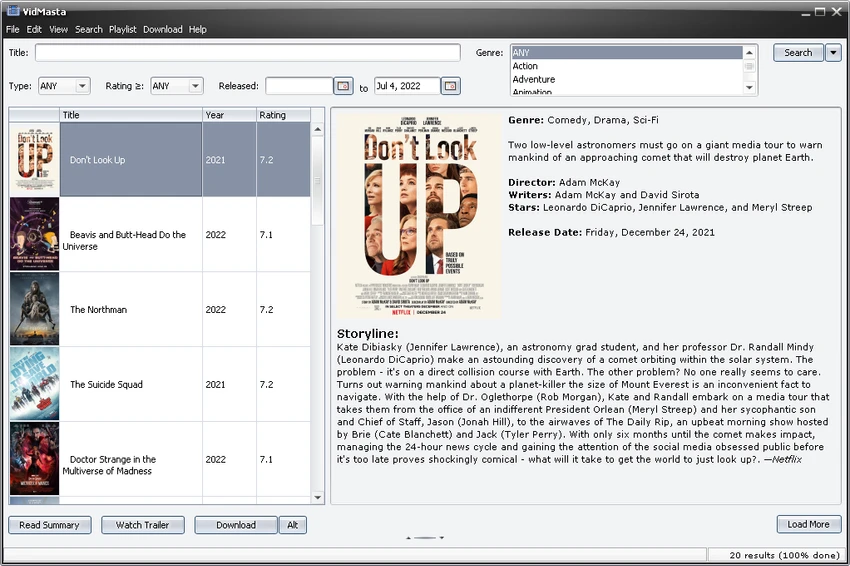
VidMasta is a desktop application designed to help users search for, preview, and manage movie and television titles available online. The software provides a centralized interface where users can search for video content, view information about titles, watch previews, and access available download or streaming options. The application focuses on simplifying the process of finding movies and TV shows. Users can search titles using different criteria, including name, release date, genre, rating, country, and language. Search results can be organized automatically by popularity, making it easier to discover frequently shared content.

VidMasta also includes tools for improving the search experience, such as its “Best Source, Deep Search” algorithm, which analyzes available download links and selects results based on factors such as source reliability, activity levels, and file size. The software provides options to filter downloads by video extension and file size, giving users more control over available results.

Additional features include subtitle downloads, trailer viewing, title summaries, release date information, ratings, and support for identifying video box sets. VidMasta also includes PeerBlock integration and options related to proxies and encryption as part of its privacy-focused features.

Features of VidMasta

  • Search for movies and TV shows by name, release date, genre, rating, country, and language
  • Download or preview video titles with a simple workflow
  • View movie and TV show summaries, ratings, and release dates
  • Watch trailers for available titles
  • Download subtitles for videos
  • Filter downloads by file size and video extension
  • Adjust the number of search results displayed
  • Automatically sort search results by popularity
  • Display popular movies and TV shows
  • Detect video box sets
  • Email download links, stream links, and trailer links
  • Use the “Best Source, Deep Search” algorithm for finding video links
  • Support PeerBlock integration

Interface and Usability

VidMasta is built around a straightforward search-based workflow. The application allows users to find movie and television titles, review available information, and access playback or download options with minimal steps. The search system provides multiple filtering options, allowing users to narrow results based on different title details. Features such as popularity sorting, file size limits, and video format selection help make searches more targeted.

The interface is focused on functionality rather than visual customization. Users who frequently search for video content may find the combination of title information, trailers, subtitles, and download controls convenient for managing their viewing options.

Who Should Use VidMasta?

  • Want a dedicated tool for searching movie and TV titles
  • Need detailed information about video content before downloading
  • Prefer filtering search results by file size or format
  • Want access to subtitles, trailers, and title summaries
  • Manage collections of movie and television content

Conclusion

VidMasta provides a feature-rich way to search for movie and television titles while offering additional tools such as previews, subtitles, trailers, and download filtering. Its detailed search options and title information features make it a useful tool for users who want more control when exploring video content.

Pros & Cons

Pros

  • Combines movie searching, previews, and download management
  • Provides detailed search filters for finding titles
  • Includes subtitle and trailer support
  • Offers movie and TV show information
  • Provides download filtering options
  • Includes PeerBlock integration

Cons

  • The software’s usefulness depends on available online sources
  • Primarily focused on finding shared content rather than managing local media libraries

Frequently Asked Questions

What is VidMasta used for?

VidMasta is a desktop application used for searching, previewing, reading information about, and managing access to movie and television titles available online.

Can VidMasta search for both movies and TV shows?

Yes. VidMasta supports searches for both movies and television titles. Users can search using criteria such as name, release date, genre, rating, country, and language.

Does VidMasta provide movie information?

Yes. VidMasta can display title summaries, release dates, ratings, and other available information for movies and TV shows.

Can VidMasta download subtitles?

Yes. One of VidMasta’s listed features is the ability to download video subtitles.

Can VidMasta filter video download results?

Yes. VidMasta allows users to set limits for video file size and choose specific video file extensions that can be downloaded.

Does VidMasta include trailer support?

Yes. VidMasta allows users to view trailers for available movie and television titles.

Recommended apps [Freeware]:
  • FBackup 9.9.1044 FBackup logo a free Windows backup tool offering automatic backups, cloud support, encryption, and easy file recovery options
  • Process Monitor 4.04 Process Monitor logo a Windows tool that tracks real-time file, registry, and process activity for system troubleshooting and malware analysis
  • TickTick 8.1.1.0 TickTick logo Organize tasks, manage schedules, and stay focused with TickTick's calendar, Pomodoro timer, and collaboration tools
  • Czkawka 12.0.0 Czkawka logo open-source file cleanup tool that finds duplicates, empty folders, similar images, and large files across your system
  • RegRun Reanimator 18.50.2026.708 RegRun Reanimator logo Detect and remove malware threats including Trojans, adware, spyware, and rootkits with detailed PC security reports.
  • Xlideit Image Viewer 1.0.260712 Xlideit Image Viewer logo View, organize, and make quick image adjustments with a lightweight viewer featuring thumbnails, slideshows, zoom, crop, and resize tools.
Recommended apps [Shareware]:
  • Amazing Laptop Cooling Wizard 1.1.5.8 Amazing Laptop Cooling Wizard logo Reduce laptop overheating by optimizing CPU and fan cooling performance on Windows.
  • VovSoft Tree Notes 3.3 VovSoft Tree Notes logo organize notes with a hierarchical structure, rich text editing, and single-file storag
  • Mountain Duck 5.3.1.29526 Mountain Duck logo mounts cloud storage and servers as local drives with smart sync, offline access, and seamless file integration
  • YoloX 1.11 YoloX logo a lightweight crosshair overlay tool for Windows featuring custom designs, animations, audio reactions, and game profiles
  • Ultimate Power Assistant 1.1.28.0 Ultimate Power Assistant logo manage Windows power settings, schedules tasks, and automates shutdown options
  • GiliSoft Audio Editor 3.2.0 GiliSoft Audio Editor logo Quickly trim, merge, batch-process, and convert audio files with a simple, beginner-friendly editor for everyday audio tasks