FileLegit Windows Internet & Network Download Managers Robin YouTube Video Downloader Pro
Robin YouTube Video Downloader Pro logo

Robin YouTube Video Downloader Pro 7.5.3

  • User Rating:
    ★★★★★
    ★★★★★
    0.0 0Votes
  • Requirements:
    Windows
  • Version: 7.5.3
  • Latest updated: 1 week ago
  • License: Free Trial  
  • Publisher: Robin Software
  • Size: 91 MB
× app stores

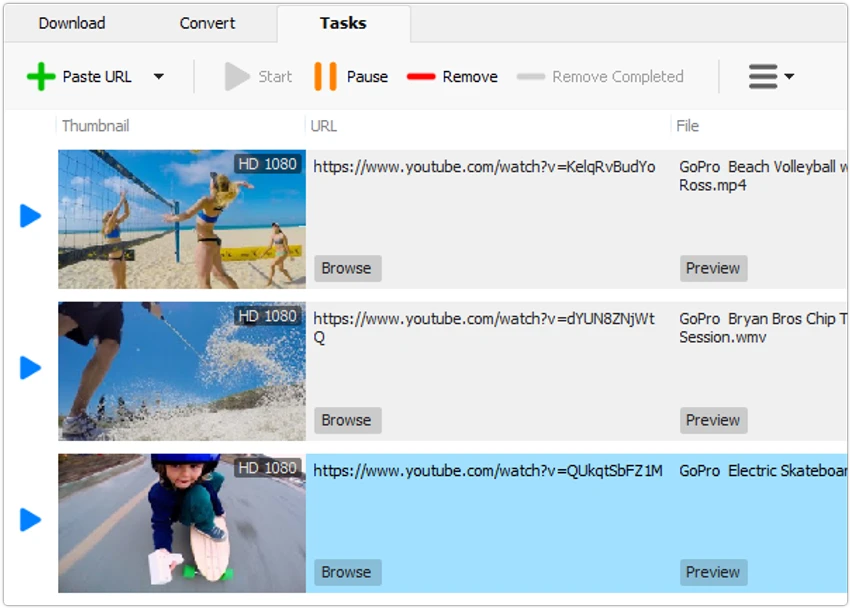
Robin YouTube Video Downloader Pro is a Windows application designed to download videos and audio from YouTube and thousands of other video-sharing websites. In addition to downloading media, the software includes built-in conversion tools that allow users to save content in various video and audio formats optimized for different devices. The application combines download acceleration, media conversion, audio extraction, and browser integration into a single package, making it suitable for users who frequently save online media for offline use.

Features of Robin YouTube Video Downloader Pro

  • Download videos from YouTube and thousands of supported video websites
  • Supports platforms including YouTube, Facebook, Dailymotion, Vimeo, Vine, and Metacafe
  • Download acceleration engine with speeds up to 5 times faster
  • Download UHD 4K, QHD 2K, Full HD 1080p, HD 720p, and 3D videos when available
  • Download audio-only streams from supported videos
  • Convert downloaded videos to multiple formats
  • Supports formats including MP4, AVI, MOV, WMV, MKV, WEBM, FLV, MPG, VOB, and more
  • Extract audio from video files
  • Save audio as MP3, WAV, WMA, AAC, FLAC, OGG, M4A, and other formats
  • Device optimization presets for smartphones, tablets, gaming consoles, and desktop devices
  • Ready-made conversion presets
  • Custom video and audio output settings
  • Optional iTunes library integration
  • Browser integration for Internet Explorer and Firefox
  • Drag-and-drop URL support
  • Supports Windows 11, Windows 10, Windows 8, and Windows 7 (64-bit)

User Experience

After reviewing Robin YouTube Video Downloader Pro, the software stands out for combining downloading and conversion into a single workflow. Users can download content and automatically convert it into a preferred format without needing separate applications. The interface focuses on simplicity. Adding video URLs is straightforward, and the drag-and-drop support makes the process even more convenient. Users who frequently save online videos can begin downloads quickly without manually copying and pasting links.

The download acceleration feature is one of the application's strongest selling points. For large files such as HD and 4K videos, faster transfer speeds can significantly reduce waiting time, especially when downloading multiple files. The built-in conversion tools add flexibility. Instead of storing large source files, users can automatically convert videos into formats optimized for their preferred devices. The ready-made presets simplify this process, particularly for less experienced users.

Audio extraction is another useful feature. Users who only need music, podcasts, interviews, or other audio content can download and save audio streams directly or extract audio from downloaded videos. Browser integration further improves usability by allowing downloads to be initiated from supported browsers with minimal effort.

Conclusion

Robin YouTube Video Downloader Pro offers a comprehensive media downloading experience with support for thousands of video websites, high-resolution downloads, format conversion, and audio extraction. The addition of download acceleration and device optimization presets helps streamline the process from download to playback.

Pros & Cons

Pros

  • Supports downloading from numerous video-sharing websites
  • Built-in video and audio conversion tools
  • Supports 4K, 2K, Full HD, HD, and 3D video downloads
  • Audio-only download capability
  • Wide range of supported output formats
  • Device-specific optimization presets
  • Download acceleration technology
  • Convenient drag-and-drop URL support
  • Audio extraction functionality included

Cons

  • Browser integration is limited to supported browsers
  • Primarily focused on downloading and conversion rather than media management

Frequently Asked Questions

What is Robin YouTube Video Downloader Pro used for?

Robin YouTube Video Downloader Pro is used to download videos and audio from YouTube and other supported video-sharing websites, then convert them into various formats.

Can it download 4K videos?

Yes. The software supports downloading UHD 4K videos when they are available from the source website.

Does it support audio-only downloads?

Yes. Users can download only the audio stream from supported videos without downloading the complete video file.

Which video formats are supported for conversion?

The software supports many formats, including MP4, AVI, MOV, WMV, MKV, WEBM, FLV, MPG, and VOB.

Can audio be extracted from videos?

Yes. The application can extract audio and save it in formats such as MP3, WAV, AAC, FLAC, OGG, M4A, and others.

Which operating systems are supported?

Robin YouTube Video Downloader Pro supports Windows 11, Windows 10, Windows 8, and Windows 7 (64-bit).

Recommended apps [Freeware]:
  • Visual Studio Code 1.126.0 Visual Studio Code logo Free and powerful code editor from Microsoft with extensions, debugging, Git support, and multi-language development
  • Microsoft Edge 149.0.4022.96 Microsoft Edge logo modern Chromium-based browser offering fast performance, strong security, privacy controls, and cross-platform support
  • Futuremark SystemInfo 5.92.1497 Futuremark SystemInfo logo scans your PC hardware and system components, generating detailed diagnostic reports.
  • AnyDesk 9.7.8 AnyDesk logo fast remote desktop access with secure connections, file sharing, and remote support for Windows users
  • Norton 360 Remover 26.6.11050.2580 Norton 360 Remover logo a utility that completely uninstalls Norton 360 security software, removing leftover files and settings
  • Uninstalr 3.1 Uninstalr logo a free software uninstaller featuring batch uninstall, leftover cleanup, and portable support
Recommended apps [Shareware]:
  • GiliSoft Private Disk 11.8 GiliSoft Private Disk logo Protect sensitive files with AES 256-bit encryption, hidden disk images, and portable encrypted storage
  • Coolutils Total Doc Converter 5.1.0.394/167 Coolutils Total Doc Converter logo Convert DOC, DOCX, RTF, and TXT files into PDF, HTML, images, and more with fast batch processing
  • Modern CSV 2.4.3 Modern CSV logo high-performance CSV editor for Windows with fast large-file handling, multi-cell editing, filtering, and sorting tools
  • XnView MP 1.11.5 XnView MP logo a powerful image viewer, editor, and batch converter supporting 500+ image formats on Windows
  • Bandicam 8.3.1.2537 Bandicam logo Record your screen, gameplay, and streaming videos with Bandicam, a fast screen recorder for Windows with high-quality compression
  • DiskBoss 16.9.18 DiskBoss logo powerful Windows file management tool for disk analysis, duplicate cleanup, file synchronization, and data migration