Disk Benchmark logo

Disk Benchmark 1.0

  • User Rating:
    ★★★★★
    ★★★★★
    0.0 0Votes
  • Requirements:
    Windows
  • Version: 1.0
  • Latest updated: 6 days ago
  • License: Freeware  
  • Publisher: Ari Sohandri Putra
  • Size: 0.5 MB
× app stores

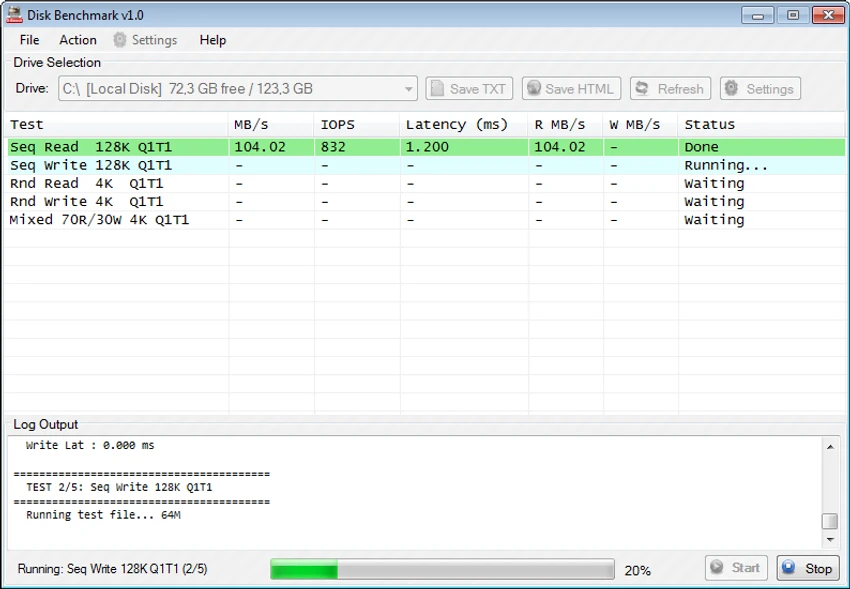
Disk Benchmark is a free Windows utility designed to evaluate the performance of storage devices, including SSDs, HDDs, NVMe drives, and USB flash drives. It provides detailed performance metrics such as throughput, IOPS, and latency, helping users understand how their storage devices perform under different workloads.

Overview

Disk Benchmark offers a straightforward approach to storage performance testing. The application allows users to benchmark a variety of storage devices without requiring complex configuration or technical expertise. With built-in presets for HDDs, SSDs, and flash drives, the software simplifies the testing process while still providing advanced customization options for more experienced users. The utility focuses on delivering comprehensive performance insights through sequential and random read/write tests, making it useful for troubleshooting, hardware comparisons, and performance monitoring.

Features of Disk Benchmark

  • Measures read and write performance of SSDs, HDDs, NVMe drives, and USB storage
  • Reports throughput in MB/s
  • Displays IOPS (Input/Output Operations Per Second)
  • Measures drive latency
  • Built-in presets for HDD, SSD, and Flash Drive testing
  • Supports sequential and random benchmark patterns
  • Customizable block sizes
  • Adjustable queue depth settings
  • Multi-threaded testing support
  • Detailed benchmark logs
  • Real-time display of completed test results
  • Three interface themes: Default, Blue, and Red
  • Supports a wide range of modern and legacy storage devices

User Experience

After testing Disk Benchmark, the software immediately stands out for its simplicity. Installation is quick, and there is virtually no learning curve before running a benchmark. Users simply select a storage device, choose an appropriate preset if desired, and start the test.

One of the most practical aspects of the application is its ability to display completed benchmark results while the testing process continues. Rather than waiting for the entire benchmark suite to finish, users can review individual sequential and random read/write results as they become available. The included presets help streamline testing for different storage types. Whether benchmarking a traditional hard drive, a modern NVMe SSD, or a USB flash drive, the software automatically applies suitable testing parameters, saving time and reducing guesswork.

Advanced users will appreciate the ability to customize benchmark configurations. Adjusting block sizes, queue entries, and thread counts allows more precise testing tailored to specific workloads and storage technologies. The interface remains clean and focused, making it easy to interpret benchmark data without being overwhelmed by unnecessary complexity.

Who Should Use Disk Benchmark?

  • PC enthusiasts
  • Hardware reviewers
  • System builders
  • IT professionals
  • Storage performance testers
  • Gamers evaluating SSD upgrades
  • Users troubleshooting storage bottlenecks
  • Anyone comparing HDD, SSD, NVMe, or USB drive performance

Conclusion

Disk Benchmark is an effective and user-friendly storage benchmarking utility that provides detailed performance analysis for a wide range of drive types. Its combination of simple operation, real-time results, and customizable testing options makes it useful for both casual users and hardware enthusiasts.

Pros & Cons

Pros

  • Completely free to use
  • Supports SSDs, HDDs, NVMe drives, and USB storage
  • Displays throughput, IOPS, and latency metrics
  • Easy setup with minimal configuration required
  • Includes presets for different storage types
  • Advanced customization options available
  • Real-time visibility of benchmark progress
  • Detailed logging capabilities

Cons

  • Limited to Windows platforms
  • Focused solely on benchmarking rather than disk maintenance
  • Interface prioritizes functionality over modern design

Frequently Asked Questions

What is Disk Benchmark?

Disk Benchmark is a free Windows utility that measures storage device performance through read and write benchmarking tests.

What types of drives does Disk Benchmark support?

The software supports HDDs, SSDs, NVMe drives, and USB flash drives.

What metrics does Disk Benchmark report?

Disk Benchmark reports throughput in MB/s, IOPS (Input/Output Operations Per Second), and latency measurements.

Can I customize benchmark settings?

Yes. Users can modify test parameters including block sizes, queue depth, thread count, and sequential or random testing patterns.

Is Disk Benchmark suitable for beginners?

Yes. The software includes drive-specific presets that simplify the benchmarking process while still offering advanced options for experienced users.

Does Disk Benchmark test drive health?

The software primarily focuses on performance benchmarking. It provides insight into storage performance characteristics through speed and latency measurements rather than dedicated health diagnostics.

Recommended apps [Freeware]:
  • Winhance 26.06.12 Winhance logo Windows optimization tool to debloat apps, tweak settings, and customize Windows 10/11
  • Visual Studio Code 1.126.0 Visual Studio Code logo Free and powerful code editor from Microsoft with extensions, debugging, Git support, and multi-language development
  • Process Monitor 4.04 Process Monitor logo a Windows tool that tracks real-time file, registry, and process activity for system troubleshooting and malware analysis
  • FlowHeater 4.5.5 FlowHeater logo data integration tool connecting files and databases like Excel, Access, SQL Server and MySQL
  • AB Download Manager 1.9.2 AB Download Manager logo Download files with features such as queue management, scheduling, speed control, and browser integration.
  • Markdown Monster 4.4.3 Markdown Monster logo a powerful Windows Markdown editor with live preview, HTML/PDF export, Git integration, and blogging tools
Recommended apps [Shareware]:
  • Audio Transcoder 2.12.24 Audio Transcoder logo all-in-one audio converter and CD ripper supporting MP3, FLAC, AAC, WMA, and more
  • ExamDiff Pro 17.0.1.4 ExamDiff Pro logo a Windows file comparison tool for code review, folder sync, and document diffing with merge support.
  • GoodSync 12.11.4.4 GoodSync logo a secure file backup and synchronization tool with real-time transfer, encryption, and version control support
  • O&O SafeErase 21.3.26142 O&O SafeErase logo securely deletes files, drives, and internet traces using certified methods to prevent data recovery on Windows
  • NTFS Permissions Auditor 26.6.27 NTFS Permissions Auditor logo analyze Windows folder permissions, audit NTFS access rights, and export detailed security reports
  • Advanced Installer 23.8 Advanced Installer logo Windows MSI packaging tool for developers to build, customize, and deploy reliable installers