


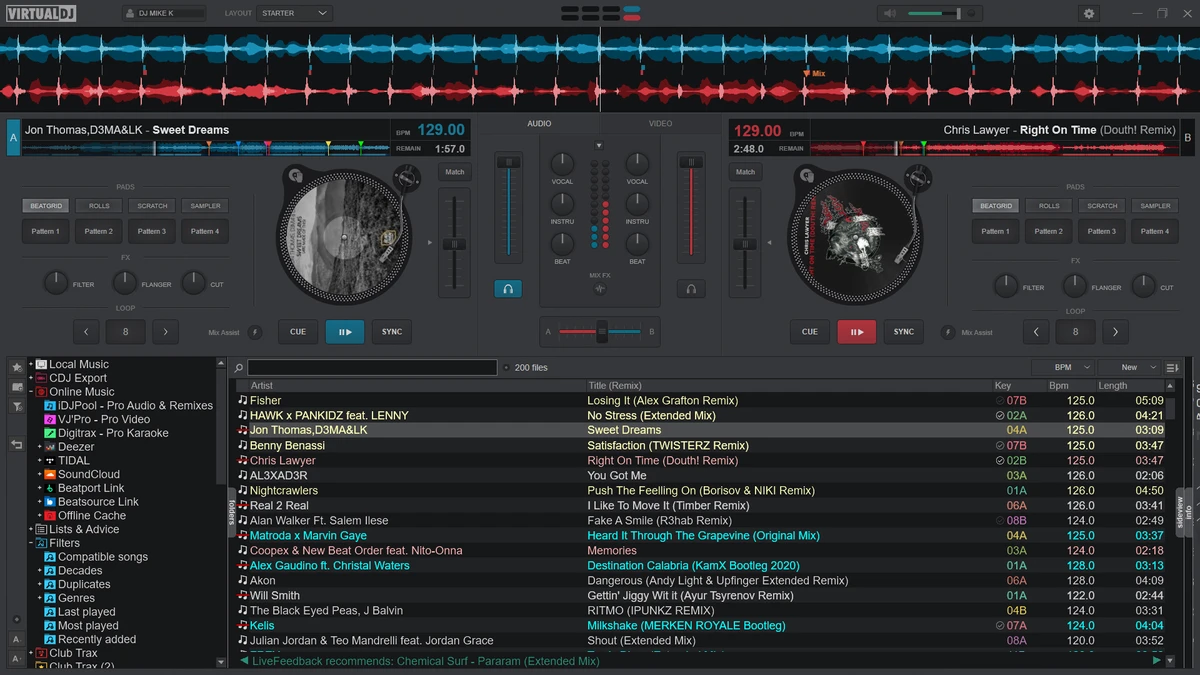

VirtualDJ is a feature-rich DJ mixing software designed for both beginners and professional DJs. It allows users to mix audio, video, and karaoke tracks using a highly customizable interface and advanced real-time audio processing tools. With support for AI-powered stem separation, controller integration, streaming services, and automated mixing features, VirtualDJ transforms a standard computer into a full DJ workstation without requiring expensive hardware.
Simple, Yet Powerful
VirtualDJ lets you dive straight into mixing with just your computer—no hardware required. The interface is clean, modern, and customizable so that you can tailor it to your style and workflow. Prefer the classic look from older versions? No problem. You can tweak it in the settings to suit your preference. The 64-bit architecture ensures smooth performance, even when handling high-quality video mixes or running intensive effects.
Features of VirtualDJ
- AI-powered stem separation (isolate vocals, drums, bass, and instruments).
- Mix music, video, and karaoke in a single platform.
- Support for 2, 4, 6, or up to 99 virtual decks.
- Compatible with 300+ DJ controllers (plug-and-play support).
- Supports over 227 audio and video formats.
- Real-time BPM and key detection.
- Harmonic mixing with automatic pitch adjustment.
- Event Scheduler for pre-planned DJ sets.
- Automix mode with intelligent transition handling.
- Seamless loops, rolling loops, and flip mode.
- Extensive audio and video effects library.
- Karaoke mode with singer management tools.
- Built-in streaming support (subscription required for services like Beatport).
- Live broadcasting to social media and radio servers.
- Customizable interface with multiple skins.
- Sandbox mode for rehearsal and mix preparation.
- Recording and podcast creation tools.
- Wireless mobile control via phone or tablet.
User Experience
VirtualDJ offers a highly flexible and modern DJing experience that adapts to different skill levels. Beginners can start mixing immediately using the intuitive interface and Automix feature, while professionals can take advantage of deep customization options and advanced performance tools. The software runs smoothly on modern systems, especially with its 64-bit architecture, which helps handle complex audio and video mixing without noticeable lag. The interface is modular and fully customizable, allowing DJs to arrange decks, waveforms, and effects according to their workflow.
One of the most impressive aspects is the real-time stem separation feature. This allows users to isolate vocals or instruments instantly, enabling creative mashups and live remixing that would normally require studio software.
Controller integration is another strong point. VirtualDJ automatically detects most DJ hardware, making setup fast and hassle-free. For mobile DJs, wireless control options add flexibility during live performances. Streaming integration and video mixing expand its use beyond traditional DJing, making it suitable for clubs, livestreams, karaoke events, and multimedia performances. Overall, VirtualDJ delivers a professional-grade experience while still being accessible to newcomers.
Who Should Use VirtualDJ?
- Beginner DJs learning mixing basics.
- Professional club and event DJs.
- Streamers and live performers.
- Karaoke hosts and entertainers.
- Users who want to mix audio, video, and live visuals.
- DJs using hardware controllers or digital vinyl systems.
Conclusion
VirtualDJ stands out as a complete DJ ecosystem rather than just mixing software. With AI stem separation, controller support, video mixing, and streaming capabilities, it covers nearly every aspect of modern DJ performance.


