SysTools EDB Converter logo

SysTools EDB Converter 7.0

  • User Rating:
    ★★★★★
    ★★★★★
    0.0 ★ 0Votes
  • Requirements:
    Windows
  • Version: 7.0
  • Latest updated: 2 weeks ago
  • License: Free Trial  
  • Publisher: SysTools
  • Size: 88 MB
× app stores

SysTools EDB Converter is a comprehensive Windows-based utility designed to convert Microsoft Exchange EDB (Exchange Database) files into a variety of widely used file formats for migration, backup, archiving, and data recovery purposes. The software supports both private and public EDB files, enabling users to export mailbox content such as emails, contacts, calendars, tasks, notes, journals, and user-created folders while preserving the original folder hierarchy and metadata. It offers conversion to formats including PST, PDF, HTML, MBOX, MSG, EML, EMLX, CSV, ICS, vCard, DOC, DOCX, JSON, TXT, and MHT, providing flexibility for different workflows and email platforms.

In addition to handling healthy Exchange databases, the software includes Quick and Advanced scanning modes to process corrupted EDB files and recover accessible mailbox data. Users can preview mailbox items before conversion, perform selective exports using category and date-based filters, remove SMIME and OpenPGP encryption when valid credentials are available, customize file naming conventions, and configure additional settings for PDF output. With compatibility across multiple versions of Microsoft Exchange Server, Microsoft Outlook, and Windows, SysTools EDB Converter is designed to support organizations and IT administrators managing Exchange mailbox migration, data extraction, and long-term email preservation.

Features of SysTools EDB Converter

  • Converts Exchange EDB files into HTML, PST, PDF, MBOX, MSG, EML, EMLX, CSV, ICS, vCard, MHT, TXT, DOC, DOCX, and JSON.
  • Supports both public.edb and private.edb mailbox files.
  • Exports emails, contacts, calendars, tasks, notes, journals, and user-created folders.
  • Preview mailbox items before conversion using a tree-structured viewer.
  • Convert only selected mailbox categories.
  • Filter emails by sent date during export.
  • Supports bulk loading of multiple EDB files using Select File or Search File options.
  • Dual scanning modes (Quick and Advanced) for corrupted EDB files.
  • Can decrypt SMIME and OpenPGP encrypted emails when valid credentials are provided.
  • Preserves original folder hierarchy and mailbox metadata.
  • Option to ignore system folders during export.
  • Supports customizable naming conventions for exported files.
  • Allows PST splitting during PST export.
  • Provides additional PDF settings including Bates Number, Date Stamp, page size, and page orientation.
  • Compatible with Exchange Server 2000–2022, Outlook 2003–2021, and supported Windows versions.

Interface and Usability

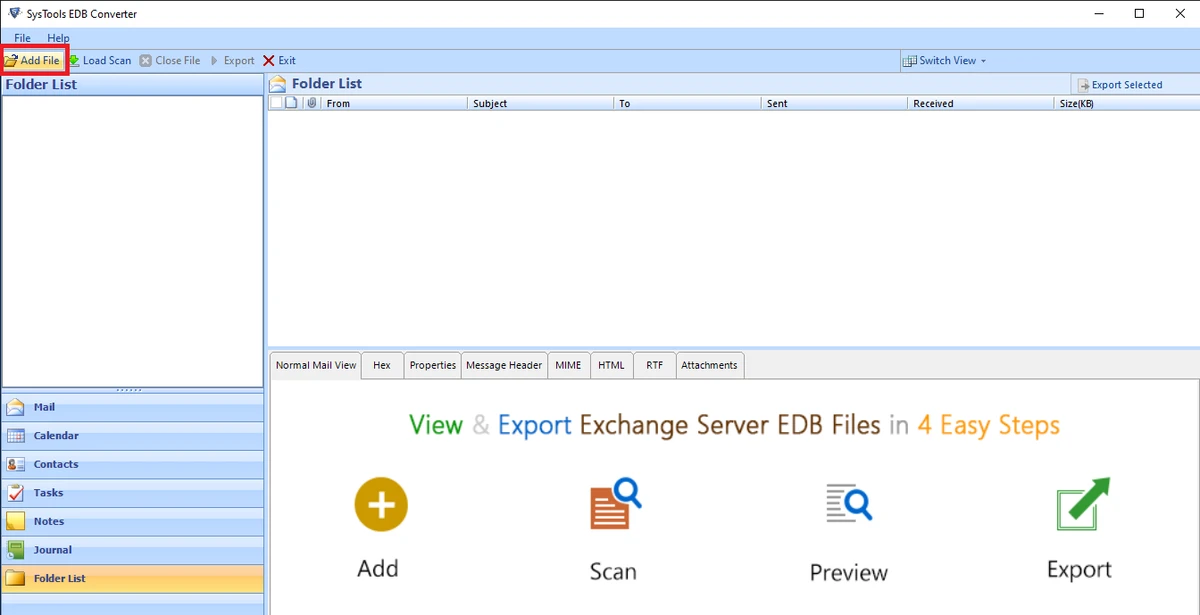
SysTools EDB Converter presents mailbox data in a familiar tree-style layout, making it straightforward to browse folders before exporting them. I appreciated the preview function because it lets you inspect emails and other mailbox items without committing to a conversion first. The filtering options for dates and mailbox categories are easy to locate and help reduce unnecessary exports. Although the application includes many export formats and configuration options, the workflow remains organized, guiding users from loading an EDB file to selecting output settings and completing the conversion.

Who Should Use SysTools EDB Converter?

  • Exchange Server administrators
  • IT professionals performing mailbox migration
  • Organizations recovering data from damaged EDB databases
  • Businesses exporting Exchange mailboxes into Outlook-compatible PST files
  • Users needing to archive Exchange mailbox data in formats such as PDF or HTML
  • Professionals requiring selective mailbox exports with date or category filters

Conclusion

SysTools EDB Converter delivers a comprehensive set of tools for Exchange mailbox conversion, migration, and recovery. Its ability to handle both healthy and corrupted EDB files, combined with extensive export format support and selective conversion options, makes it a practical choice for professional Exchange environments. Features such as mailbox preview, metadata preservation, and folder hierarchy maintenance further improve its reliability for administrative tasks. If you regularly manage Microsoft Exchange databases or need to recover and export mailbox content into different formats, SysTools EDB Converter is worth considering.

Pros & Cons

✓

Pros

  • Supports a wide range of export formats.
  • Converts both public and private Exchange mailboxes.
  • Includes preview before conversion.
  • Can process corrupted EDB files with Quick and Advanced scan modes.
  • Preserves folder hierarchy and metadata.
  • Supports selective conversion using category and date filters.
  • Compatible with numerous Exchange Server, Outlook, and Windows versions.
✕

Cons

  • No official changelog for the latest version.
  • Advanced Scan is supported only on 64-bit Windows.

Frequently Asked Questions

How do I convert an Exchange EDB file to PST?

Load the EDB file into SysTools EDB Converter, preview the mailbox, choose PST as the export format, select the mailboxes you want to export, configure optional settings such as PST splitting if needed, and start the conversion.

Can SysTools EDB Converter recover corrupted EDB files?

Yes. The software includes both Quick Scan and Advanced Scan modes. Quick Scan is intended for healthy or minimally damaged databases, while Advanced Scan is designed to process more severely corrupted EDB files on supported 64-bit Windows systems.

Does the software preserve the original mailbox folder structure?

Yes. During conversion, the software can maintain the original folder hierarchy so that exported mailbox data closely matches the structure of the source Exchange database.

Can I export only selected emails instead of the entire mailbox?

Yes. The software allows selective export by mailbox category and also includes a date filter that exports emails within a specified sent-date range.

Which file formats does SysTools EDB Converter support?

The software supports exporting EDB files to HTML, PST, PDF, MBOX, MSG, EML, EMLX, CSV, ICS, vCard, MHT, TXT, DOC, DOCX, and JSON formats.

Which Microsoft Exchange versions are supported?

According to the provided specifications, the software supports Exchange Server versions from 2000 through 2022, along with multiple Outlook releases and supported Windows operating systems.

Recommended apps [Freeware]:
  • EarthView 7.17.0 EarthView logo dynamic wallpapers and screensavers with day, night, and weather effects
  • Dashlane 6.2626.1 Dashlane logo secure password manager that stores credentials, autofills forms, and enhances online security with encryption and alerts
  • Hasleo Backup Suite 5.8.2.2 Hasleo Backup Suite logo Windows backup software for system restore, disk imaging, and cloning with emergency recovery support
  • PHP 8.5.8 PHP logo Develop dynamic websites with PHP, the free open-source scripting language for modern server-side web development
  • Dism++ 10.1.1002.2 Dism++ logo a lightweight Windows optimization tool for cleaning system files, managing startup items, updates, and system images
  • Microsoft OneDrive 26.113.0614.0004 Microsoft OneDrive logo Store, sync, and access files across devices with cloud storage that automatically keeps documents, photos, and folders up to date.
Recommended apps [Shareware]:
  • Amazing Laptop Cooling Wizard 1.1.5.8 Amazing Laptop Cooling Wizard logo Reduce laptop overheating by optimizing CPU and fan cooling performance on Windows.
  • Image for Windows 4.12 Image for Windows logo disk imaging tool for full system backup, restore, and recovery with encryption, compression, and bootable rescue medi
  • CleverPrint 9.3.73976 CleverPrint logo virtual printing utility that optimizes print jobs, saves paper and ink, adds watermarks, and exports documents to PDF or images
  • UniFab 4.1.7.0 UniFab logo Enhance videos with AI using UniFab. Upscale footage, reduce noise, boost frame rates, convert HDR, and improve audio quality
  • WinCatalog 2026.2.0.629 WinCatalog logo a disk and file cataloging tool for Windows that indexes files for fast search and organization
  • Serato DJ Pro 4.0.8 Serato DJ Pro logo professional DJ software with Stems, music streaming, hardware integration, and reliable live performance tools