WinContig logo

WinContig 5.0.3.4

  • User Rating:
    ★★★★★
    ★★★★★
    0.0 ★ 0Votes
  • Requirements:
    Windows
  • Version: 5.0.3.4
  • Latest updated: 3 weeks ago
  • License: Freeware  
  • Publisher: Marco D'Amato
  • Size: 2 MB
× app stores

WinContig is a lightweight and portable file defragmentation utility designed for Windows users who want to improve file access speed without performing a full disk defragmentation. Instead of processing an entire drive, it focuses on defragmenting selected files, which makes it faster and more targeted compared to traditional defrag tools.

During evaluation of its features, WinContig stands out for its simplicity and portability. It does not require installation and does not create registry entries or system folders, making it ideal for users who prefer minimal system impact tools. The software is especially useful for optimizing large files or frequently accessed documents without affecting the rest of the disk.

Key Features of WinContig

  • Defragments individual files instead of entire disks.
  • Portable application with no installation required.
  • Does not create registry entries or system directories.
  • Allows grouping files into profiles for batch processing.
  • Supports command-line switches for advanced control.
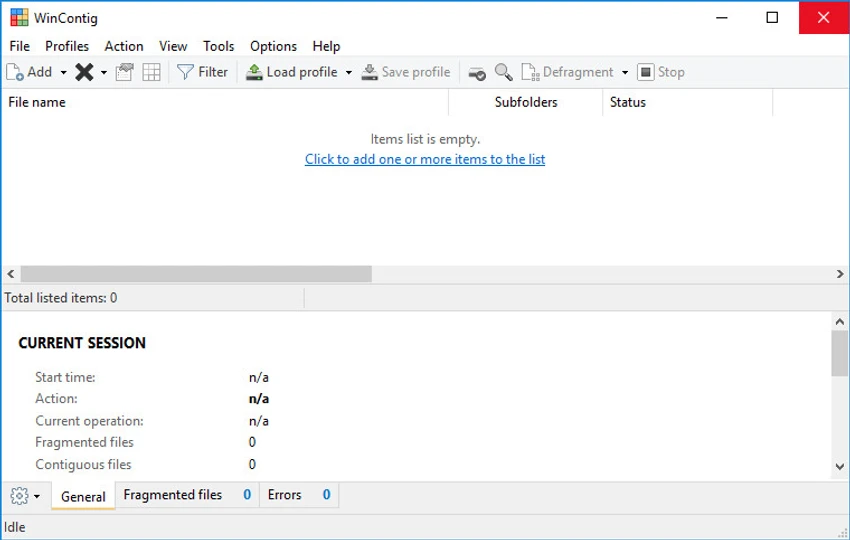
  • Simple and intuitive user interface.
  • Displays file status with color-coded statistics.
  • Multi-language interface support.
  • Lightweight executable (~1.5 MB).

Interface and Usability

WinContig provides a straightforward and functional interface focused on ease of use. From my perspective, the application is designed so that users can quickly select files and begin defragmentation without navigating complex settings.

The profile feature allows users to group frequently optimized files, which improves efficiency for repeated tasks. For advanced users, command-line support adds flexibility for automation and scripting workflows. Despite its technical purpose, the interface remains accessible even for users with limited experience in disk optimization tools.

Who Should Use WinContig?

  • Users who want to speed up access to specific large files.
  • IT technicians performing targeted file optimization.
  • Portable software users who prefer no-install tools.
  • Advanced users needing command-line defragmentation options.
  • Anyone looking to optimize storage performance without full disk defrag.

System Requirements

  • Windows 7
  • Windows 8
  • Windows 10
  • Windows 11

Conclusion

WinContig is a practical and efficient tool for users who need quick file-level defragmentation without the overhead of full disk optimization. Its portability and simplicity make it especially useful for technicians and advanced users who want precise control over file performance improvements.

Pros & Cons

✓

Pros

  • Portable and lightweight
  • No installation or registry changes required
  • Defragments individual files instead of entire disks
  • Simple and user-friendly interface
  • Supports file grouping via profiles
  • Command-line support for advanced use
  • Multi-language support
✕

Cons

  • Limited to file-level defragmentation (not full disk optimization)
  • Basic interface compared to modern disk utilities

Frequently Asked Questions

Is WinContig a full disk defragmentation tool?

No. WinContig is designed to defragment individual files rather than entire disks, making it faster and more targeted.

Does WinContig require installation?

No. WinContig is a portable application that runs without installation and does not create registry entries.

Can WinContig improve system performance?

It can improve performance indirectly by optimizing fragmented files, which may result in faster file access times.

Does WinContig support automation?

Yes. WinContig supports command-line switches, allowing advanced users to automate defragmentation tasks.

Can I group files for defragmentation?

Yes. WinContig allows users to create profiles to group files for easier and repeated optimization tasks.

Which Windows versions are supported?

WinContig supports Windows 7, Windows 8, Windows 10, and Windows 11.

Recommended apps [Freeware]:
  • ShareX 21.0.0 ShareX logo a free Windows tool for screenshots, screen recording, annotation, and instant file sharing with cloud support
  • VeraCrypt 1.26.29 VeraCrypt logo Protect sensitive data with advanced disk and partition encryption, customizable algorithms, and strong password-based security.
  • FotoSketcher 4.40 FotoSketcher logo Transform photos into artistic sketches with creative effects, drawing styles, filters, and simple image editing tools.
  • VUPlayer 4.24 VUPlayer logo Play music with a lightweight audio player supporting multiple formats, playlists, customization, and enhanced listening controls.
  • DuckDuckGo 0.164.1 DuckDuckGo logo Browse privately with tracker blocking, ad protection, private search, cookie controls, and secure browsing tools built in.
  • Telegram 7.0.2 Telegram logo Securely chat, share files, join large communities, and stay connected across devices with a feature-rich cloud messaging platform.
Recommended apps [Shareware]:
  • Gilisoft Screen Recorder Pro 13.1 Gilisoft Screen Recorder Pro logo a Windows tool for capturing screen, webcam, and audio with editing features, GPU acceleration, and multiple formats
  • NTFS Permissions Auditor 26.6.27 NTFS Permissions Auditor logo analyze Windows folder permissions, audit NTFS access rights, and export detailed security reports
  • Capture One 16.8.3.3630 Capture One logo professional RAW photo editor with advanced color accuracy, tethered shooting, and studio workflow tools for photographers
  • Adobe Bridge 2026 Adobe Bridge logo digital asset manager for organizing, previewing, and batch processing creative files in Adobe workflows
  • Abelssoft YouTube Song Downloader 2026 v26.13 Abelssoft YouTube Song Downloader logo Download YouTube music and videos in multiple formats with Abelssoft YouTube Song Downloader for Windows
  • Argente Registry Cleaner 4.0.8.7 Argente Registry Cleaner logo Clean invalid registry entries safely with backup protection, multiple scan modes, and an easy-to-use Windows maintenance tool.