


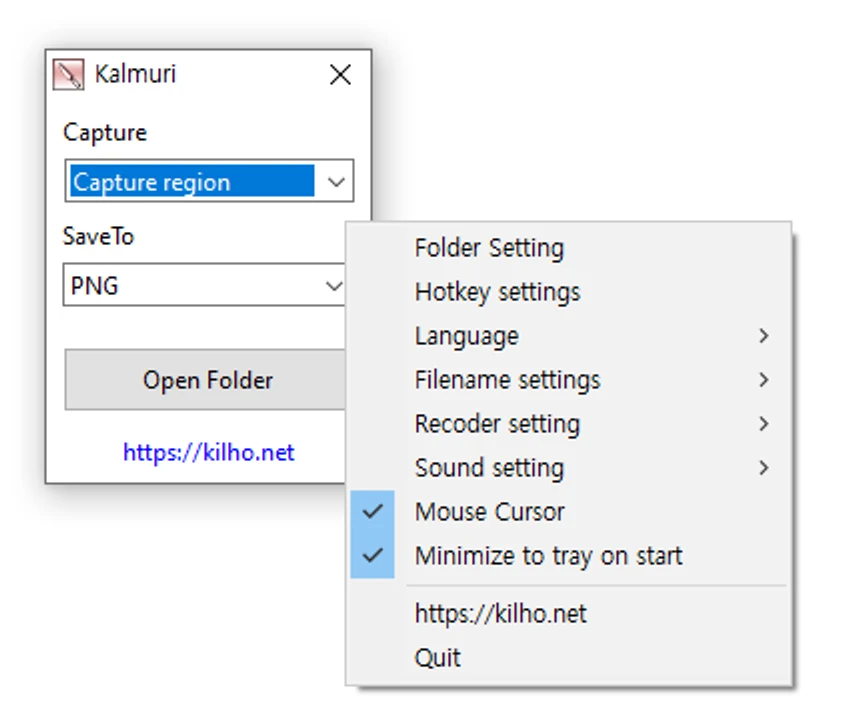

Kalmuri is a lightweight screen capture and screen recording tool designed for users who want a simple yet functional way to record or take snapshots of their screen. It runs quietly in the system tray and offers both screenshot and video recording capabilities without requiring complex setup. The application focuses on simplicity while still providing flexible output options, making it suitable for tutorials, presentations, and everyday screen capture tasks.
Features of Kalmuri
- Screenshot capture tool and screen recorder in one
- Runs quietly in the system tray
- Supports full screen or selected area capture
- Multiple image formats:
- PNG (high-quality, transparent backgrounds)
- JPG (compressed images)
- GIF (simple animations)
- BMP (uncompressed images)
- MP4 screen recording support
- Hotkey customization for quick capture
- Configurable output folder for saved files
- File naming options
- Sound settings adjustment for recordings
- Clipboard, print, and local save options
- Upload screenshots to Imgbox
- Built-in browser for website snapshots
- Capture cursor during screen recordings
User Experience
Kalmuri offers a minimal interface that makes screen capturing quick and straightforward. At first glance, the application appears simple, with only a few dropdown menus for selecting actions and output formats. However, additional functionality is available through a hidden context menu accessed by right-clicking the main window. Once configured, the tool runs in the system tray and can be triggered instantly using hotkeys, which is particularly useful for users who need frequent screen captures without interrupting their workflow.
The ability to switch between image formats and video recording makes it flexible enough for different use cases, from documentation to tutorial creation. MP4 recording is especially useful for producing lightweight video guides. While it does not offer advanced editing or annotation features found in more complex tools, its simplicity is its strength, making it easy to use even for beginners.
Who Should Use Kalmuri?
- Students creating tutorials or study notes
- Office workers capturing documentation
- Content creators needing quick screen recordings
- Users who prefer lightweight tools
- Anyone needing fast screenshot functionality
Conclusion
Kalmuri is a practical and lightweight screen capture and recording tool that focuses on ease of use and speed. With support for multiple image formats, MP4 recording, and hotkey-driven capture, it delivers all essential features without unnecessary complexity.


