WinScript logo

WinScript 2.20.1

  • User Rating:
    ★★★★★
    ★★★★★
    0.0 0Votes
  • Requirements:
    Windows
  • Version: 2.20.1
  • Latest updated: 2 days ago
  • License: Freeware  
  • Publisher: flick9000
  • Size: 3.3 MB
× app stores

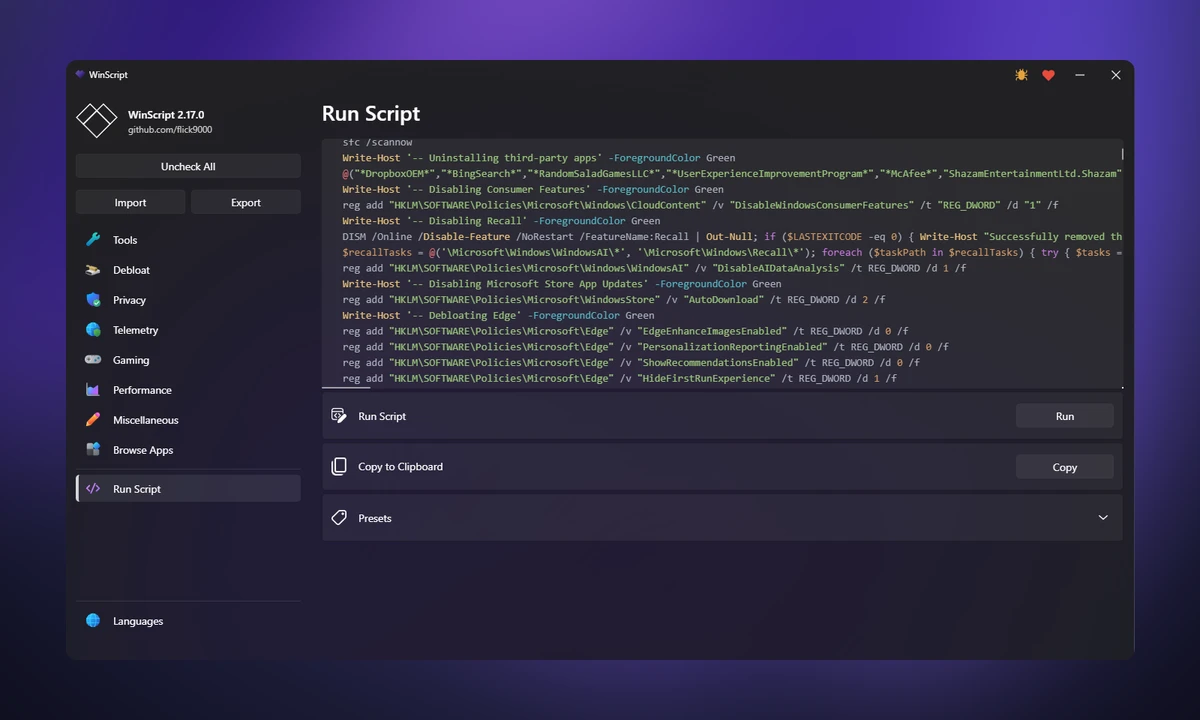
WinScript is an open-source Windows customization and optimization tool designed to help users create and apply custom scripts for improving their Windows experience. It includes collections of scripts focused on removing unnecessary Windows components, improving privacy, optimizing performance, and installing applications. The tool provides a centralized way to apply system changes that would otherwise require manually editing settings or running separate commands. It is aimed at users who want more control over Windows 10 and Windows 11 configuration.

Features of WinScript

Windows Debloat Tools

  • Remove Windows bloatware
  • Remove selected pre-installed Windows features
  • Remove Copilot
  • Remove Edge
  • Remove OneDrive

Privacy Improvements

  • Disable Windows telemetry
  • Disable third-party telemetry and data collection
  • Reduce tracking features
  • Manage application access settings
  • Apply privacy-focused system changes

Performance Optimization

  • Set background services to manual mode
  • Free system resources by adjusting services
  • Configure preferred DNS settings
  • Clean temporary files
  • Apply performance-related tweaks

One-Click Application Installation

  • Install multiple applications simultaneously
  • Uses Chocolatey for application installation
  • Simplifies software setup after Windows installation

Additional Features

  • Open-source design
  • Custom Windows scripts
  • Requires administrator privileges
  • Supports Windows 10 and Windows 11

User Experience

WinScript provides a practical approach for users who want to customize Windows without manually searching through numerous system settings. The application brings together debloat, privacy, performance, and software installation options in one place. The debloat features are useful for users who want to remove unnecessary pre-installed Windows components. Instead of manually uninstalling applications or changing settings individually, users can apply prepared scripts designed for common cleanup tasks.

Privacy controls are another important part of the experience. WinScript allows users to adjust telemetry, tracking, and application access settings, giving more control over how Windows handles data collection. The performance section focuses on lightweight system adjustments rather than major hardware changes. Options such as managing background services, selecting DNS settings, and cleaning temporary files provide straightforward ways to customize system behavior.

The application installation feature is especially convenient when setting up a new Windows system. By using Chocolatey, WinScript can automate the installation of multiple preferred applications, reducing repetitive setup work. Because WinScript modifies system settings, it is intended for users who understand the effects of applying Windows tweaks. Running the application with administrator permissions is required, and some security software may flag it because of its ability to make system changes.

Who Should Use WinScript?

  • Windows power users
  • Users setting up new Windows installations
  • Privacy-focused users
  • PC enthusiasts who customize system settings
  • Administrators managing Windows configurations
  • Users looking for an open-source optimization toolkit

Conclusion

WinScript offers a convenient way to customize Windows through ready-made scripts for debloating, privacy improvements, performance adjustments, and application installation. Its open-source approach and broad feature set make it a useful option for users who want greater control over their Windows environment.

Pros & Cons

Pros

  • Open-source Windows customization tool
  • Combines debloat, privacy, and performance scripts
  • Removes unnecessary Windows components
  • Helps reduce telemetry and tracking
  • Includes one-click application installation
  • Uses Chocolatey for software setup
  • Lightweight approach to Windows optimization
  • Supports Windows 10 and Windows 11

Cons

  • Requires administrator privileges
  • Designed for users comfortable with system modifications
  • Changing Windows settings can require careful selection
  • May be flagged by security tools due to its system modification capabilities

Frequently Asked Questions

What is WinScript?

WinScript is an open-source Windows utility that provides scripts for debloating, privacy improvements, performance optimization, and software installation.

Which Windows versions does WinScript support?

WinScript supports Windows 10 and Windows 11.

Does WinScript remove Windows bloatware?

Yes. It includes scripts designed to remove bloatware and selected pre-installed Windows components.

Can WinScript improve Windows privacy?

Yes. It includes options for disabling telemetry, reducing tracking, and managing data collection settings.

Does WinScript install applications automatically?

Yes. WinScript can install multiple applications at once through Chocolatey.

Why does Windows Defender flag WinScript?

The tool may be flagged because it can modify system settings. According to the provided information, this is related to its functionality rather than indicating that the software is unsafe.

Does WinScript require administrator access?

Yes. Administrator privileges are required for WinScript to apply system changes correctly.

Recommended apps [Freeware]:
  • Smadav 2026 v15.8.2 Smadav logo a lightweight antivirus for Windows that provides USB protection, malware cleaning, and additional security
  • Cyberduck 9.5.0.45237 Cyberduck logo Manage FTP, SFTP, and cloud storage services like Google Drive, Dropbox, and Amazon S3 with Cyberduck for Windows
  • Disk Benchmark 1.0 Disk Benchmark logo measures SSD, HDD, NVMe, and USB drive performance with detailed speed, IOPS, and latency tests
  • Adobe Acrobat Reader DC 2026.001.21691 Adobe Acrobat Reader DC logo trusted PDF viewer for reading, printing, and annotating PDFs with strong security and cloud sync support
  • Winstep Nexus 26.6 Winstep Nexus logo customizable desktop dock for Windows with app launch shortcuts, widgets, and multi-monitor support
  • DISMTools 0.8 DISMTools logo open-source GUI for Windows DISM that simplifies image management, system repair, and maintenance
Recommended apps [Shareware]:
  • Wondershare AllMyTube 7.4.9.2 Wondershare AllMyTube logo download and convert videos from YouTube and 100+ sites into multiple formats for offline viewing.
  • HWMonitor Pro 1.58 HWMonitor Pro logo extends HWMonitor with remote monitoring, logging graphs, and improved sensor interface tools.
  • GiliSoft Private Disk 11.8 GiliSoft Private Disk logo Protect sensitive files with AES 256-bit encryption, hidden disk images, and portable encrypted storage
  • Sketchbook Pro 9.4.7.0 Sketchbook Pro logo a professional drawing app with customizable brushes, layers, symmetry tools, and natural pen support.
  • eM Client 10.4.5600.0 eM Client logo a modern Windows email client with support for Gmail, Exchange, calendars, tasks, contacts, and chat in one app
  • Image for Windows 4.12 Image for Windows logo disk imaging tool for full system backup, restore, and recovery with encryption, compression, and bootable rescue medi