


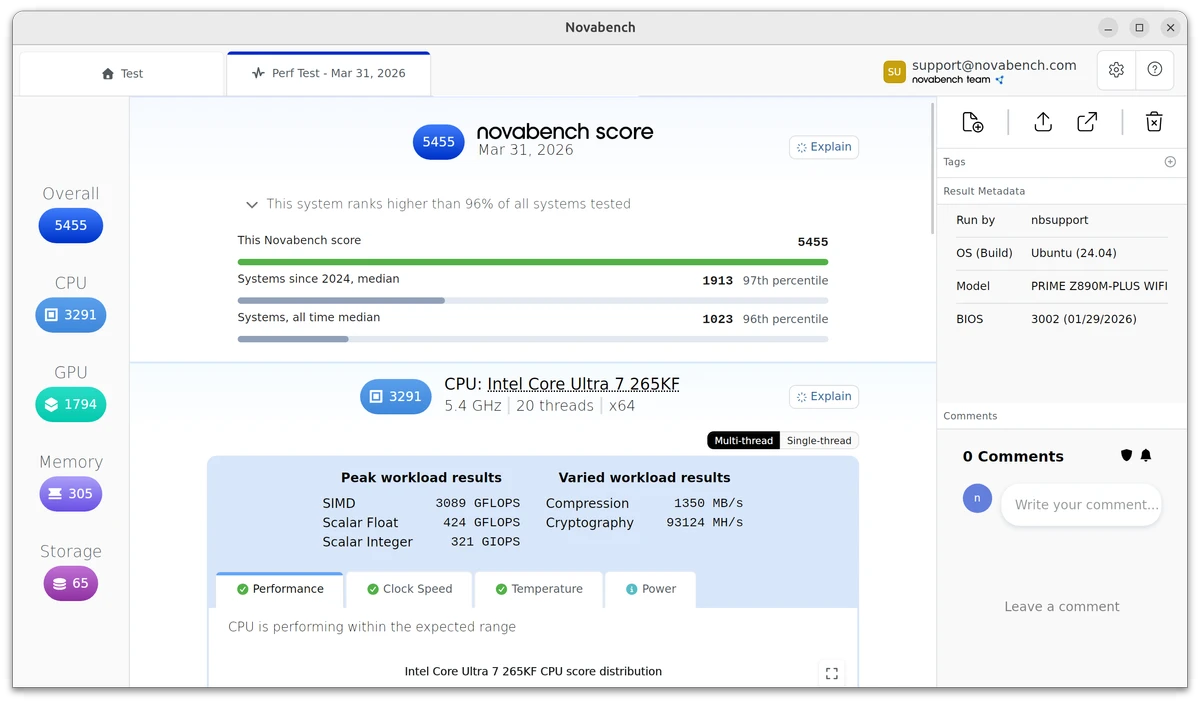

NovaBench is a lightweight benchmarking utility designed to measure the performance of your computer's core hardware components. It evaluates your CPU, GPU, RAM, and storage in just a few minutes, generating detailed benchmark results along with an overall system score. One of NovaBench's biggest strengths is its ability to compare your benchmark results with other systems through its online database. This makes it easier to identify performance bottlenecks, evaluate hardware upgrades, and understand how your PC performs compared to similar configurations.
Features of NovaBench
- Benchmark CPU, GPU, RAM, and storage performance.
- Complete system benchmark in approximately 1–2 minutes.
- Generate an overall system performance score.
- View detailed benchmark results for individual hardware components.
- Compare benchmark scores with other submitted systems.
- Verified benchmark results submitted to NovaBench.
- Create a personal benchmark profile.
- Share benchmark results through social networks.
- Generate benchmark images for forums, blogs, or websites.
- CPU floating-point performance test.
- CPU integer arithmetic test.
- MD5 hashing performance test.
- GPU 3D graphics benchmark using a shader-intensive scene.
- RAM read and write speed benchmark.
- Disk write speed benchmark for primary or selected storage devices.
User Experience
NovaBench is refreshingly simple to use. After launching the application, running a complete benchmark requires only a single click, and the entire testing process typically finishes within a couple of minutes. The results are presented in a clear format, showing both an overall performance score and individual scores for each major hardware component. This makes it easy to identify whether your processor, graphics card, memory, or storage is limiting overall system performance.
One feature I found especially useful is the online comparison system. Seeing how my hardware compares with similar systems provides valuable context when considering upgrades or troubleshooting unexpected performance issues. Since submitted benchmark results are verified, the comparisons are generally more trustworthy than manually entered benchmark databases. The interface remains clean and focused without unnecessary complexity, making NovaBench approachable for beginners while still offering meaningful benchmark data for enthusiasts.
The free edition covers the core benchmarking experience well, although some advanced analysis tools and utilities are reserved for the paid Plus version.
Pricing
NovaBench Free
- Basic benchmarking features.
- Personal use only.
- Requires submission of benchmark results.
NovaBench Plus
- Starts at $35.00 per year.
- Includes:
- Full benchmark suite.
- Powerful performance tools for enthusiasts.
- Online comparison.
- Offline mode and private profiles.
- Bottleneck testing.
- Temperature and power monitoring utilities.
Who Should Use NovaBench?
- PC enthusiasts comparing hardware performance.
- Gamers evaluating system upgrades.
- Users troubleshooting performance bottlenecks.
- System builders testing newly assembled computers.
- Anyone looking for a quick and reliable Windows benchmark utility.
Conclusion
NovaBench is an excellent benchmarking utility for users who want fast, reliable insights into their computer's performance. It covers all of the essential hardware components—including the CPU, GPU, RAM, and storage—while presenting results in an easy-to-understand format.


