DiskGenius logo

DiskGenius 6.2.0.1829

  • User Rating:
    ★★★★★
    ★★★★★
    0.0 0Votes
  • Requirements:
    Windows
  • Version: 6.2.0.1829
  • Latest updated: 1 day ago
  • License: Free Trial  
  • Publisher: YIZHISHU Ltd
  • Size: 64 MB
×

DiskGenius is a Windows utility designed for managing disk partitions and recovering lost data. It combines partition management, disk cloning, and file recovery features into a single toolkit, making it useful for both system maintenance and data rescue scenarios.

Originally known as PartitionGuru, it has evolved into a comprehensive disk utility supporting multiple file systems and storage devices.

Overview

DiskGenius provides a wide set of tools for handling storage devices, including hard drives, SSDs, USB drives, and virtual disks. It allows users to create, resize, format, delete, and manage partitions while also offering advanced recovery features for lost or damaged data. Beyond basic partitioning, it includes disk cloning, backup imaging, and sector-level operations. These features make it suitable for both everyday maintenance tasks and more advanced data recovery workflows.

The software is compatible with common file systems such as FAT, NTFS, and EXT, and supports both physical and virtual storage environments.

Features of DiskGenius

  • Create, delete, format, resize, and split partitions
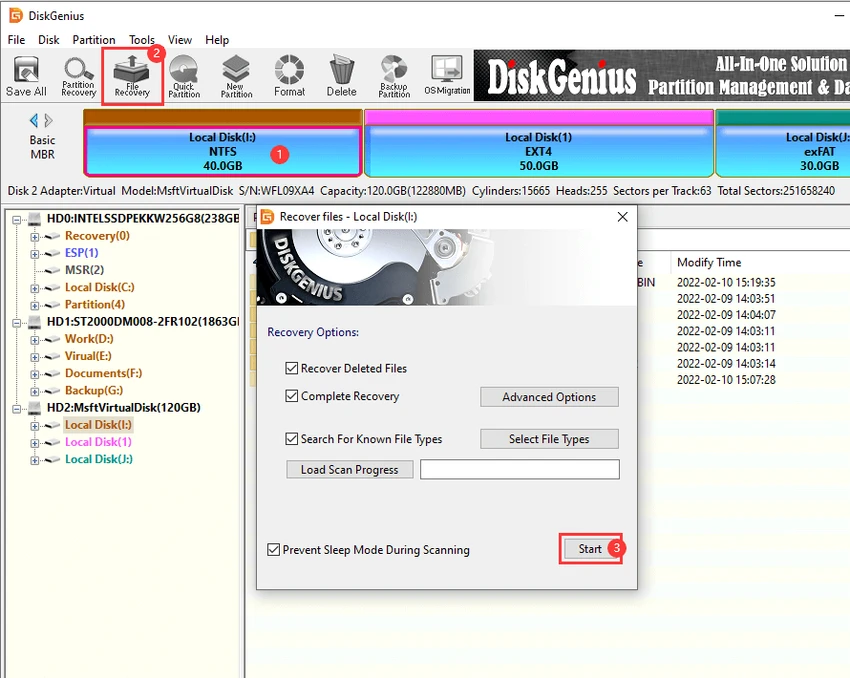
  • Recover lost files and lost partitions
  • Disk and partition cloning (file-based and sector-based)
  • Backup partitions to image files and restore from images
  • Support for virtual disk files (VMware, VirtualBox, Virtual PC)
  • Works with HDD, SSD, USB drives, memory cards, and external storage
  • Support for FAT12/16/32, NTFS, and EXT3 file systems
  • Convert disk types between MBR and GPT without data loss
  • Dynamic disk management and conversion to basic disks
  • Check and repair bad sectors on storage devices
  • Create bootable USB drives for system recovery
  • Secure file deletion (irrecoverable data removal)
  • Sector-level editing tools for advanced users
  • Virtual RAID reconstruction and recovery

User Experience

Using DiskGenius feels like working with a professional-grade disk management suite. The interface is feature-dense, with tools organized around partition operations, recovery utilities, and disk-level diagnostics. For everyday users, tasks like resizing partitions or creating backups are relatively straightforward, guided by step-by-step workflows. However, more advanced functions such as sector editing, RAID reconstruction, or disk conversion require technical understanding.

Who Should Use DiskGenius?

DiskGenius is best suited for IT professionals, system administrators, and advanced users who need reliable tools for disk management, partition recovery, or data restoration. It is also useful for users handling multi-disk setups or recovering data from failed drives.

Conclusion

DiskGenius is a powerful and versatile disk utility that combines partition management, recovery, and cloning into one platform. Its broad feature set makes it especially valuable for professionals and users dealing with complex storage or data recovery tasks.

Pros & Cons

Pros

    • Comprehensive partition management tools
    • Strong data and partition recovery capabilities
    • Supports multiple storage devices and file systems
    • Disk cloning and backup imaging included
    • Virtual disk and RAID support
    • Advanced recovery and diagnostic features

Cons

    • Interface can feel complex for beginners
    • Some advanced tools require technical expertise
    • No provided rating or user feedback in the data

Frequently Asked Questions

What is DiskGenius used for?

DiskGenius is used for managing disk partitions, recovering lost data, and cloning storage drives.

Can it recover lost partitions?

Yes, it includes tools for recovering lost partitions and files from various storage devices.

Does it support disk cloning?

Yes, it supports both partition cloning and full disk cloning using file or sector methods.

Is it suitable for beginners?

Basic tasks are accessible, but advanced features may require technical knowledge.

Recommended apps [Freeware]:
  • Trillian 6.6 Build 15 Trillian logo all-in-one chat software designed to simplify online communication
  • FBackup 9.9.1044 FBackup logo a free Windows backup tool offering automatic backups, cloud support, encryption, and easy file recovery options
  • BitTorrent 7.11.0.47255 BitTorrent logo peer-to-peer file sharing client for fast, decentralized downloads with bandwidth control and resume support
  • AnyTXT Searcher 1.3.3173 AnyTXT Searcher logo fast desktop search tool that indexes and searches full-text content across documents, PDFs, emails, and more
  • Automatic Email Processor 4.0.24 Automatic Email Processor logo Automatically save, archive, print, and process Outlook emails and attachments with customizable rules.
  • FluentTweaker 26.06.02 FluentTweaker logo a Windows utility for safe, reversible system tweaks focused on UI, privacy, and performance control.
Recommended apps [Shareware]:
  • Typing Instructor Platinum 21.1 Typing Instructor Platinum logo improve typing speed and accuracy through interactive lessons, games, and 10-finger typing practice.
  • Internet Download Manager (IDM) 6.42 Build 64 Internet Download Manager (IDM) logo boosts download speeds up to 5x, schedules downloads, and supports all major browsers and protocols
  • VMware InstallBuilder Enterprise 26.5.1 VMware InstallBuilder Enterprise logo It helps developers quickly create professional installers, RPM packages, and software bundles for multiple platforms.
  • Charles 5.2.0 Charles logo HTTP proxy tool for web debugging, allowing developers to inspect, modify, and analyze network traffic in real time
  • Any video Converter 9.2.3 Any video Converter logo video conversion tool that supports multiple formats, editing features, and device-ready output profiles
  • Fast Video Cataloger 10.0.4.0 Fast Video Cataloger logo Organize, search, browse, and manage large video collections with Fast Video Cataloger for Windows