MakeMKV logo

MakeMKV 1.18.4

  • User Rating:
    ★★★★★
    ★★★★★
    0.0 0Votes
  • Requirements:
    Windows
  • Version: 1.18.4
  • Latest updated: 1 week ago
  • License: Freeware  
  • Publisher: GuinpinSoft
  • Size: 16 MB
× app stores

MakeMKV is a specialized disc ripping and format conversion tool designed to extract video content from DVDs and Blu-ray discs into the MKV format. It focuses on simplicity and preservation, allowing users to convert protected discs into playable digital files with minimal effort.

Overview of MakeMKV

MakeMKV is built around a straightforward concept: convert physical video discs into high-quality MKV files without losing content. It supports DVDs and Blu-ray discs, including many that are protected with modern encryption systems such as AACS and BD+. Unlike traditional video converters, MakeMKV prioritizes lossless structure preservation. It retains all audio tracks, subtitles, chapters, and metadata inside a single MKV container, which is widely supported across media players.

The software is available on Windows, macOS, and Linux, making it accessible across major operating systems.

Features of MakeMKV

  • Reads and processes DVD and Blu-ray discs
  • Supports discs protected with AACS and BD+ encryption
  • Converts disc content into MKV format without re-encoding
  • Preserves all video and audio tracks, including HD audio
  • Maintains chapter information and metadata
  • Supports multiple subtitle and audio streams in a single file
  • Fast conversion based on optical drive read speed
  • No additional software required for decryption or conversion
  • Cross-platform support: Windows, macOS, and Linux

User Experience

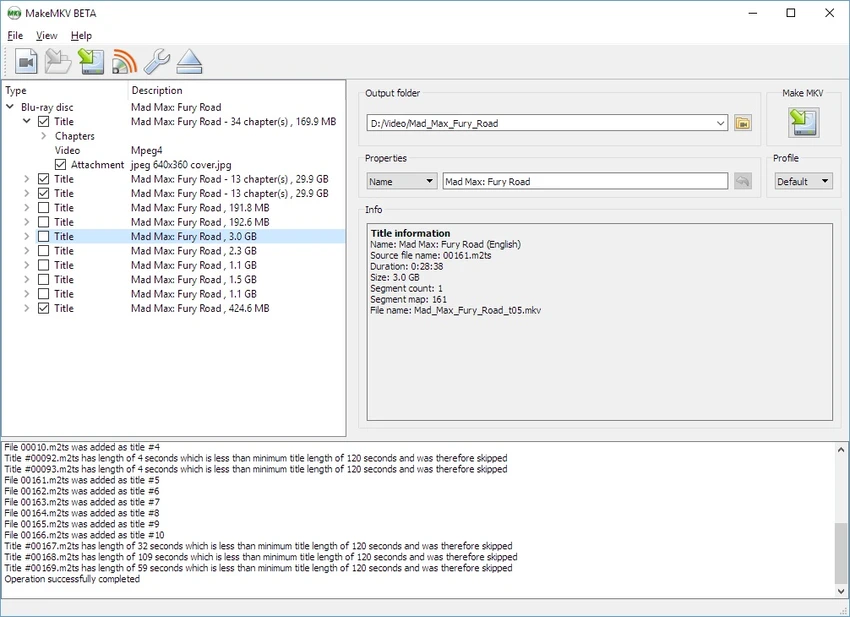
MakeMKV offers a very simple and focused user experience. The interface is minimal, typically presenting only the disc contents and a few conversion options. Users can select which titles to rip and start the process with a single action. The software performs efficiently because it does not re-encode video; it simply extracts and packages streams into an MKV container. This results in fast processing times and high-quality output identical to the source disc. It is especially useful for users who want to build digital movie libraries from physical media without dealing with complex encoding settings.

Conclusion

MakeMKV is a highly reliable and straightforward tool for converting physical DVDs and Blu-ray discs into high-quality MKV files. Its strength lies in its simplicity and ability to preserve original media content without quality loss.

Pros & Cons

Pros

  • Very simple one-click ripping process
  • Preserves original video and audio quality
  • Supports encrypted DVDs and Blu-ray discs
  • Keeps subtitles, chapters, and metadata intact
  • Fast conversion with no re-encoding required
  • Cross-platform availability

Cons

  • Limited editing or customization features
  • Output is only MKV format
  • Requires optical drive for physical discs
  • No built-in media editing tools

Frequently Asked Questions

What is MakeMKV used for?

MakeMKV is used to convert DVD and Blu-ray discs into MKV digital video files.

Does MakeMKV compress videos?

No, it does not re-encode or compress video; it preserves original quality.

Can MakeMKV remove disc protection?

It can read many protected discs using built-in support for common encryption systems like AACS and BD+.

Is MakeMKV free?

It operates under a beta model, where features are available during the beta period.

Recommended apps [Freeware]:
  • WinScan2PDF 9.77 WinScan2PDF logo scan documents and save them as PDFs or JPEGs with minimal setup and low CPU usage.
  • Android Studio 2026.1.1.9 Android Studio logo Google’s official IDE for Android, offering intelligent coding, fast emulators, and cloud integration.
  • FluentTweaker 26.06.02 FluentTweaker logo a Windows utility for safe, reversible system tweaks focused on UI, privacy, and performance control.
  • CheckMail 5.23.6 CheckMail logo a POP3 email checker that lets users preview, manage, and delete emails before downloading them
  • Windows 11 Debloater 2.1.3 Windows 11 Debloater logo remove unwanted features, adjust privacy settings, and personalize Windows 11
  • Recuva 1.55.133 Recuva logo recover deleted files from PCs, USB drives, memory cards, and damaged or formatted disks
Recommended apps [Shareware]:
  • Send Anywhere 24.6.0 Send Anywhere logo free cross-platform file-sharing tool that transfers files of any size without registration.
  • Total Excel Converter 7.1.0.135 Total Excel Converter logo convert Excel, ODS, CSV, DBF, and more into PDF, DOC, HTML, SQL, and other formats on Windows.
  • All Video Downloader Pro 10.4.7 All Video Downloader Pro logo Download videos, playlists, subtitles, and audio from popular sites with built-in conversion and playback tools
  • Coolutils Total Doc Converter 5.1.0.394/167 Coolutils Total Doc Converter logo Convert DOC, DOCX, RTF, and TXT files into PDF, HTML, images, and more with fast batch processing
  • VideoPad Video Editor 18.38 VideoPad Video Editor logo a Windows movie maker for editing videos, adding effects, transitions, audio, and exporting to social platforms
  • Lyric Video Studio 1.5.49 Lyric Video Studio logo a Windows app for creating lyric videos with AI tools, subtitles, motion tracking, and 4K video editing