FileLegit Windows Multimedia Media Players K-Lite Codec Pack Full
K-Lite Codec Pack Full logo

K-Lite Codec Pack Full 19.8.2

  • User Rating:
    ★★★★★
    ★★★★★
    0.0 0Votes
  • Requirements:
    Windows
  • Version: 19.8.2
  • Latest updated: 1 week ago
  • License: Freeware  
  • Publisher: Codec Guide
  • Size: 54 MB
× app stores

K-Lite Codec Pack Full is a comprehensive collection of codecs, DirectShow filters, and multimedia tools designed to enable smooth playback of virtually all audio and video formats on Windows systems. It integrates with media players such as Windows Media Player and Media Player Classic, allowing users to open media files without compatibility issues. The package focuses on providing a stable, lightweight, and user-friendly solution for multimedia playback, ensuring that both common and less common file formats can be played without requiring multiple separate codec installations.

Key Features of K-Lite Codec Pack Full

  • Supports playback of most popular and uncommon audio/video formats
  • Includes DirectShow filters for system-wide media decoding
  • Provides VFW (Video for Windows) and ACM codecs
  • Compatible with Windows Media Player and Media Player Classic
  • Supports modern formats such as H.264 and MPEG-4
  • Lightweight and optimized for system performance
  • Customizable installation options for advanced users
  • Built-in tools for configuring audio and video decoders
  • Clean uninstallation without leftover components
  • Regular updates for improved compatibility
  • Works with Windows 7, 8, 10, and 11

User Experience

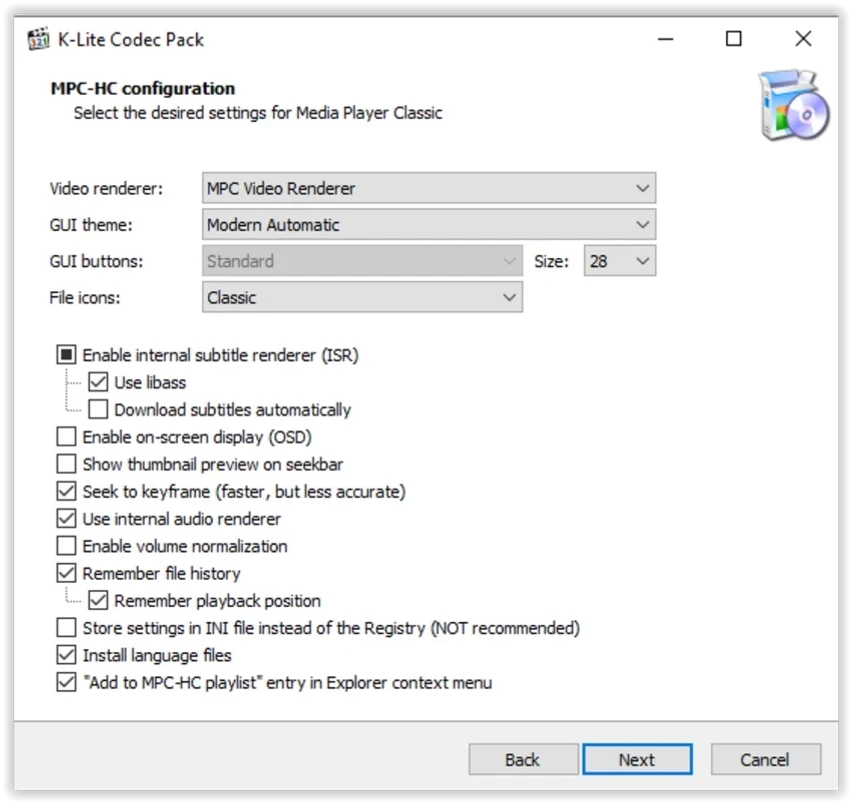
After reviewing K-Lite Codec Pack Full, the installation process is designed to be straightforward, with step-by-step guidance that helps users select the components they need. While advanced users can access detailed configuration options, the default setup is optimized for most users and requires minimal adjustments. Once installed, the codec pack integrates seamlessly into the Windows multimedia environment. Users can immediately open a wide variety of audio and video files without needing additional software or manual configuration.

Performance is generally stable, with minimal system impact, even on older hardware. Media playback feels smooth, and compatibility issues with unsupported file formats are significantly reduced. For users who want more control, the package includes configuration tools that allow adjustments to audio and video decoding settings. These options are helpful for optimizing playback quality or resolving specific file compatibility issues. Overall, K-Lite Codec Pack Full delivers a reliable and efficient multimedia experience without unnecessary complexity.

Conclusion

K-Lite Codec Pack Full provides a balanced and efficient solution for multimedia playback on Windows. With broad format support, system integration, and lightweight design, it remains a strong choice for everyday media use.

Pros & Cons

Pros

  • Supports a wide range of media formats
  • Lightweight and system-friendly
  • Easy installation for beginners
  • Advanced configuration options available
  • Stable playback performance
  • Regular updates improve compatibility
  • Clean and complete uninstallation

Cons

  • Advanced settings may confuse non-technical users
  • Not a standalone media player
  • Requires compatible media player for use

Frequently Asked Questions

What is K-Lite Codec Pack Full used for?

It is used to enable playback of a wide range of audio and video formats on Windows systems.

Does it include a media player?

It works with media players like Windows Media Player and Media Player Classic but is not a standalone player.

Is it lightweight?

Yes. It is designed to be resource-friendly and stable on most systems.

Can I customize the installation?

Yes. It offers both simple and advanced installation options.

Does it support modern video formats?

Yes. It supports formats like H.264 and MPEG-4 among others.

Which Windows versions are supported?

It supports Windows 7, 8, 10, and 11.

Recommended apps [Freeware]:
  • WinScan2PDF 9.77 WinScan2PDF logo scan documents and save them as PDFs or JPEGs with minimal setup and low CPU usage.
  • Helium Music Manager 18.1.777 Helium Music Manager logo Organize, tag, play, sync, and manage your music collection with Helium Music Manager for Windows
  • Futuremark SystemInfo 5.92.1497 Futuremark SystemInfo logo scans your PC hardware and system components, generating detailed diagnostic reports.
  • OcenAudio 3.19.5 OcenAudio logo a fast and easy-to-use audio editor with real-time effects, spectrogram analysis, and VST plugin support
  • KMPlayer 2026.6.26.11 KMPlayer logo high-performance 4K/8K media player with ad-free UI, codec support, and YouTube playback tools
  • Media Player Codec Pack Plus 5.1.2.625 Media Player Codec Pack Plus logo Windows codec bundle that enhances video and audio playback with broad format support and advanced filters
Recommended apps [Shareware]:
  • Amazing Laptop Cooling Wizard 1.1.5.8 Amazing Laptop Cooling Wizard logo Reduce laptop overheating by optimizing CPU and fan cooling performance on Windows.
  • Internet Download Manager (IDM) 6.43 Build 2 Internet Download Manager (IDM) logo boosts download speeds up to 5x, schedules downloads, and supports all major browsers and protocols
  • EF Commander 26.06 EF Commander logo a feature-rich Windows file manager with FTP, media tools, archiving, and advanced file control
  • SysTools SQL Backup Recovery 12.0.0 SysTools SQL Backup Recovery logo Repair and recover corrupt SQL Server BAK files, restore database objects, and export recovered data with ease.
  • Movavi Video Editor 26.18.0 Movavi Video Editor logo easy video editing tool with AI subtitles, effects, transitions, and color correction for creators
  • Total Image Converter 8.5.0.320 Total Image Converter logo Windows tool for converting, resizing, and editing images in bulk with support for RAW, TIFF, PSD, and more