FontExpert logo

FontExpert 2026 21.0 Release 1

  • User Rating:
    ★★★★★
    ★★★★★
    0.0 0Votes
  • Requirements:
    Windows
  • Version: 2026 21.0 Release 1
  • Latest updated: 1 week ago
  • License: Free Trial  
  • Publisher: Proxima Software
  • Size: 12.5 MB
× app stores

FontExpert is a professional font management utility designed to help users install, organize, preview, and troubleshoot fonts on Windows. It is especially useful for designers, typographers, and creative professionals who work with large font libraries and need precise control over font organization and quality.

Overview of FontExpert

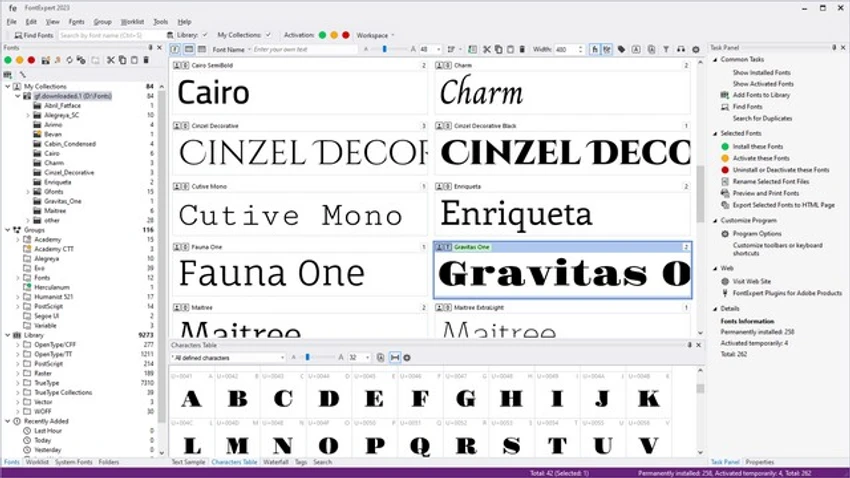
FontExpert provides a centralized environment for managing installed and uninstalled fonts across local drives, removable media, and network locations. It offers detailed font previews, metadata inspection, and advanced management tools such as activation, deactivation, duplication detection, and corruption checking. The software is built to simplify font handling by combining browsing, organizing, and diagnostic features in one interface. Users can view fonts in multiple formats, including paragraph previews and character maps, with adjustable size and styling options for better readability.

Beyond basic management, FontExpert also supports font database creation, search tools, and export options for web or documentation use.

Key Features of FontExpert

  • View and preview installed and uninstalled fonts
  • Character map and paragraph-based font preview modes
  • Organize fonts using keywords, categories, ratings, and tags
  • Search fonts across local disks, CDs/DVDs, and network drives
  • Detect duplicate, corrupted, or incomplete fonts
  • Activate or deactivate font sets for better workflow control
  • Create structured font libraries and grouped collections
  • Print font samples, character maps, and reports
  • Export fonts to HTML web albums with image formats (JPG, PNG, GIF, BMP, TIFF)
  • View advanced font properties (kerning, metrics, Panose data, TrueType tables)
  • Windows shell integration for quick install/open/print actions

User Experience

FontExpert delivers a structured and professional workflow tailored for users managing large font collections. The interface is data-driven, showing fonts in detailed lists with metadata such as family, style, and character sets. Browsing fonts is straightforward, and switching between preview modes helps users evaluate typography more effectively. The ability to detect font issues and duplicates adds practical value, especially for users dealing with inconsistent or corrupted font libraries. While the interface is functional and information-rich, it is clearly designed for productivity rather than casual use, making it more suitable for professional environments.

Who Should Use FontExpert?

  • Graphic designers and typographers
  • UI/UX designers working with multiple font styles
  • Print and publishing professionals
  • Users managing large or complex font libraries
  • Developers or agencies needing consistent font organization across projects

Conclusion

FontExpert is a robust font management solution designed for professionals who need full control over their typography assets. With its deep organizational features, diagnostic tools, and flexible preview options, it stands out as a practical choice for managing extensive font libraries.

Pros & Cons

Pros

  • Comprehensive font management and organization tools
  • Advanced preview options including character maps
  • Detects corrupted and duplicate fonts
  • Strong search and tagging system for large libraries
  • Useful export and printing features for font samples

Cons

  • Windows-only and x64-focused system requirements
  • Interface prioritizes functionality over modern design aesthetics
  • May be too advanced for casual users with small font collections

Frequently Asked Questions

What is FontExpert used for?

FontExpert is used to manage, organize, preview, and troubleshoot fonts on Windows systems.

Can FontExpert detect broken fonts?

Yes, it includes tools to detect corrupted, incomplete, or duplicate font files.

Does FontExpert support font previews?

Yes, it allows previewing fonts as text paragraphs or detailed character maps.

Can I organize fonts into groups?

Yes, users can create font sets and organize them using tags, ratings, and categories.

Does FontExpert work with network or external drives?

Yes, it can scan and manage fonts stored on local drives, CDs/DVDs, removable storage, and network drives.

Recommended apps [Freeware]:
  • Valentina Studio 17.5 Valentina Studio logo manage SQL and NoSQL databases with schema design, queries, reports, and cross-platform support.
  • DefenderUI 2.10 DefenderUI logo enhances Microsoft Defender on Windows 10/11 with advanced security profiles and easier system protection control
  • XRecode 3 v1.184 XRecode logo a powerful audio converter supporting many formats, CD ripping, and audio extraction from video files
  • FluentCleaner 26.06.04 FluentCleaner logo a lightweight Windows cleaning tool designed to remove unnecessary files using a modern, minimal WinUI 3 interface
  • QueueExplorer 5.0.84 QueueExplorer logo helps developers and admins manage, test, troubleshoot, and monitor message queues across platforms
  • GLview 7.4.4 GLview logo displays detailed OpenGL, Vulkan, DirectX, and GPU information, helping users analyze graphics hardware and driver capabilities
Recommended apps [Shareware]:
  • Amazing Laptop Cooling Wizard 1.1.5.8 Amazing Laptop Cooling Wizard logo Reduce laptop overheating by optimizing CPU and fan cooling performance on Windows.
  • Gilisoft SnapID 8.8.0 Gilisoft SnapID logo Edit, enhance, retouch, and transform images with powerful tools in Gilisoft SnapID for Windows
  • PowerDirector 2026 v24.6 PowerDirector logo AI-powered video editor offering templates, effects, and tools for fast, professional video creation
  • Paradox Converter 4.86 Paradox Converter logo transforms Paradox DB files into SQL, Excel, CSV, XML, DBF, HTML, and other formats
  • XYplorer 28.30.1300 XYplorer logo a fast, portable Windows file manager with tabbed browsing, dual-pane support, scripting, and advanced file management tools
  • XnView MP 1.11.5 XnView MP logo a powerful image viewer, editor, and batch converter supporting 500+ image formats on Windows