


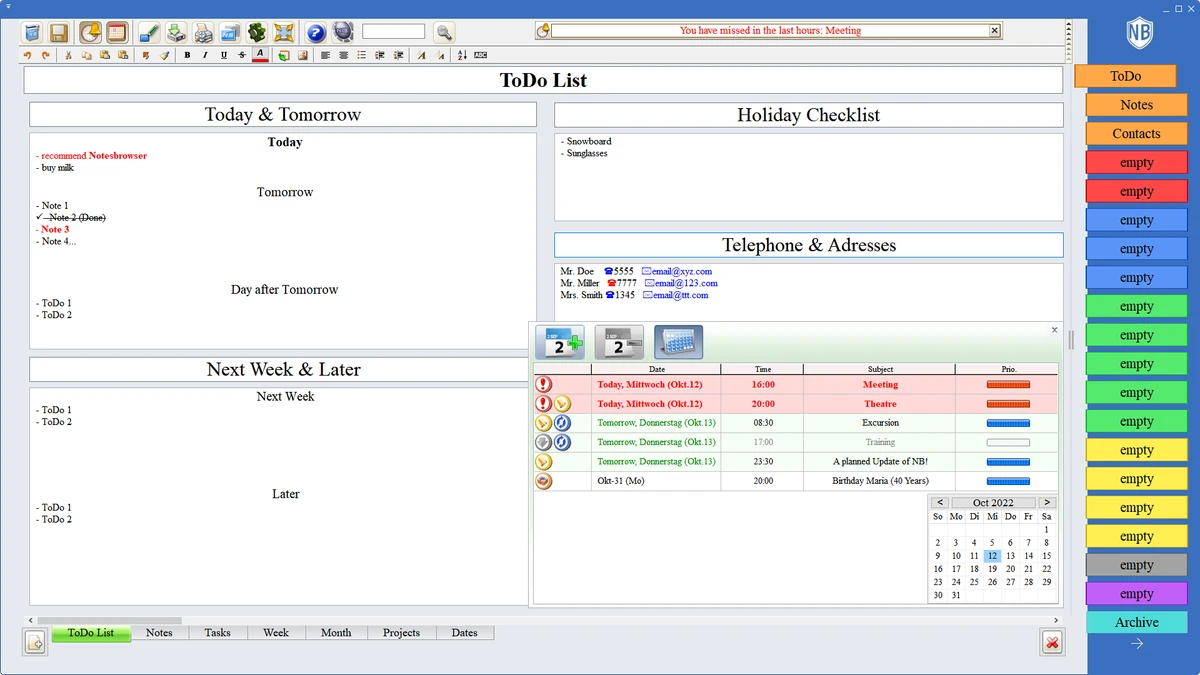

Notesbrowser is a versatile desktop organizer that combines note-taking, task management, scheduling, and personal information management into a single application. Designed for users who need more than a basic notes app, it provides a structured environment for organizing text, ideas, appointments, projects, bookmarks, calendars, and other personal information within an integrated interface.
One of Notesbrowser's biggest strengths is its flexibility. The software allows users to customize its appearance using predefined skins while organizing virtually unlimited amounts of information into categories and pages. Whether you're managing daily to-do lists, collecting research notes, planning projects, or storing reference material, the application is built to keep everything accessible from one central workspace.
The built-in search function makes locating notes and tasks quick, even as your database grows over time. In addition to text-based information, users can also store images alongside their notes, making it useful for both personal organization and project documentation. Recent updates have improved usability by introducing adjustable page and category panels, refining keyboard shortcuts, and fixing several usability issues. Notesbrowser is available in multiple editions ranging from a free version to paid editions, with all features available during a 60-day trial period.
Features of Notesbrowser
- Integrated note-taking and personal information manager.
- Organize notes, ideas, memos, and text documents.
- Manage to-do lists and tasks.
- Store appointments and calendar information.
- Organize bookmarks and projects.
- Manage MP3 playlists.
- Store both text and images.
- Built-in search for quickly locating notes and tasks.
- Customizable interface with multiple predefined skins.
- Supports virtually unlimited information storage.
- Adjustable page/tab height.
- Adjustable category panel width.
- Improved keyboard shortcuts and usability enhancements.
- Available in free and paid editions.
- 60-day full-feature trial.
Interface and Usability
Notesbrowser offers a workspace-oriented interface that emphasizes organization and accessibility. During use, categories and tabs make it easy to separate different types of information while keeping everything within a single application.
The interface is highly customizable, allowing users to personalize its appearance with built-in skins. Recent improvements such as resizable page tabs and adjustable category panels provide greater flexibility for different screen sizes and workflows.
Navigation remains straightforward thanks to the integrated search function, which helps users quickly locate notes, tasks, or stored information without manually browsing through categories. The updated keyboard shortcuts also improve efficiency for users who prefer working primarily with the keyboard. Although the application includes many organizational features, the interface remains practical for users who regularly manage large collections of notes and personal information.
Who Should Use Notesbrowser?
- Students organizing research and study notes.
- Professionals managing projects and reference materials.
- Users maintaining personal journals or idea collections.
- Individuals tracking appointments and calendars.
- Anyone looking for a desktop productivity organizer.
- Users who prefer keeping notes, tasks, and schedules in one application.
Conclusion
Notesbrowser is more than a simple note-taking application—it serves as a comprehensive personal information manager for users who prefer organizing everything in one place. Its ability to manage notes, appointments, projects, bookmarks, calendars, and tasks makes it suitable for both personal and professional productivity.
The customizable interface, integrated search, and flexible organizational structure help users maintain large collections of information without sacrificing accessibility. While it does not focus on cloud collaboration, it offers a feature-rich desktop experience that appeals to users who value local organization and detailed information management.


