


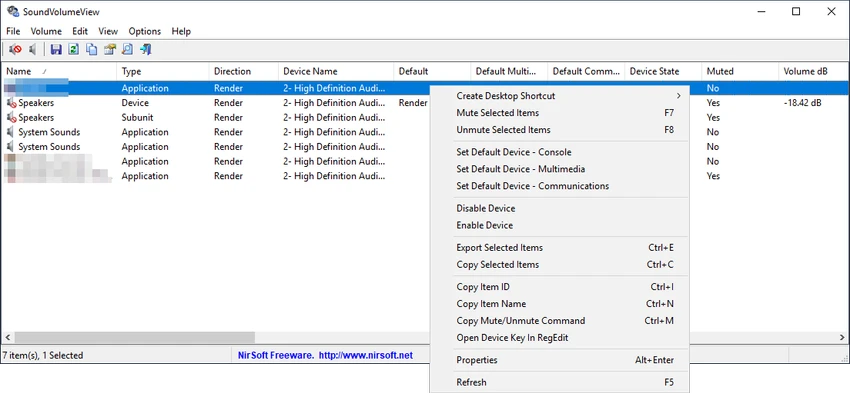

SoundVolumeView is a compact Windows utility that provides detailed information about all active audio components on a system. Beyond simply displaying volume levels, it allows users to manage sound devices, mute or unmute components, save complete audio profiles, and restore them whenever needed. Developed as a lightweight and portable solution, SoundVolumeView is particularly useful for users who frequently switch between audio configurations or require command-line control over Windows sound settings.
Features of SoundVolumeView
- Display all active audio devices, subunits, and application volume controls
- View current volume levels for audio components
- Display volume levels in both percentage and decibel values (where applicable)
- View separate channel volume levels for audio subunits
- Instantly mute or unmute audio components
- Save complete sound profiles to a file
- Restore previously saved audio profiles
- Save and restore default audio device settings
- Extensive command-line support
- Change volume levels through command-line commands
- Mute and unmute audio components without opening the graphical interface
- Portable and lightweight utility
- Supports language translation through external language files
- Freeware distribution
User Experience
During my experience with SoundVolumeView, the utility proved to be a powerful yet straightforward tool for managing Windows audio settings. Unlike the standard Windows volume controls, which often provide limited visibility into active audio components, SoundVolumeView presents a detailed overview of devices, subunits, and application-specific volume controls in a single interface.
One of the most useful features is the ability to save complete audio profiles. This functionality makes it easy to switch between different audio setups or recover preferred configurations after system changes. The restoration process is simple and accurately returns volume levels, mute states, and default audio device settings.
For advanced users and system administrators, the command-line support adds significant flexibility. Volume adjustments, profile loading, and mute controls can be automated without launching the graphical interface, making the utility suitable for scripting and administrative tasks. The portable design also means users can run the application without installation, making it a convenient addition to a troubleshooting toolkit.
Who Should Use SoundVolumeView?
- Power users who need advanced audio control
- IT administrators managing Windows systems
- Users who frequently switch audio devices
- Professionals using multiple sound configurations
- Users who want to automate audio management tasks
- Anyone seeking more detailed audio information than Windows provides by default
Conclusion
SoundVolumeView is a highly capable audio management utility that goes beyond simple volume adjustment. With support for audio profile backups, device management, detailed volume monitoring, and command-line automation, it provides a level of control that many Windows users will appreciate.


