


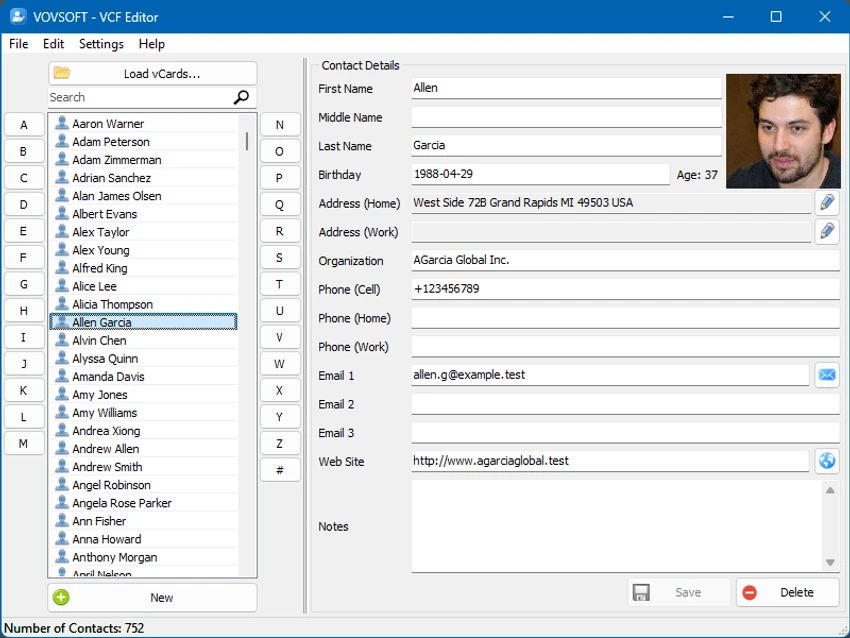

Managing contact information can become difficult when dealing with large collections of vCard files. VovSoft VCF Editor provides a simple and privacy-focused solution for viewing, editing, organizing, and exporting VCF contact data directly on Windows. Unlike online contact management tools, VovSoft VCF Editor works completely offline. All contact information stays on the user's computer, making it a practical choice for anyone who wants to maintain control over personal or business contact data.
Overview
VovSoft VCF Editor is a Windows application designed for editing and managing vCard (VCF) files. It allows users to open contact files, modify important information such as names, phone numbers, addresses, and other personal details, then save the updated data for continued use. The software supports both individual and multiple contact files, making it suitable for personal contact maintenance as well as larger directories. Users can save edited contacts back into VCF format or export them as CSV files for use with spreadsheets and databases. A key feature is duplicate contact removal, helping users clean and organize large contact collections more efficiently.
Features of VovSoft VCF Editor
- Edit vCard (VCF) contact files on Windows
- Fully offline operation for improved privacy
- Load and view contact information
- Edit important contact fields, including:
- First names
- Surnames
- Phone numbers
- Addresses
- Other personal details
- Manage single or multiple VCF files
- Save edited contacts in VCF format
- Export contact data as CSV files
- Support bulk contact editing
- Remove duplicate contacts
- Keep contact information stored locally
- Suitable for personal and business contact management
User Experience
VovSoft VCF Editor focuses on simplicity and privacy. Since the application runs entirely on the local computer, users do not need to upload contact files to an online service before making changes. This offline approach is especially valuable when working with sensitive contact information.
The editing process is straightforward. Users can load their VCF files, review existing contact details, make changes, and save the updated information. The ability to handle multiple contacts makes it more practical than manually editing individual files. The export functionality adds useful flexibility. Keeping contacts in VCF format ensures compatibility with contact management applications, while CSV export allows users to move contact information into spreadsheets or databases for further organization.
The duplicate removal feature is another helpful addition. For users with large contact lists, identifying and deleting repeated entries can save time and help maintain a cleaner address book. Overall, VovSoft VCF Editor provides a focused experience. It does not attempt to replace a full contact management platform, but it offers the essential tools needed for editing and organizing vCard files efficiently.
Who Should Use VovSoft VCF Editor?
- Users managing personal contact lists
- Businesses maintaining customer or employee contacts
- Users migrating contact databases
- Anyone needing to edit VCF files directly
- Privacy-conscious users who prefer offline tools
- Users who need CSV exports for spreadsheets or databases
Conclusion
VovSoft VCF Editor is a practical tool for anyone who needs a simple and secure way to manage vCard files. Its offline design, contact editing capabilities, duplicate removal feature, and export options make it useful for both personal and professional contact management.


