


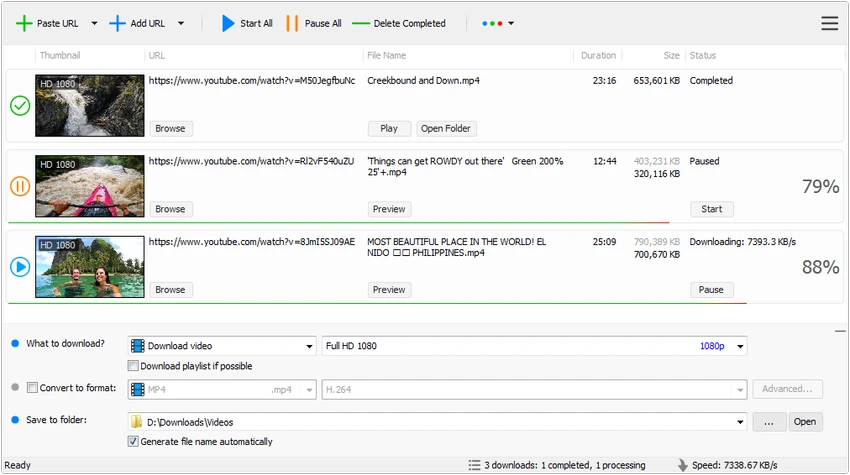

Tomabo MP4 Downloader is a Windows application designed for downloading online videos from hundreds of supported video-sharing websites. Alongside its downloading capabilities, the software includes video and audio conversion tools, playlist support, subtitle downloads, and batch processing features.
Overview
Tomabo MP4 Downloader aims to simplify the process of downloading and converting online media content. The software supports a wide range of video resolutions, including HD, Full HD, 2K, 4K, and even 8K where available. Beyond downloading individual videos, it offers support for playlists, audio extraction, subtitle downloads, simultaneous downloads, and scheduled tasks. Built-in conversion tools further extend its functionality, allowing users to convert downloaded media into formats optimized for various devices and platforms.
Its lightweight design and drag-and-drop functionality make it accessible to beginners while still providing enough options for users who need more control over their downloads and conversions.
Features of Tomabo MP4 Downloader
- Download videos from hundreds of supported video-sharing websites
- Accelerated download speeds with multi-connection downloading
- Support for HD, 1080p, 2K, 4K, and 8K video downloads
- Download audio-only streams without downloading full video files
- Playlist download support
- Subtitle download support
- Simultaneous downloading of multiple videos
- Pause and resume download functionality
- Scheduled downloads
- Preview videos while downloading
- Drag-and-drop URL support
- Convert video and audio files to multiple formats
- Supported output formats include MP4, WebM, FLV, MKV, AVI, WAV, AAC, and others
- Device-specific conversion presets
- Audio extraction from video files
- Fully customizable video and audio conversion settings
User Experience
Tomabo MP4 Downloader focuses on simplicity and efficiency. The interface is straightforward, making it easy to start downloads by pasting a URL or using the drag-and-drop feature. The ability to download multiple videos simultaneously is particularly useful when handling large playlists or multiple projects. Pause and resume functionality adds flexibility, especially for users with limited bandwidth or long download queues.
One standout feature is the preview option, which allows users to verify content before a download completes. This can help avoid wasting time and storage space on incorrect downloads. The built-in conversion tools also reduce the need for separate software. Users can convert downloaded videos for playback on various devices or extract audio tracks into common audio formats directly within the application. Overall, the workflow feels streamlined and practical for users who frequently download and convert online media.
Who Should Use Tomabo MP4 Downloader?
- Users who frequently download online videos
- Content collectors managing playlists and media libraries
- Users who need audio extraction from videos
- People looking for built-in media conversion tools
- Users who want device-specific conversion presets
- Anyone needing batch download capabilities
Conclusion
Tomabo MP4 Downloader is a capable media downloading solution that goes beyond basic video downloads. With support for high-resolution content, playlist downloads, subtitle retrieval, audio extraction, and format conversion, it offers a comprehensive toolkit for managing online media.


