


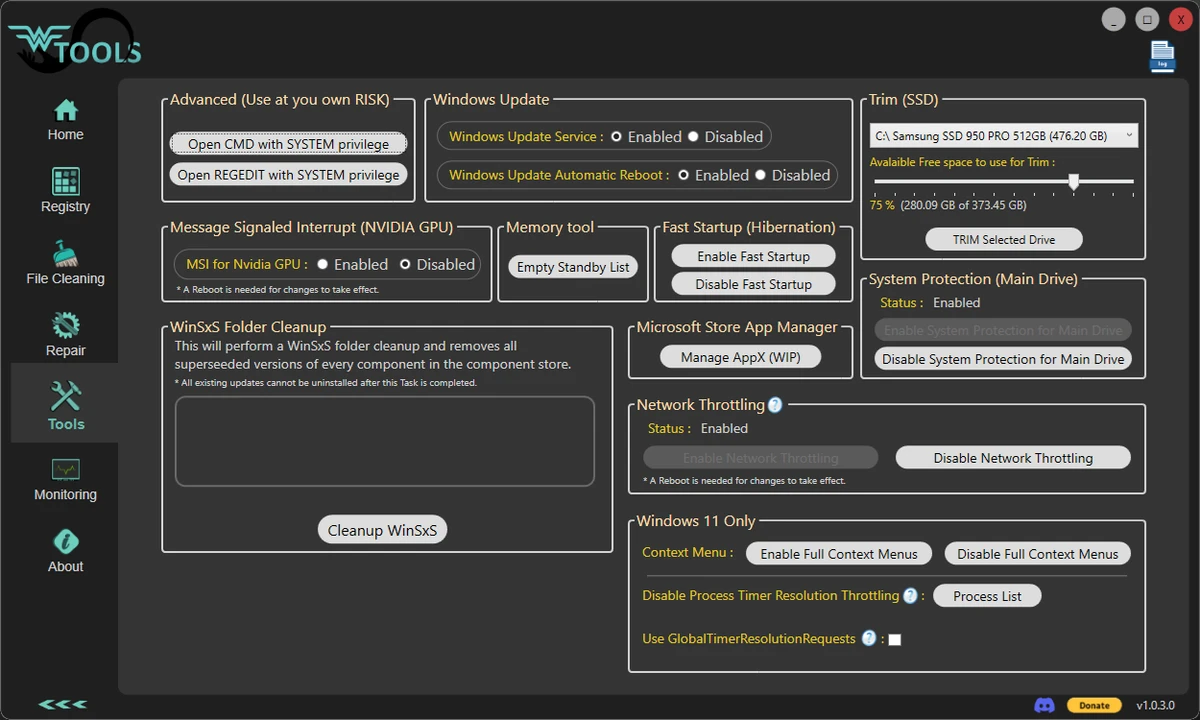

Wagnardsoft Tools (WTools) is a lightweight Windows maintenance utility developed by the creators of Display Driver Uninstaller (DDU). It combines several practical system maintenance tools into a single application, allowing users to remove temporary files, clean unused registry entries, repair Windows system files, and perform a handful of advanced administrative tasks. Rather than trying to be an all-in-one optimization suite, WTools focuses on essential cleanup and maintenance features that help recover disk space and keep Windows running more efficiently. Because some functions interact directly with the Windows registry and system privileges, creating a registry backup before making changes is strongly recommended.
Features of Wagnardsoft Tools (WTools)
- Remove temporary Windows files to free up storage space.
- Delete current user and browser temporary data.
- Clean unused registry keys.
- Repair corrupted Windows system files.
- Perform custom-size SSD trimming.
- Launch Command Prompt (CMD.exe) with elevated system privileges.
- Open Registry Editor (REGEDIT) with system privileges for advanced registry management.
- Enable or disable MSI (Message Signaled Interrupts) for NVIDIA graphics cards prior to the RTX 3000 series.
- Lightweight utility designed for targeted Windows maintenance.
User Experience
Using Wagnardsoft Tools feels straightforward thanks to its focused approach. Instead of overwhelming users with dozens of optimization modules, it presents practical maintenance utilities that can be useful during routine PC cleanup. The temporary file removal feature is particularly convenient for reclaiming storage space by clearing Windows temporary files as well as current user and browser data. Having Windows system file repair available within the same utility also reduces the need to switch between multiple built-in Windows tools.
For advanced users, the ability to launch CMD and Registry Editor with system privileges can simplify administrative tasks that normally require additional steps. The inclusion of MSI management for supported NVIDIA graphics cards is another specialized feature that may appeal to experienced users working with compatible hardware. Because registry cleanup always carries some level of risk, I appreciated the reminder to avoid deleting important registry keys and to create a registry backup before making changes. This reinforces that WTools is best used carefully, especially when accessing its advanced functions.
Overall, the application remains lightweight while offering several useful maintenance tools without unnecessary complexity.
Who Should Use Wagnardsoft Tools (WTools)?
- Windows users looking to remove temporary files and recover storage space.
- Power users who regularly maintain Windows systems.
- Users who need quick access to elevated CMD or Registry Editor.
- PC enthusiasts who want additional maintenance tools alongside Display Driver Uninstaller.
- Users who need occasional Windows system file repair.
Conclusion
Wagnardsoft Tools (WTools) delivers a focused collection of Windows maintenance utilities without unnecessary extras. Its combination of temporary file cleanup, registry maintenance, Windows system file repair, SSD trimming, and advanced administrative tools makes it a practical addition to a Windows maintenance toolkit.


