DBeaver logo

DBeaver 26.1.3

  • User Rating:
    ★★★★★
    ★★★★★
    0.0 ★ 0Votes
  • Requirements:
    Windows
  • Version: 26.1.3
  • Latest updated: 1 week ago
  • License: Open Source  
  • Publisher: DBeaver
  • Size: 111 MB
× app stores

DBeaver is an open-source universal database management tool designed for developers, database administrators, and users who need to work with different database systems in one unified environment. The software provides a graphical interface that allows users to browse and edit data, create and execute SQL scripts, and manage database objects without relying only on command-line tools.

Supporting a wide range of databases, including MySQL, PostgreSQL, Oracle, SQLite, MariaDB, SQL Server, and many others, DBeaver simplifies database management across different platforms. It includes tools for data visualization, database import/export, and backup/restore operations, making it suitable for handling both everyday database tasks and more advanced workflows. With its plugin-based architecture, JDBC support, and cross-platform availability, DBeaver provides a flexible workspace for professionals and users who need efficient database management.

Features of DBeaver

  • Universal database support for popular systems including MySQL, PostgreSQL, MariaDB, SQLite, Oracle, DB2, SQL Server, Sybase, MS Access, Teradata, Firebird, and Derby.
  • Graphical database interface for browsing, editing, and managing data.
  • SQL script support for creating and executing database queries.
  • Database object management through an intuitive GUI.
  • Data visualization tools for easier analysis and understanding of datasets.
  • Import and export features for transferring database information.
  • Backup and restore tools for database maintenance tasks.
  • JDBC driver support allowing compatibility with databases that provide JDBC connectivity.
  • Plugin-based framework that allows extensions and additional database utilities.
  • Cross-platform availability for working across different operating systems.

Interface and Usability

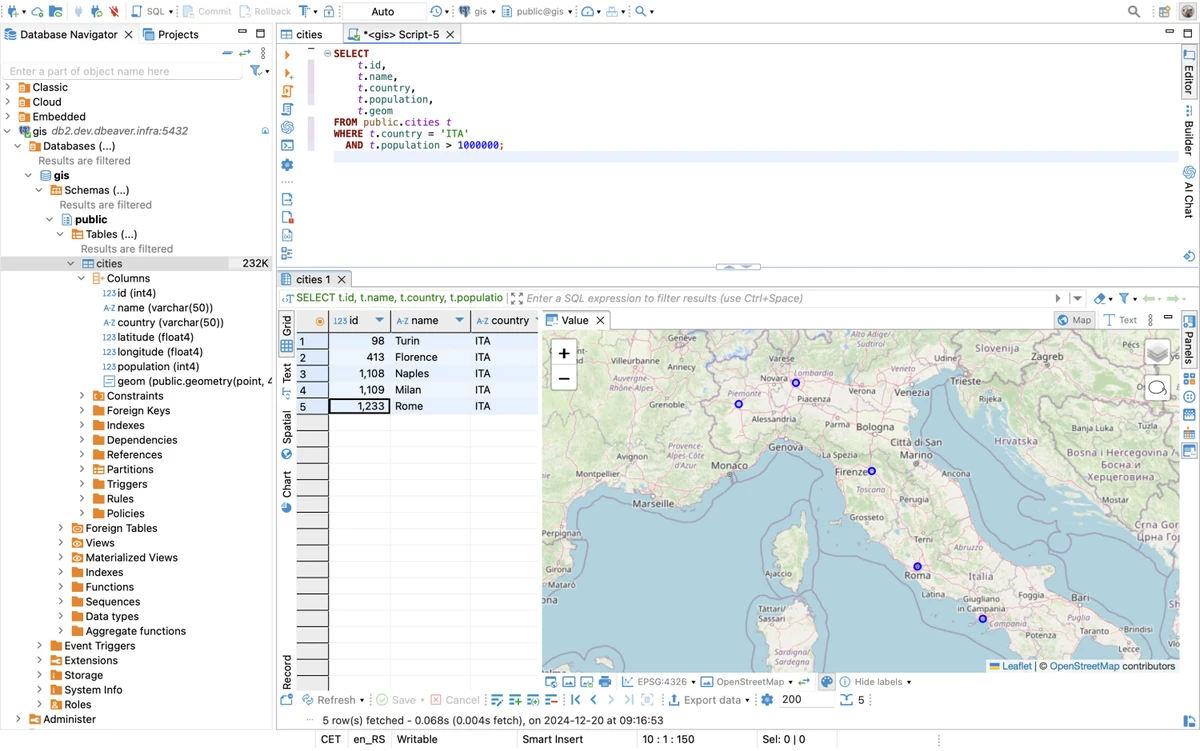
DBeaver focuses on usability by providing a carefully designed graphical interface for database management. Instead of switching between different database-specific applications, users can manage multiple database platforms from a single environment. The interface provides access to common database tasks such as viewing data, editing records, running SQL scripts, and managing database objects. For users working with multiple database systems, having a unified workspace can make daily workflows more organized and efficient.

DBeaver’s support for plugins also allows additional functionality to be added for specific databases and database management tasks. However, new users may need some familiarity with database concepts to take full advantage of its extensive feature set.

Who Should Use DBeaver?

DBeaver is a strong choice for database administrators, software developers, data professionals, and students who work with multiple database systems. It is especially useful for users who need a single application to manage different databases instead of using separate tools for each platform. The software is also suitable for hobbyists learning database management, thanks to its visual interface and support for many popular database technologies.

Conclusion

DBeaver is a versatile and reliable database management solution that brings multiple database platforms together in one application. Its combination of broad database compatibility, graphical management tools, SQL support, and open-source flexibility makes it a valuable choice for developers and database administrators.

The software is particularly useful for users who regularly work with different database systems and want a consistent workflow for managing data, executing queries, and maintaining databases. While its extensive capabilities may feel overwhelming at first, the unified interface and powerful toolset make it a practical option for both professional and personal database projects.

Pros & Cons

✓

Pros

  • Supports a wide range of database platforms.
  • Free and open-source software.
  • Provides a unified interface for multiple databases.
  • Includes SQL editing and database management tools.
  • Supports extensions through plugins.
  • Available across multiple platforms.
✕

Cons

  • Requires Java Runtime Environment (JRE) 1.8 or newer.
  • The large feature set may require time to learn for beginners.
  • Advanced database tasks may require existing database knowledge.

Frequently Asked Questions

What is DBeaver used for?

DBeaver is used for managing databases through a graphical interface. It allows users to browse and edit data, create SQL scripts, manage database objects, and perform database administration tasks.

Which databases does DBeaver support?

DBeaver supports many popular databases, including MySQL, PostgreSQL, MariaDB, SQLite, Oracle, DB2, SQL Server, Sybase, MS Access, Teradata, Firebird, and Derby. It can also work with databases that provide JDBC drivers.

Is DBeaver free to use?

Yes. DBeaver is an open-source database management tool distributed under the Apache Software License (ASL).

Can DBeaver run on different operating systems?

Yes. DBeaver is designed as a multiplatform application, allowing users to work with databases across different supported operating systems.

Does DBeaver support SQL editing?

Yes. DBeaver allows users to create and execute SQL scripts, making it useful for developers and database administrators who need to write and manage database queries.

What are the system requirements for DBeaver?

DBeaver requires Java Runtime Environment (JRE) version 1.8 or newer to run. Users should ensure Java is installed before using the application.

Recommended apps [Freeware]:
  • FastCopy 5.11.3 FastCopy logo a lightweight Windows tool for ultra-fast file copying, syncing, and error-resilient data transfer
  • Disk Benchmark 1.0 Disk Benchmark logo measures SSD, HDD, NVMe, and USB drive performance with detailed speed, IOPS, and latency tests
  • Dolphin Emulator 2606 Dolphin Emulator logo play Nintendo GameCube and Wii games on PC with improved graphics and performance options
  • DISMTools 0.8 DISMTools logo open-source GUI for Windows DISM that simplifies image management, system repair, and maintenance
  • Black Menu for Google 31.6.2 Black Menu for Google logo Access popular Google services quickly from your browser with a customizable menu extension for search, Gmail, Maps, Drive, and more.
  • Beeper 4.2.972 Beeper logo Bring multiple messaging services together in one app with unified chats, cross-platform support, searchable conversations, and synced notifications.
Recommended apps [Shareware]:
  • EF Duplicate MP3 Finder 26.05 EF Duplicate MP3 Finder logo Find and remove duplicate MP3, FLAC, WMA, and OGG audio files using tag-based and similarity analysis
  • MixPad 14.19 MixPad logo Record, mix, and edit unlimited audio tracks with MixPad, an intuitive multitrack audio production software
  • Take Command 36.50.70 Take Command logo a Windows CMD replacement with tabbed console, scripting IDE, and advanced batch tools.
  • Actual Window Guard 8.15.4 Actual Window Guard logo organizes windows, manages positioning, sizing, and rules to improve productivity on Windows desktops
  • GiliSoft AI Toolkit 10.9 GiliSoft AI Toolkit logo combines chatbot, OCR, TTS, ASR, and image tools to streamline AI-powered workflow automation.
  • Wise Care 365 8.0.4.732 Wise Care 365 logo Optimize Windows performance with system cleanup, registry tools, privacy protection, and hardware monitoring features.