Garden Planner logo

Garden Planner 3.8.86

  • User Rating:
    ★★★★★
    ★★★★★
    0.0 ★ 0Votes
  • Requirements:
    Windows
  • Version: 3.8.86
  • Latest updated: 2 weeks ago
  • License: Free Trial  
  • Publisher: Artifact Interactive
  • Size: 203 MB
× app stores

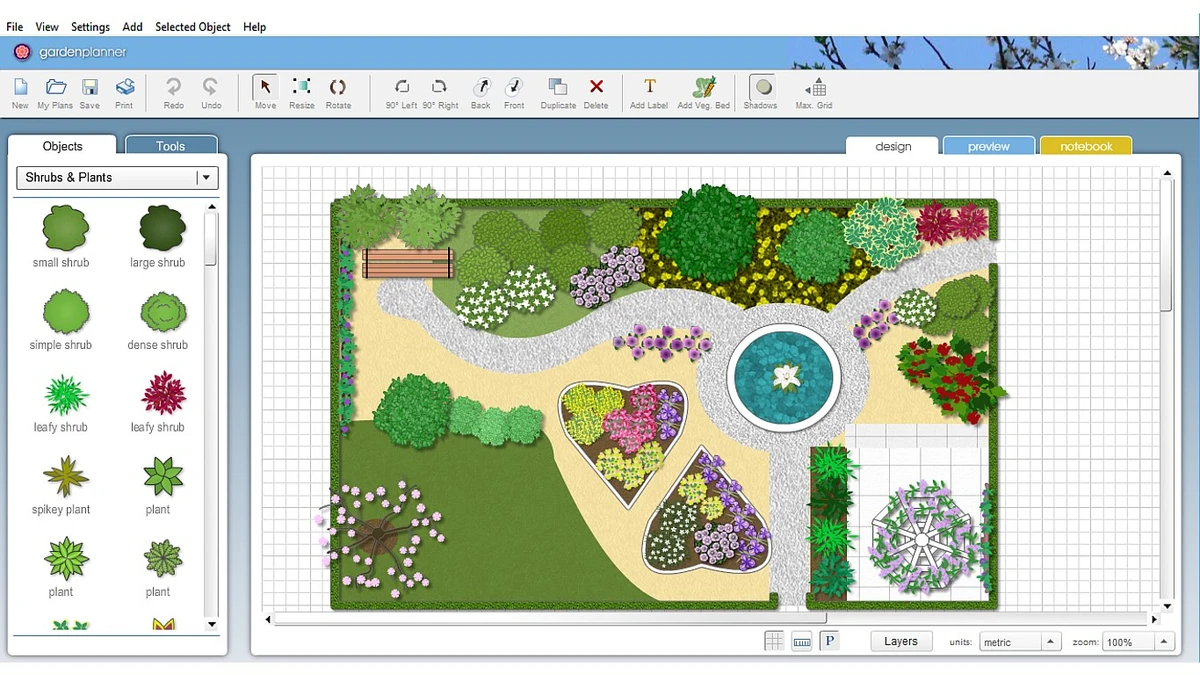
Garden Planner is a simple garden design application that helps users create detailed garden layouts without requiring professional landscaping experience. The software is designed around an easy-to-use drag-and-drop interface, allowing users to arrange plants, trees, buildings, and other garden objects to visualize their outdoor spaces.

The program provides a collection of generic plant shapes and design elements, making it accessible even for users who do not have botanical knowledge. Instead of focusing on complex landscaping calculations, Garden Planner emphasizes quick visual planning and straightforward garden arrangement.

Users can create paths, paving areas, and fences using built-in tools, then save their designs for later editing. Once a garden plan is complete, the software can generate a professional-looking color printout and produce a report listing the plants and objects included in the design. Garden Planner also allows users to build a custom plant library, giving them more flexibility when creating personalized garden layouts. With modest system requirements and support for common Windows versions, it is designed as a lightweight solution for homeowners and garden enthusiasts who want to plan their outdoor projects digitally.

Features of Garden Planner

  • Easy-to-use drag-and-drop garden design interface
  • Arrange plants, trees, buildings, and objects in a garden layout
  • Save and load custom garden designs
  • Use generic plant shapes for simple planning
  • Create paving, paths, and fences quickly
  • Generate professional-looking color printouts
  • Produce reports of plants and objects used in a design
  • Create a custom library of plants

Interface and Usability

Garden Planner focuses on simplicity, with an interface designed for users who want to create garden layouts without a steep learning curve. The drag-and-drop approach makes it easy to place objects and adjust the design visually.

The included tools for paths, paving, and fences help speed up common garden planning tasks, while the ability to save and reload projects makes it convenient to continue working on designs over time. The software does not require specialist landscaping knowledge, making it approachable for casual users planning home gardens. The option to generate printable plans and plant reports adds practical value for users who want to use their digital designs during real-world gardening projects.

Who Should Use Garden Planner?

  • Homeowners planning a garden redesign
  • Gardening enthusiasts creating landscape ideas
  • Users who want a simple visual garden layout tool
  • Beginners looking for an easy alternative to complex design software
  • Anyone preparing printable garden plans

Conclusion

Garden Planner offers a straightforward way to visualize and organize garden ideas before starting a landscaping project. Its simple interface, drag-and-drop design system, and printable plans make it a practical choice for users who want an uncomplicated garden planning experience.

Pros & Cons

✓

Pros

  • Simple and beginner-friendly interface
  • Drag-and-drop garden design workflow
  • Includes plants, objects, paths, and fencing tools
  • Supports printable garden plans
  • Allows custom plant libraries
✕

Cons

  • Focused on visual planning rather than advanced landscape analysis

Frequently Asked Questions

What is Garden Planner used for?

Garden Planner is used to create digital garden layouts by arranging plants, trees, buildings, and other objects. It helps users visualize garden designs before making physical changes.

Do I need gardening experience to use Garden Planner?

No. The software uses generic plant shapes and a simple design interface, allowing users to create plans without needing detailed botanical knowledge.

Can I print my garden design?

Yes. Garden Planner can produce a high-quality color printout of your garden plan for reference or project planning.

Can I save my garden designs and edit them later?

Yes. The software allows users to save and load their own garden designs.

Does Garden Planner include plant information?

Garden Planner provides plant shapes for design purposes and can generate a report of the plants and objects included in a garden layout. It also allows users to create a custom plant library.

What operating systems support Garden Planner?

According to the provided requirements, Garden Planner supports Microsoft Windows 11, Windows 10, and Windows 7. It requires a 2.33GHz or faster x86-compatible processor (or Intel Atom 1.6GHz or faster for netbooks), with 512MB RAM recommended at minimum and 1GB recommended for better performance.

Recommended apps [Freeware]:
  • PortKiller 3.3.3 PortKiller logo a network utility for monitoring TCP ports, managing processes, and handling tunnels on Windows.
  • XnConvert 1.112.0.0 XnConvert logo batch image converter supporting 500 formats with 80+ editing actions and cross-platform compatibility
  • Advanced Trigonometry Calculator 2.1.7 Advanced Trigonometry Calculator logo Solve advanced trigonometry, scientific notation, complex numbers, and equations with Advanced Trigonometry Calculator
  • FanControl v271 FanControl logo manages CPU and GPU fans with custom curves, temperature sensors, profiles, and advanced cooling controls
  • Nuclear Music Player 1.42.2 Nuclear Music Player logo Stream and discover music with a free open-source player offering ad-free playback, playlists, downloads, and cross-platform support.
  • LosslessCut 3.69.0 LosslessCut logo Cut and trim videos quickly without re-encoding using a lightweight editor designed for fast, lossless video processing.
Recommended apps [Shareware]:
  • Syncovery 12.3.4 Syncovery logo fast backup and file synchronization tool with real-time sync, versioning, and advanced automation features
  • FastStone Image Viewer 8.5 FastStone Image Viewer logo a fast and user-friendly tool for viewing, editing, converting, and managing images on Windows
  • Glary Malware Hunter 1.218.0.860 Glary Malware Hunter logo Windows security tool that scans, detects, and removes malware while offering system cleanup and performance optimization features
  • MobiKin Eraser for Android 5.0.24 MobiKin Eraser for Android logo Permanently erase Android data with MobiKin Eraser for Android, a secure tool that wipes files, history, and settings safely.
  • Serato DJ Pro 4.0.8 Serato DJ Pro logo professional DJ software with Stems, music streaming, hardware integration, and reliable live performance tools
  • CrawlRhino SEO Crawler 1.1.36.0 CrawlRhino SEO Crawler logo Analyze website structure, detect SEO issues, audit backlinks, and generate detailed reports with a comprehensive website crawler.