Broot logo

Broot 1.58.0

  • User Rating:
    ★★★★★
    ★★★★★
    0.0 ★ 0Votes
  • Requirements:
    Windows
  • Version: 1.58.0
  • Latest updated: 2 weeks ago
  • License: Open Source  
  • Publisher: Canop
  • Size: 57 MB
× app stores

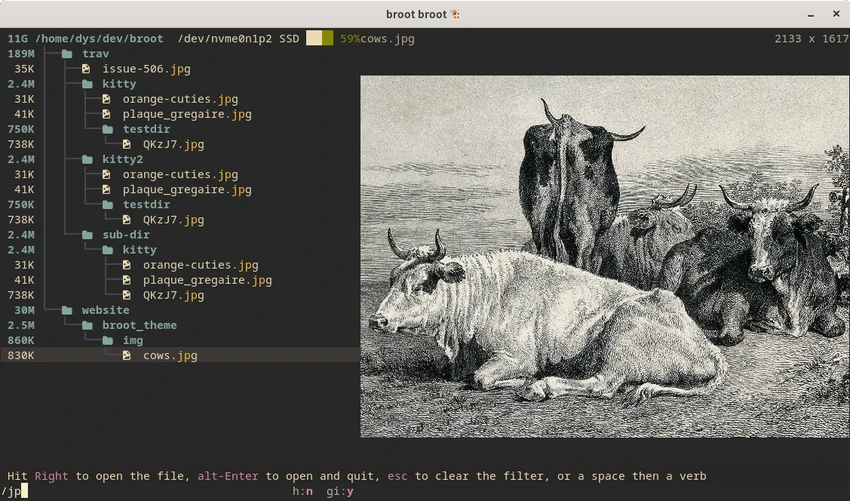
Broot is an open-source command-line file manager designed to simplify filesystem navigation through an interactive tree-based interface. Built for users who spend significant time working in the terminal, it replaces the traditional workflow of switching between commands like ls, cd, and find with a live, searchable directory tree that updates as you type.

The application emphasizes speed and minimalism, allowing users to navigate large directory structures with fewer keystrokes. Its interactive interface makes it easier to locate files and folders, even when you do not remember their exact locations. Searches remain responsive, and ongoing searches can be interrupted immediately as new queries are entered, helping maintain a smooth workflow even on large storage devices.

Beyond navigation, Broot provides essential file management capabilities, including searching for files, performing basic file operations, and attaching custom keyboard shortcuts. It also displays detailed file information such as size, modification date, and permissions, while allowing users to copy file paths directly to the clipboard for use in other applications.

Broot supports Windows, macOS, and Linux, making it a versatile tool for developers, system administrators, and terminal enthusiasts. To enable full navigation functionality, the application requires a shell function (br) to be configured. With its lightweight design and focus on efficient terminal workflows, Broot offers a practical alternative to traditional command-line file navigation.

Features of Broot

  • Interactive tree-based file navigation
  • Live file and folder search
  • Fast navigation with minimal keystrokes
  • Responsive searching for large directories
  • Custom keyboard shortcuts
  • Customizable color themes
  • Basic file operations
  • Display file size, permissions, and modification dates
  • Copy file paths to the clipboard
  • Cross-platform support for Windows, macOS, and Linux
  • Open-source project
  • Designed for terminal-based workflows

Interface and Usability

Broot replaces traditional command-line navigation with an interactive tree view that updates in real time as you type. Instead of repeatedly entering directory commands, users can quickly browse folder structures and jump directly to the files they need.

The interface is intentionally minimal, reducing unnecessary complexity while providing quick access to navigation and search functions. Keyboard-driven controls make it efficient for terminal users, and customizable shortcuts allow users to adapt the workflow to their preferences. Although Broot is easy to use once configured, new users should expect to spend some time learning its commands and setting up the required shell integration for the best experience.

Who Should Use Broot?

  • Developers working primarily in the terminal
  • Linux, macOS, and Windows power users
  • System administrators
  • Users who frequently navigate large directory structures
  • Anyone looking for a faster command-line file manager

Conclusion

Broot is an excellent choice for users who spend most of their time working in the terminal and want a faster way to navigate the filesystem. Its live tree view, responsive search, and keyboard-focused workflow reduce the need for repetitive shell commands while keeping the interface lightweight and efficient. Although it requires some initial setup and familiarity with terminal workflows, Broot rewards regular users with a streamlined navigation experience. If you're looking for a modern command-line file manager that improves productivity without unnecessary complexity, Broot is well worth trying.

Pros & Cons

✓

Pros

  • Fast interactive tree navigation
  • Live search updates while typing
  • Lightweight and responsive design
  • Customizable keyboard shortcuts
  • Cross-platform compatibility
  • Open-source software
  • Useful file information and clipboard integration
✕

Cons

  • Requires shell function configuration before use
  • Command-line interface may not suit beginners
  • Learning keyboard shortcuts takes some practice

Frequently Asked Questions

What is Broot used for?

Broot is a command-line file manager used to navigate directories, search for files, and manage files through an interactive tree-based interface.

Is Broot a replacement for the cd command?

Broot is not a direct replacement for cd, but it provides a faster way to navigate directories and can be integrated into your shell using the required br shell function.

Can Broot search large directories efficiently?

Yes. Broot is designed to search large directory structures quickly, and searches remain responsive because each new keystroke interrupts the previous search and starts a new one.

Does Broot support Windows, macOS, and Linux?

Yes. Broot is cross-platform and supports Windows, macOS, and Linux.

Can I customize keyboard shortcuts in Broot?

Yes. Broot allows users to configure custom keyboard shortcuts to match their preferred workflow.

Does Broot support basic file management?

Yes. In addition to navigation and searching, Broot provides basic file operations and displays information such as file size, permissions, and modification dates.

Recommended apps [Freeware]:
  • FastCopy 5.11.3 FastCopy logo a lightweight Windows tool for ultra-fast file copying, syncing, and error-resilient data transfer
  • CalendarTask 3.30.296.9122 CalendarTask logo lightweight desktop calendar with note-taking, cloud sync, reminders, and desktop scheduling tools
  • 3D Youtube Downloader 1.26.7 3D Youtube Downloader logo download videos, playlists, and subtitles from YouTube and other sites
  • Wagnardsoft Tools 1.0.8.2 Wagnardsoft Tools logo Clean temporary files, repair Windows system files, and maintain your PC with Wagnardsoft Tools (WTools)
  • Xreveal 2.9.6 Xreveal logo a lightweight disc decryption tool that removes supported Blu-ray, UHD, DVD, and CD protections for compatible media
  • Intel Ethernet Adapter Complete Driver Pack 31.2.2 Intel Ethernet Adapter Complete Driver Pack logo Install and update Intel Ethernet drivers for supported network adapters with a complete collection for Windows, Linux, and FreeBSD.
Recommended apps [Shareware]:
  • Digimizer 6.5.4 Digimizer logo image analysis tool for precise measurements, object detection, and scientific image processing
  • LumaBooth 8.2.1.0 LumaBooth logo professional photo booth software for photos, GIFs, videos, 360 booths, and event customization
  • Adobe Media Encoder 2026 Adobe Media Encoder logo a powerful video encoding and media management tool for exporting and transcoding
  • Classroom Spy Pro 5.6.6 Classroom Spy Pro logo Monitor, control, and manage student computers remotely with Classroom Spy Pro for Windows classrooms
  • Fast Video Downloader 4.0.0.82 Fast Video Downloader logo download videos from YouTube, Facebook, Vimeo, and more, with conversion and screen recording tools
  • NoteCase Pro 4.9.0 NoteCase Pro logo organize notes, tasks, attachments, and audio across multiple platforms with powerful import and export support