PingPlotter logo

PingPlotter 5.27.10

  • User Rating:
    ★★★★★
    ★★★★★
    0.0 ★ 0Votes
  • Requirements:
    Windows
  • Version: 5.27.10
  • Latest updated: 3 weeks ago
  • License: Free Trial  
  • Publisher: Pingman Tools, LLC
  • Size: 36 MB
× app stores

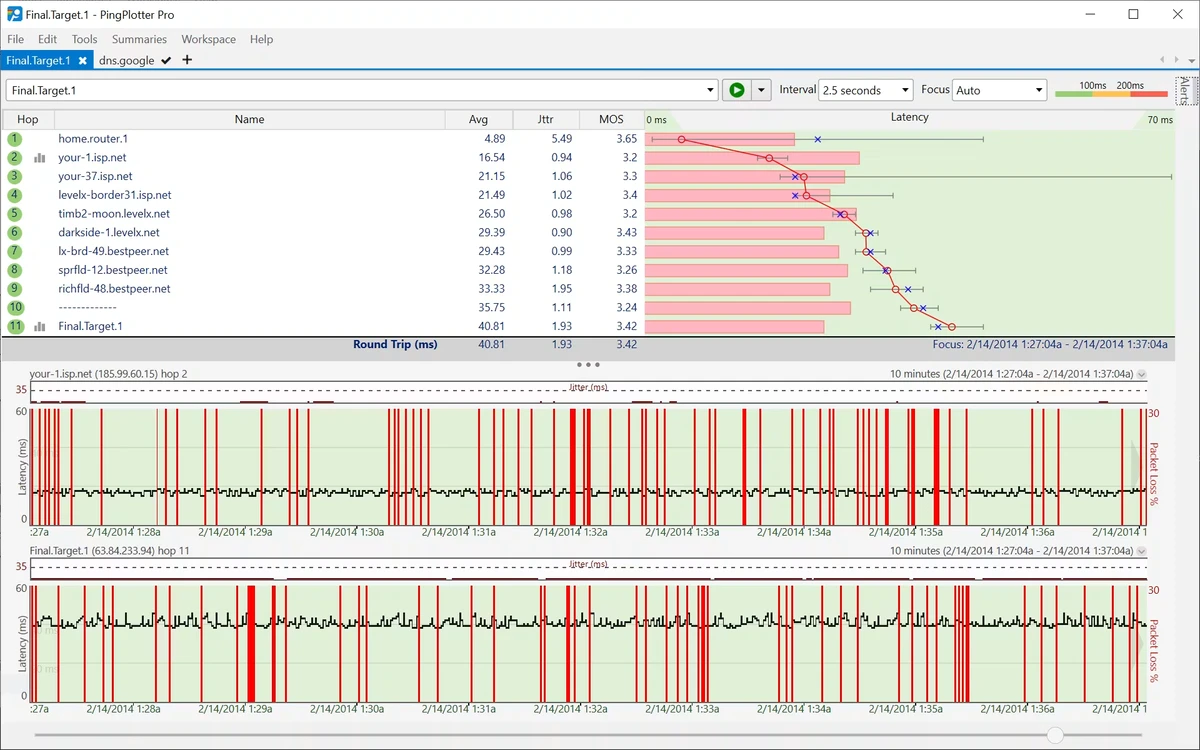
PingPlotter is a network monitoring and troubleshooting tool designed to help users track the performance of remote hosts, servers, and websites. It focuses on collecting real-time data about latency, packet loss, and connection stability, making it useful for diagnosing network issues. The software is commonly used in IT environments where continuous monitoring of network health is required. It allows users to visualize connection quality over time and respond quickly to performance issues or outages.

Features of PingPlotter

  • Monitor latency, packet loss, and network performance in real time
  • Track multiple remote hosts or IP addresses simultaneously
  • Visual timeline view for network activity and diagnostics
  • Custom workspace layouts with adjustable panels
  • Save and reuse workspace configurations
  • Add targets using URL or IP address input
  • Store and manage multiple monitored targets
  • Adjustable sampling settings for short or long-term analysis
  • Custom trace intervals and sample counts
  • Real-time packet tracking and visualization
  • Context tools including WHOIS lookup and summary views
  • Graph-based analysis of network performance
  • Alert system for latency, packet loss, and MOS conditions
  • Custom triggers and notification rules for network events

Interface and Usability

PingPlotter uses a panel-based interface where users can view timelines, graphs, and target lists simultaneously. Each monitored target is displayed in a separate tab, allowing multiple traces to run at the same time. The workspace can be customized to show more or fewer panels depending on the level of detail needed. Once targets are added, monitoring begins with a simple start action, and results are updated continuously in real time. Navigation between targets and analysis views is designed for quick access to performance data, making it suitable for both short diagnostics and long-term monitoring.

Who Should Use PingPlotter?

  • Network administrators managing servers and infrastructure
  • IT support teams diagnosing connectivity issues
  • Businesses monitoring website or service uptime
  • Users troubleshooting slow internet or unstable connections
  • Professionals tracking packet loss and latency trends

Conclusion

PingPlotter provides a clear and structured way to monitor network performance and diagnose connectivity issues. Its ability to track multiple targets, visualize latency, and trigger alerts makes it useful for both real-time troubleshooting and long-term network analysis.

Pros & Cons

✓

Pros

  • Real-time monitoring of latency and packet loss
  • Supports multiple targets simultaneously
  • Customizable workspace and timeline views
  • Alert system for network performance issues
  • Useful for both short and long-term diagnostics
✕

Cons

  • Focused specifically on network diagnostics (not general-purpose software)
  • Can be complex for non-technical users

Frequently Asked Questions

What is PingPlotter used for?

PingPlotter is used to monitor network performance by tracking latency, packet loss, and connection stability to remote hosts or servers.

Can PingPlotter monitor multiple servers at once?

Yes. It supports monitoring multiple IP addresses or URLs simultaneously in separate tabs.

Does PingPlotter show packet loss?

Yes. It visualizes packet loss and latency over time using graphs and timelines.

Can I receive alerts for network issues?

Yes. PingPlotter includes an alert system that can notify users when specific conditions like high latency or packet loss are detected.

Is PingPlotter useful for troubleshooting slow internet?

Yes. It helps identify where delays or connectivity issues occur along a network path.

Does PingPlotter support real-time monitoring?

Yes. It continuously updates network data in real time during active monitoring sessions.

Recommended apps [Freeware]:
  • Sysinternals Suite 2026.07.09 Sysinternals Suite logo a powerful collection of Windows tools for system monitoring, troubleshooting, process analysis, and performance optimization.
  • Disk Benchmark 1.0 Disk Benchmark logo measures SSD, HDD, NVMe, and USB drive performance with detailed speed, IOPS, and latency tests
  • WinPaletter 1.0.9.8 WinPaletter logo Customize Windows themes, colors, icons, cursors, fonts, and visual styles
  • SQLite 3.53.3 SQLite logo compact, reliable embedded SQL database engine with zero configuration and serverless design
  • Scriptboxie 2.0.1.4 Scriptboxie logo automate repetitive Windows tasks by recording actions and creating scripts without coding
  • PDFCreator 6.3.0 PDFCreator logo Create PDFs from any Windows application with PDFCreator, supporting encryption, merging, and file format conversion
Recommended apps [Shareware]:
  • iPubsoft Android Desktop Manager 3.7.22 iPubsoft Android Desktop Manager logo transfer files, manage Android data, back up and restore devices, and organize contacts and SMS from your PC
  • Capture One 16.8.3.3630 Capture One logo professional RAW photo editor with advanced color accuracy, tethered shooting, and studio workflow tools for photographers
  • ActiveXperts Network Monitor 2026 v902.6061 ActiveXperts Network Monitor logo Monitor servers, devices, and applications with ActiveXperts Network Monitor. Get alerts via SMS, email, WhatsApp, and SNMP traps
  • 4K YouTube to MP3 26.2.0 4K YouTube to MP3 logo a simple tool to extract audio from YouTube, Vimeo, and more into MP3, M4A, or OGG
  • XMLBlueprint 22.20260704 XMLBlueprint logo a professional XML editor supporting XSD, XPath, XSLT, validation, and large XML file editing for Windows
  • FileSearchEX 1.1.0.9 FileSearchEX logo Quickly locate files, folders, and document content with a lightweight Windows search tool supporting network shares and PDF searches.