MusConv logo

MusConv 4.10.471

  • User Rating:
    ★★★★★
    ★★★★★
    0.0 ★ 0Votes
  • Requirements:
    Windows
  • Version: 4.10.471
  • Latest updated: 3 weeks ago
  • License: Free Trial  
  • Publisher: MusConv
  • Size: 107 MB
× app stores

MusConv is a utility designed to help users transfer playlists between major music streaming platforms such as Spotify, Apple Music, and Google Play Music. Instead of rebuilding playlists manually when switching services, MusConv simplifies the process by automating playlist migration through a straightforward web-based interface.

Overview

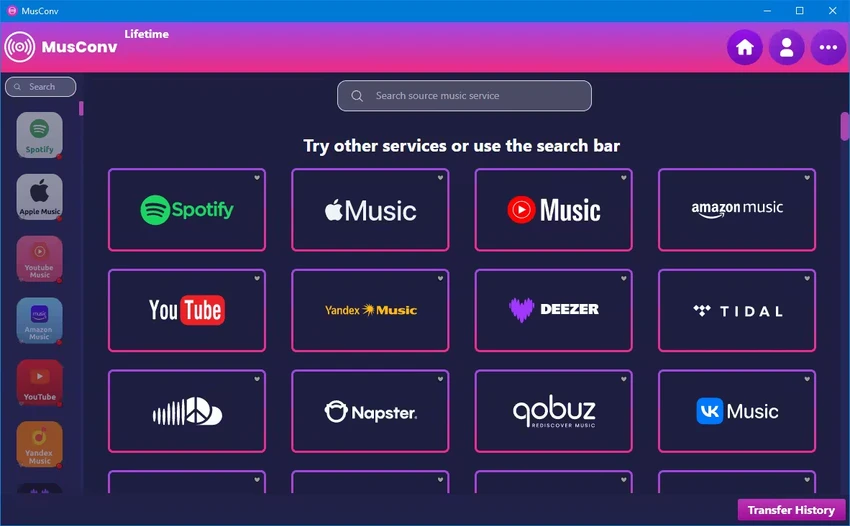
MusConv focuses on solving a common problem in the streaming world: moving music libraries between platforms. Many users switching services often face the frustration of recreating playlists from scratch. MusConv addresses this by connecting to supported streaming accounts and transferring playlists directly. The tool works through a browser-based interface and does not require installation. However, it requires an active internet connection, a MusConv account, and valid subscriptions for the connected music services. In addition to playlist transfers, MusConv also supports exporting playlists as CSV files, which can be useful for backups or manual editing.

Features of MusConv

  • Transfer playlists between major streaming platforms
  • Supports services such as Spotify, Apple Music, and Google Play Music
  • No installation required (web-based usage)
  • Simple step-by-step playlist selection and transfer process
  • Export playlists as CSV files
  • Requires login to connected streaming services
  • Works with multiple accounts and platforms

User Experience

MusConv is designed with simplicity in mind. The interface is minimal, focusing mainly on selecting a source service, choosing playlists, and initiating transfers. From a usability standpoint, the process is straightforward even for non-technical users. After logging into the required streaming platforms, users can quickly select playlists and start transferring them with a single action.

However, because it depends on external streaming services, setup can feel slightly restrictive—users must have active subscriptions and valid accounts for each platform involved. Overall, the experience is smooth, especially for users who prioritize convenience over advanced customization.

Who Should Use MusConv?

  • Users switching between music streaming platforms
  • Spotify, Apple Music, or similar service subscribers
  • People who want to back up or export playlists
  • Users looking for a quick, no-technical way to migrate music libraries

Conclusion

MusConv is a practical solution for anyone looking to switch music streaming platforms without losing playlists. Its simple workflow and broad service compatibility make it a useful tool for quick music library migration. While it lacks advanced customization, it performs its core function efficiently and with minimal effort from the user.

Pros & Cons

✓

Pros

  • Very easy playlist migration process
  • No software installation required
  • Supports multiple major streaming platforms
  • Simple and beginner-friendly interface
  • CSV export option for playlists
✕

Cons

  • Requires subscriptions to music services
  • Dependent on internet connection
  • Limited advanced customization options
  • No official update changelog provided

Frequently Asked Questions

What is MusConv used for?

MusConv is used to transfer playlists between different music streaming services like Spotify and Apple Music.

Does MusConv require installation?

No, MusConv works without installation through a web-based interface.

Can I export playlists with MusConv?

Yes, MusConv allows exporting playlists as CSV files.

Do I need accounts for music services?

Yes, you need active accounts and subscriptions for the streaming services you want to connect.

Is MusConv suitable for beginners?

Yes, it is designed to be simple and easy to use even for non-technical users.

Recommended apps [Freeware]:
  • Daum PotPlayer 1.7.22979 Daum PotPlayer logo a free media player for Windows with broad format support, built-in codecs, subtitles, and customization
  • Photo Pos Pro 4.21 Build 51 Photo Pos Pro logo a feature-rich photo editor for Windows with layers, filters, RAW support, and advanced image design tools
  • Avast Free Antivirus 26.6.11050 Avast Free Antivirus logo real-time malware protection, phishing defense, and scam detection with minimal impact on Windows performance
  • Shortcut Virus Removal Tool 2.2.0 Shortcut Virus Removal Tool logo Remove shortcut viruses from USB drives, recover hidden files, delete autorun threats, and repair Windows settings with one click.
  • DXVA Checker 4.8.0 DXVA Checker logo Check DXVA support, decoder compatibility, GPU usage, and hardware video acceleration capabilities for Windows media playback.
  • Beeper 4.2.972 Beeper logo Bring multiple messaging services together in one app with unified chats, cross-platform support, searchable conversations, and synced notifications.
Recommended apps [Shareware]:
  • LanSend 26.06 LanSend logo LAN messaging tool for system administrators to send instant messages to multiple Windows users without installing client software
  • Epic Pen 3.12.182 Epic Pen logo Windows annotation tool for drawing, writing, and highlighting directly on your screen
  • Beyond Compare 5.2.3.32296 Beyond Compare logo compare, merge, and sync files easily with Beyond Compare, a powerful cross-platform tool
  • Catalyst Production Suite 2026.1.1 Catalyst Production Suite logo a professional media tool for browsing, preparing, transcoding, and managing Pro video formats.
  • Actual Window Guard 8.15.4 Actual Window Guard logo organizes windows, manages positioning, sizing, and rules to improve productivity on Windows desktops
  • PDF Architect 9.1.133.23134 PDF Architect logo Windows PDF editor for creating, editing, converting, and securing PDF documents efficiently.