Artweaver Plus logo

Artweaver Plus 8.1.6.4131

  • User Rating:
    ★★★★★
    ★★★★★
    0.0 ★ 0Votes
  • Requirements:
    Windows
  • Version: 8.1.6.4131
  • Latest updated: 3 weeks ago
  • License: Free Trial  
  • Publisher: Artweaver
  • Size: 17 MB
× app stores

Artweaver Plus is a full-featured digital painting application designed for both beginners and advanced artists. It provides a wide range of realistic brushes and tools that simulate traditional painting techniques, allowing users to create digital artwork with a natural feel. The software is built around a powerful painting engine that supports layers, transparency, and high-precision brush control.

In practice, Artweaver Plus is not just a simple drawing tool—it is a creative environment where users can experiment with brush styles, edit images, and develop detailed illustrations. It also includes collaboration features, enabling multiple artists to work on the same project over a network or the internet. Additionally, its event recording system allows users to replay the entire painting process, making it useful for learning and showcasing artistic workflows.

Features of Artweaver Plus

  • Wide selection of realistic and customizable brushes
  • Advanced brush engine with support for 16-bit precision
  • Layer support with transparency and blending options
  • Customizable user interface and workspace layouts
  • Pen tablet support with pressure sensitivity and eraser input
  • Collaboration tools for teamwork over LAN or internet
  • Event recording and replay of painting process
  • Plugin support to extend functionality
  • High-quality image editing and painting tools
  • Mirror painting for symmetrical artwork creation

Interface and Usability

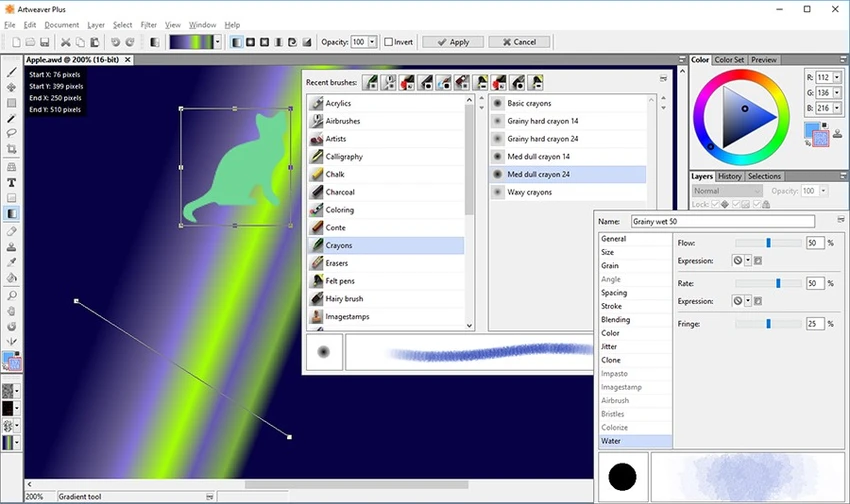
Artweaver Plus offers a flexible and configurable interface designed to suit different working styles. Panels, palettes, and tools can be rearranged or docked freely, allowing users to create a personalized workspace. While the interface is accessible for beginners, it also provides deeper customization options for experienced digital artists who want more control over their workflow.

The software performs well with pen tablets, making it especially suitable for illustrators and designers who rely on pressure-sensitive input. Its layout prioritizes functionality over visual complexity, ensuring that tools remain accessible during creative work.

Who Should Use Artweaver Plus?

Artweaver Plus is ideal for digital artists, illustrators, hobby painters, and students who want a flexible painting environment. It is also suitable for professionals who need a lightweight but capable alternative to larger digital art suites. Users interested in collaborative art projects or recording their creative process will also find it especially useful.

Conclusion

Artweaver Plus is a well-balanced digital painting tool that combines ease of use with a solid set of creative features. Its realistic brush system, layer support, and pen tablet compatibility make it a practical choice for digital illustration, sketching, and image creation on Windows.

Pros & Cons

✓

Pros

  • Realistic and highly customizable brush system
  • Strong support for pen tablets and pressure input
  • Flexible and customizable workspace
  • Collaboration features for team-based artwork
  • Event recording and replay for learning or presentation
✕

Cons

  • May require time to learn advanced features
  • Not as advanced as high-end professional art suites in some areas

Frequently Asked Questions

What is Artweaver Plus used for?

Artweaver Plus is used for digital painting, illustration, and image editing. It allows users to create artwork using realistic brushes and advanced painting tools.

Does Artweaver Plus support layers?

Yes. It supports layers and transparency, allowing users to build complex compositions and edit artwork non-destructively.

Can I use a drawing tablet with Artweaver Plus?

Yes. The software supports pen tablets with pressure sensitivity, pen erasers, and tool identification for a natural drawing experience.

Does Artweaver Plus allow collaboration?

Yes. It includes teamwork features that let multiple users work on the same document over a local network or the internet.

Can I record my drawing process in Artweaver Plus?

Yes. The software can record painting actions and replay them later to show the creation process step by step.

Is Artweaver Plus suitable for beginners?

Yes. It is designed to be user-friendly for beginners while still offering advanced tools for experienced digital artists.

Recommended apps [Freeware]:
  • Dr.Web Live Disk 9.0.1 Dr.Web Live Disk logo free bootable antivirus rescue disk that removes malware and helps recover infected systems
  • Awesome Miner 11.5.5 Awesome Miner logo manage Bitcoin, Litecoin and Ethereum mining, monitor rigs, switch pools, and optimize profitability
  • LAV Filters 0.82 LAV Filters logo a free DirectShow codec package that enables broad audio and video format support on Windows
  • 1Click Uninstaller 4.0 1Click Uninstaller logo simple Windows uninstaller tool with context menu removal, leftover cleanup, and process termination features
  • Jailer 17.2 Jailer logo database subsetting and data browsing tool for exporting consistent relational datasets and navigating database relationships
  • MEmu Android Emulator 9.5.5.1 MEmu Android Emulator logo Play Android games and run mobile apps on Windows with MEmu Android Emulator, featuring customizable controls and multi-instance support
Recommended apps [Shareware]:
  • EF Duplicate MP3 Finder 26.05 EF Duplicate MP3 Finder logo Find and remove duplicate MP3, FLAC, WMA, and OGG audio files using tag-based and similarity analysis
  • Softros LAN Messenger 12.6.3.0 Softros LAN Messenger logo secure encrypted LAN messaging, group chat, and file sharing for office communication
  • ezAccounting 3.16.18 ezAccounting logo Manage accounting, payroll, invoicing, and tax forms locally with ezAccounting, an affordable desktop solution for small businesses
  • Perplexity 1.7.0 Perplexity logo Get AI-powered answers, summaries, and research help with source links using this modern search and productivity tool.
  • Revo Uninstaller Pro 5.5.0 Revo Uninstaller Pro logo Remove unwanted programs completely, clean leftover files, and manage Windows applications with an advanced software uninstall utility.
  • MassTube 22.1.0.216 MassTube logo Download online videos and convert audio into multiple formats with an easy-to-use tool designed for fast offline viewing and listening.