


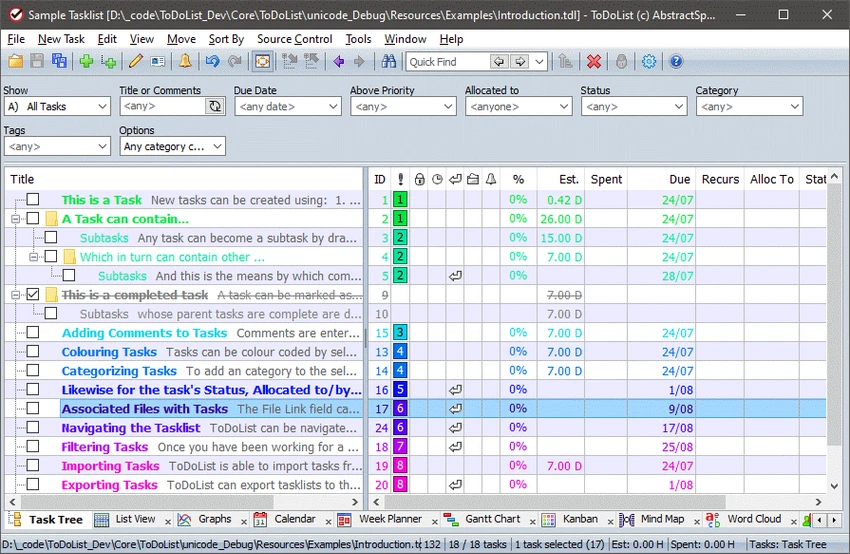

ToDoList is a Windows-based task management application designed to help users organize, track, and manage personal tasks or complex projects. The software combines a simple to-do list approach with advanced project management features, allowing users to create multiple levels of subtasks, attach notes, track time, and customize the interface. With support for detailed task organization, reminders, backups, import/export options, and collaboration-oriented features, ToDoList is suitable for both individual productivity workflows and larger team projects.
Features of ToDoList
- Create and manage general tasks or project-related tasks.
- Organize work using multiple levels of subtasks.
- Add plain text or rich text notes to tasks.
- Assign task icons for easier visual organization.
- Add file links to tasks.
- Track time spent on tasks.
- Set task reminders and receive due task alerts.
- Customize the interface and configuration options.
- Support multi-user team projects with source control features.
- Import and export task data.
- Includes integrated backup functionality.
- Provides customizable themes.
- Adds numbered bullets in rich text comments.
- Allows control over start time display and column width settings.
User Experience
ToDoList provides a flexible experience for users who need more than a basic checklist application. The software allows tasks to be structured into detailed hierarchies, making it easier to manage larger projects with multiple steps and dependencies. The ability to add notes, icons, file links, and time tracking creates a more complete workspace for organizing project information. Users can keep related details attached directly to tasks instead of managing separate documents.
Customization is one of ToDoList’s strongest areas. The application includes various configuration settings, interface adjustments, and theme options that allow users to adapt the software to their preferred workflow. For team environments, features such as source control support and multi-user project capabilities make ToDoList more suitable for structured project management compared with simpler task list applications. At the same time, users who follow personal productivity methods can also use it for general GTD-style task organization.
ToDoList supports Windows 11, Windows 10, Windows 8, and Windows 7.
Who Should Use ToDoList?
- Users who need detailed task organization beyond simple checklists.
- Project managers handling complex workflows.
- Individuals who want customizable task tracking software.
- Teams that need structured task management with additional organization options.
- Users who prefer a desktop-based productivity application.
Conclusion
ToDoList is a feature-rich task management application for Windows users who want detailed control over their projects and daily activities. Its combination of hierarchical tasks, customization options, reminders, and tracking tools makes it a versatile choice for productivity-focused users.


