Home Manager logo

Home Manager 2026 v4.10.1002

  • User Rating:
    ★★★★★
    ★★★★★
    0.0 0Votes
  • Requirements:
    Windows
  • Version: 2026 v4.10.1002
  • Latest updated: 5 days ago
  • License: Free Trial  
  • Publisher: Kaizen Software Solutions
  • Size: 49 MB
× app stores

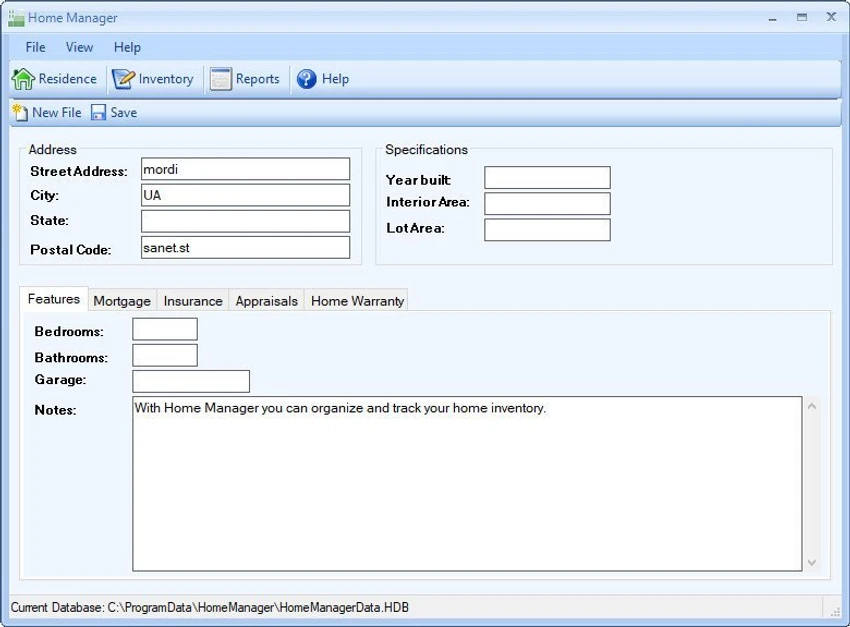
Home Manager is a home inventory management software designed to help users organize, document, and track personal belongings. It allows users to create a structured database of household items, complete with photos, categories, and maintenance history, making it especially useful for insurance preparation and asset management.

Home Manager is built for users who want a clear and organized way to keep track of everything they own, from electronics and furniture to books and personal collections. It provides a centralized system where items can be recorded with detailed information such as purchase cost, warranty data, and repair history. One of its key strengths is its ability to attach images directly to inventory items. Users can drag and drop photos to automatically create new entries, making it easier to build a visual catalog of household possessions. The software also supports categorization by location and type, allowing users to manage multiple rooms or even multiple properties within a single system.

Features of Home Manager

  • Home inventory tracking for one or multiple properties
  • Add detailed information for each item (cost, notes, condition)
  • Drag-and-drop image import for automatic item creation
  • Organize items by category and physical location
  • Built-in search for quick inventory lookup
  • Track maintenance and repair history
  • Store warranty and insurance information
  • Create custom categories and locations
  • Generate printable home inventory reports with images
  • Backup inventory data for safekeeping
  • Supports exporting reports for insurance claims
  • Track books, movies, and personal collections in a database
  • Supports unlimited digital image attachments

User Experience

Using Home Manager feels like building a personal digital catalog of your home. Adding items is straightforward, especially with the drag-and-drop image feature that speeds up data entry. Once the inventory is built, navigation is intuitive. Users can quickly search for items or filter them by category and location, which is useful when managing large households or multiple properties. The ability to generate reports is particularly valuable in real-world scenarios such as insurance claims or home audits. Having organized records with images and purchase details significantly reduces the stress of documenting losses or damage.

Who Should Use Home Manager?

  • Homeowners wanting to catalog belongings
  • Renters documenting personal property
  • Users preparing for insurance claims
  • People managing multiple properties
  • Anyone wanting better organization of household items

Conclusion

Home Manager provides a simple yet effective way to build a complete digital inventory of your home. Its combination of item tracking, image support, and reporting tools makes it especially useful for insurance preparedness and personal organization.

Pros & Cons

Pros

  • Easy-to-use inventory system for home belongings
  • Drag-and-drop image-based item creation
  • Strong organization with categories and locations
  • Useful for insurance documentation and claims
  • Supports maintenance and warranty tracking
  • Printable reports with visual documentation
  • Works for multiple properties

Cons

  • Windows-only (based on provided system requirements)
  • Interface may feel basic compared to modern apps

Frequently Asked Questions

What is Home Manager used for?

Home Manager is used to create and manage a digital inventory of household items, including details like photos, costs, and warranties.

Can I add photos to my inventory items?

Yes. You can drag and drop digital images to automatically create or attach them to inventory entries.

Is Home Manager useful for insurance purposes?

Yes. It helps generate detailed reports with images and item information, which can be used for insurance claims.

Can I track multiple homes?

Yes. Home Manager supports inventory tracking for multiple residences.

Does Home Manager support item categories?

Yes. You can organize items by custom categories and locations.

Can I back up my inventory data?

Yes. The software allows you to back up your inventory to disk or email for safekeeping.

What operating system does Home Manager require?

It requires Windows 10 or higher and may install .NET 8.0 if not already present.

Recommended apps [Freeware]:
  • TreeSize 9.8.1.2302 TreeSize logo Windows disk space analyzer to scan, visualize, and clean storage efficiently with reports.
  • Automatic Email Processor 4.1.0 Automatic Email Processor logo Automatically save, archive, print, and process Outlook emails and attachments with customizable rules.
  • Tails 7.9 Tails logo a privacy-focused live operating system that enables anonymous browsing and secure communication
  • Wondershare Recoverit 14.0.29.10 Wondershare Recoverit logo Recover deleted, lost, formatted, or corrupted files from PCs, USB drives, SD cards, and more with Wondershare Recoverit
  • QontrolPanel 1.18.2 QontrolPanel logo system tray audio tool for quickly switching output devices, managing inputs, and controlling app volume on Windows
  • MSI Dragon Center 2.0.156.0 MSI Dragon Center logo monitor CPU, GPU, and RAM, optimize gaming performance, and control RGB and system settings on MSI PCs
Recommended apps [Shareware]:
  • Adobe Acrobat Pro DC 2026 Adobe Acrobat Pro DC logo create, edit, and secure PDFs easily. Professional PDF solution for individuals and businesses.
  • Total Audio Converter 6.1.0.299 Total Audio Converter logo convert MP3, WAV, FLAC, AAC and more with batch processing, CD ripping, and Windows integration.
  • MacDrive 12.0.1.23 MacDrive logo Access, read, and write Mac-formatted APFS and HFS+ drives on Windows with full support for encrypted volumes and RAID
  • Digimizer 6.5.4 Digimizer logo image analysis tool for precise measurements, object detection, and scientific image processing
  • IntraWEB 16.2.2 IntraWEB logo web development framework for creating interactive web applications using a Windows application-style approach
  • TubeDownload Pro 7.5.6 TubeDownload Pro logo a Windows video downloader that supports HD downloads, playlists, speed boosts, and format conversion