DocuFreezer logo

DocuFreezer 7.0.2606.20080

  • User Rating:
    ★★★★★
    ★★★★★
    0.0 0Votes
  • Requirements:
    Windows
  • Version: 7.0.2606.20080
  • Latest updated: 1 week ago
  • License: Free Trial  
  • Publisher: fCoder SIA
  • Size: 180 MB
× app stores

DocuFreezer is a powerful batch file conversion tool for Windows designed to convert documents and images into fixed-output formats such as PDF, JPG, TIFF, PNG, and TXT. Its main purpose is to “freeze” document layouts so they remain identical across all devices while also enabling fast bulk conversion.

Overview of DocuFreezer

DocuFreezer focuses on simplifying large-scale file conversion tasks. Instead of manually converting files one by one, users can drag and drop multiple documents, folders, or archives and process them in batches. The software supports a wide range of input formats including Microsoft Office documents, PDFs, HTML files, images, CAD files, and email formats. It is designed to preserve the original structure of documents, including layout, fonts, metadata, and formatting, ensuring consistent output across devices.

Beyond simple conversion, DocuFreezer also supports PDF merging, splitting, watermarking, and OCR functionality for turning scanned content into searchable text.

Features of DocuFreezer

  • Batch conversion of documents and images
  • Converts files to PDF, JPG, PNG, TIFF, and TXT
  • Supports 80+ input file formats including DOCX, XLSX, PPTX, PDF, HTML, DWG, and more
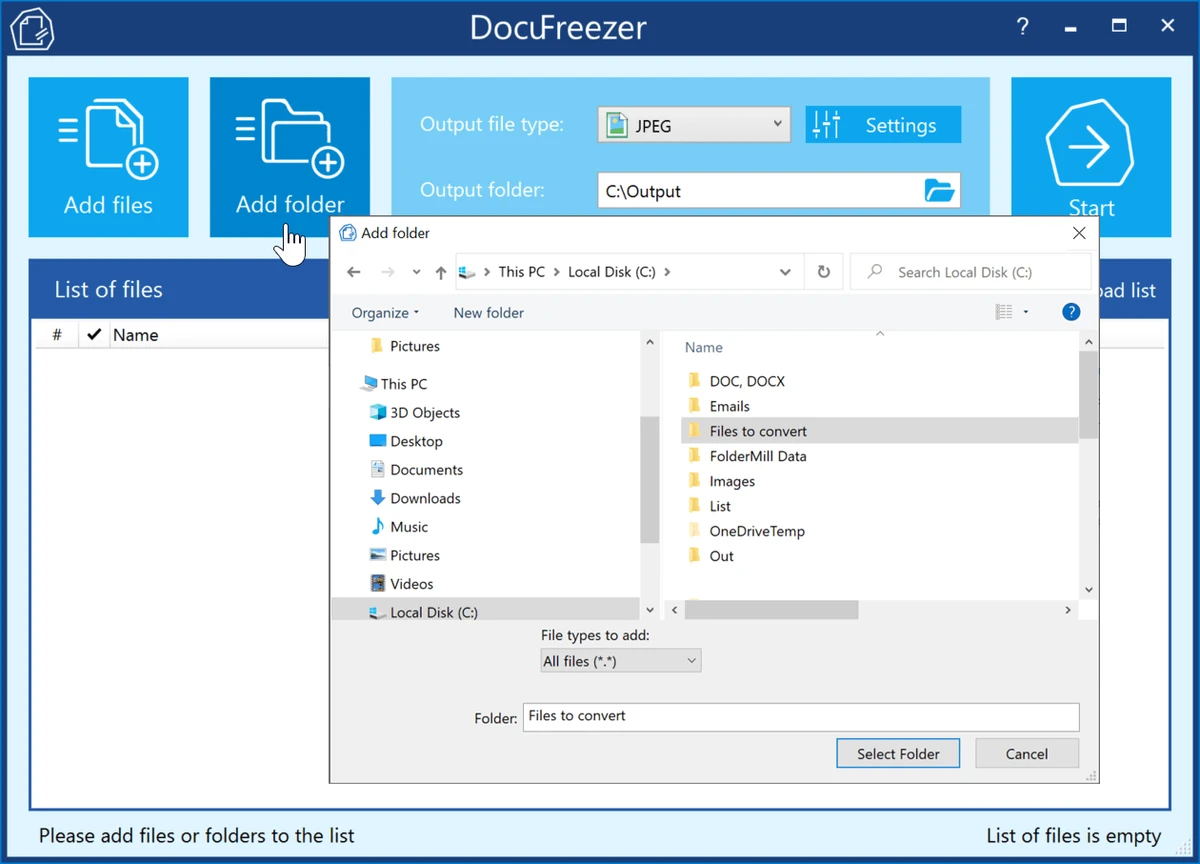
  • Drag-and-drop interface for fast workflow
  • Preserves original layout, fonts, hyperlinks, and formatting
  • Convert email files with attachments
  • Merge multiple files into a single PDF
  • Split and extract pages from PDFs
  • Add watermarks (text or image)
  • OCR support for converting scans into searchable PDFs or TXT files
  • Supports archives like ZIP, RAR, and 7ZIP
  • Adjustable output settings (DPI, color mode, page rotation, file naming)
  • Save and reuse conversion presets and file lists

User Experience

DocuFreezer is designed with productivity in mind. The interface is straightforward, allowing users to quickly add files, choose output formats, and start conversion without complex configuration. For advanced users, deeper settings provide control over output quality, page handling, and formatting. Batch processing is one of its strongest advantages, making it especially useful when dealing with large document libraries or repetitive conversion tasks. The software prioritizes function over design, focusing on efficiency rather than visual polish.

Who Should Use DocuFreezer?

  • Office workers handling large volumes of documents
  • Businesses needing standardized PDF output
  • Students or researchers converting study materials
  • Designers and engineers working with mixed file formats
  • Users who frequently convert or archive documents in bulk

Conclusion

DocuFreezer is a highly practical batch conversion tool for users who regularly handle multiple document formats. Its ability to preserve formatting, automate large-scale conversions, and support a wide range of file types makes it a strong productivity utility.

Pros & Cons

Pros

  • Excellent batch processing capabilities
  • Supports a wide variety of file formats
  • Preserves original document layout and structure
  • Includes PDF tools like merge, split, and watermark
  • OCR support for scanned documents
  • Simple drag-and-drop workflow

Cons

  • Interface is functional rather than modern
  • Requires .NET Framework and specific system setup
  • May be over-featured for users needing only occasional conversion

Frequently Asked Questions

What is DocuFreezer used for?

DocuFreezer is used to convert multiple documents and images into formats like PDF, JPG, PNG, TIFF, and TXT.

Can DocuFreezer convert Word to PDF?

Yes, it supports converting Word documents (DOC/DOCX) to PDF in batch mode.

Does DocuFreezer support OCR?

Yes, it can convert scanned images into searchable PDF or text using OCR.

Can I merge PDFs with DocuFreezer?

Yes, it allows merging multiple files into a single PDF document.

Is DocuFreezer good for bulk conversion?

Yes, it is specifically designed for batch processing large numbers of files efficiently.

Recommended apps [Freeware]:
  • Mozilla Firefox 152.0.3 Mozilla Firefox logo Browse the web securely and quickly with Mozilla Firefox, a customizable browser with strong privacy and add-on support
  • Edge Remover 2.7 Edge Remover logo a lightweight Windows tool designed to uninstall Microsoft Edge Chromium and UWP versions
  • ExpanDrive 2026.06.11 ExpanDrive logo mounts cloud storage and remote servers as local drives for seamless file access in Windows Explorer
  • Urban VPN 5.2.1 Urban VPN logo virtual private network tool designed to help users protect their identity and privacy while browsing the internet
  • Winstep Nexus 26.6 Winstep Nexus logo customizable desktop dock for Windows with app launch shortcuts, widgets, and multi-monitor support
  • Shutter Encoder 20.2 Shutter Encoder logo free multimedia tool for converting, editing, compressing, and processing video, audio, and image files with advanced batch features
Recommended apps [Shareware]:
  • Quick Heal AntiVirus Pro 26.1.0.2 Quick Heal AntiVirus Pro logo real-time malware protection, ransomware defense, and email security
  • Adobe Premiere Pro 2026 Adobe Premiere Pro logo professional 4K video editor with advanced audio, color, and motion graphics tools.
  • TweakNow Gallery 1.3.1 TweakNow Gallery logo a fast Windows photo viewer and organizer with slideshow and built-in image conversion tools
  • Lyric Video Studio 1.5.49 Lyric Video Studio logo a Windows app for creating lyric videos with AI tools, subtitles, motion tracking, and 4K video editing
  • Karaosoft Karma 2026.6.26 Karaosoft Karma logo Manage karaoke shows using drag-and-drop rotation, triple display support, and smart search tools.
  • IObit Uninstaller 15.4.0.1 IObit Uninstaller logo Windows tool for removing programs, browser extensions, leftovers, and unwanted apps