


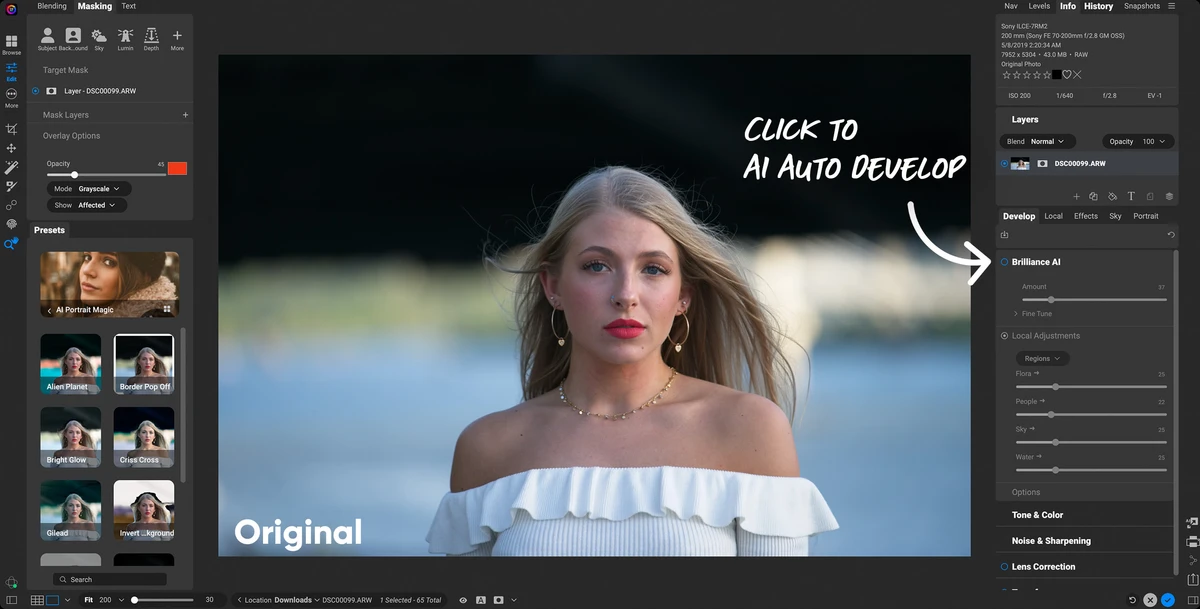

ON1 Photo RAW 2026 is the latest version of ON1's all-in-one photo editing software, bringing significant improvements to AI masking, creative effects, photo enlargement, and workspace customization. Designed for photographers who want professional editing capabilities without relying on multiple applications, it positions itself as a strong alternative to Adobe Lightroom.
Overview
ON1 Photo RAW 2026 introduces one of the most substantial updates in the software's history. The release focuses on improving editing speed, selection accuracy, and creative flexibility through redesigned masking tools, enhanced AI-powered enlargement technology, and new visual effects. The software combines photo organization, non-destructive editing, AI enhancements, and creative filters into a single workflow. Whether you're refining complex selections, correcting perspective distortions, enlarging low-resolution images, or experimenting with artistic effects, ON1 Photo RAW 2026 offers a comprehensive editing environment for photographers of all skill levels.
Features of ON1 Photo RAW 2026
- Fully redesigned masking workflow
- One-click automatic subject masking
- One-click automatic background masking
- AI-powered Depth Lighting filter with depth masks
- New Split Field Filter for landscape background adjustments
- Built-in Resize AI 2026 for photo enlargements
- Improved edge detection with fewer halos and refinements
- Advanced mask stacking and combination tools
- Perspective correction tools that preserve image edges
- Workspace customization with dockable and floating panels
- Redesigned Add Filter dialog for quicker access to effects
- Double Exposure creative effect
- Motion Blur effects including panning, zoom, and twist motion
- Film negative inversion and color correction tools
- New Starting Points workflow for quickly applying favorite effects
User Experience
After exploring ON1 Photo RAW 2026, the most noticeable improvement is the redesigned masking system. Tasks that previously required multiple manual refinements now feel significantly faster thanks to automatic subject and background detection. The software makes complex selections more accessible while still providing advanced controls for users who want greater precision.
The addition of AI-powered Depth Lighting brings a creative dimension to portrait and landscape editing. Combined with the new masking tools, it becomes easier to isolate specific areas of an image and apply targeted adjustments. Resize AI 2026 is another standout feature. Having photo enlargement technology integrated directly into the editing workflow eliminates the need to switch between separate applications. The focus on producing larger, cleaner, and sharper images makes it particularly useful for printing and high-resolution output.
Creative users will appreciate the new filters and effects. Features such as Double Exposure, Motion Blur, and Split Field Filter offer additional artistic possibilities without requiring complex layer-based workflows. Workspace customization also contributes to a smoother editing experience. The ability to dock or float panels helps users optimize screen space based on their editing preferences and monitor setup
Who Should Use ON1 Photo RAW 2026?
- Professional photographers
- Enthusiast photographers
- Landscape photographers
- Portrait photographers
- Content creators
- Print-focused photographers who frequently enlarge images
- Users looking for a Lightroom alternative
- Editors who rely heavily on masking and selective adjustments
System Requirements
Operating System
- Windows 11 (x86 or ARM, 64-bit)
Processor
- Eight-core processor
- 2 GHz or faster
- SSE 4.2 or Neon support
Memory
- 32 GB RAM or more
Graphics
- DirectX 12 compatible GPU
- DirectML, Vulkan 1.1, and OpenGL 4.2 support
- 8 GB VRAM
- NVIDIA RTX 3000 Series or AMD Radeon RX 6000 Series or newer
Display
- 1920 × 1080 resolution minimum
Storage
- 6 GB installation space
- SSD recommended
Conclusion
ON1 Photo RAW 2026 is a substantial upgrade that focuses on areas photographers use most: masking, image enlargement, creative editing, and workflow efficiency. The improved AI tools reduce manual work while maintaining control for advanced users, and the expanded creative effects add greater flexibility to the editing process.


