Atlantis Word Processor logo

Atlantis Word Processor 5.0.5.3

  • User Rating:
    ★★★★★
    ★★★★★
    0.0 ★ 0Votes
  • Requirements:
    Windows
  • Version: 5.0.5.3
  • Latest updated: 3 weeks ago
  • License: Freemium  
  • Publisher: The Atlantis Word Processor Team
  • Size: 2 MB
× app stores

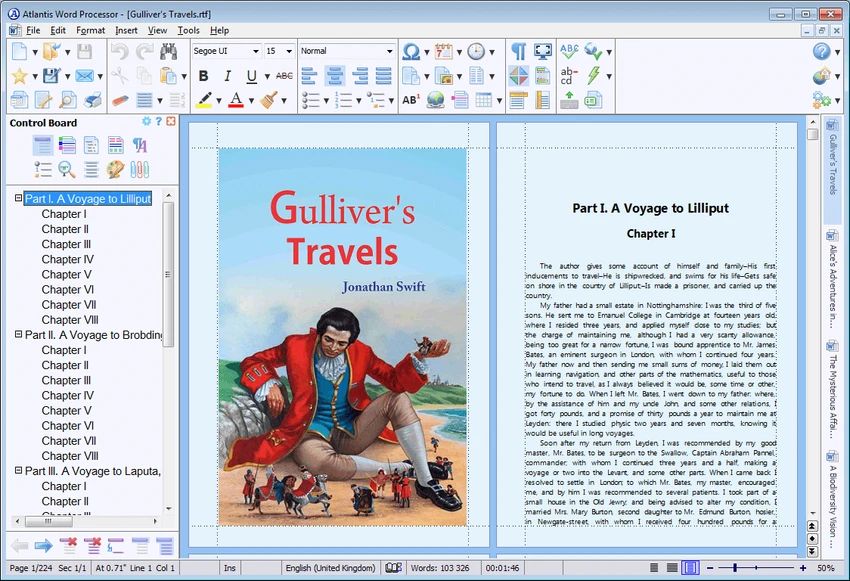
Atlantis Word Processor is a lightweight yet capable word processing application for Windows that focuses on speed, ease of use, and efficient document creation. Suitable for everything from simple letters to lengthy novels and business reports, it provides the essential tools needed to produce professional documents without the complexity of larger office suites. Despite its compact size, Atlantis includes standard text formatting, spell checking, AutoCorrect, customizable shortcuts, document templates, and several productivity features designed specifically for writers. It also supports document encryption, HTML export, booklet printing, and even the ability to convert documents into eBooks in the full version.

A free Lite edition is available, allowing users to perform everyday word processing tasks while offering access to trial versions of premium features before upgrading to the paid edition.

Features of Atlantis Word Processor

  • Fast and lightweight word processor
  • Standard document formatting tools
  • Spell checking
  • AutoCorrect
  • Customizable keyboard shortcuts
  • Customizable toolbars (full version)
  • Customizable sounds and color schemes (full version)
  • Clip library for frequently used text and images
  • Font formatting preview
  • Dynamic field values for document templates
  • HTML export
  • Optional 256-bit document encryption
  • Built-in booklet printing
  • Save documents as eBooks (full version)
  • Overused Words feature to identify repetitive wording (full version)
  • Writing time and typing speed statistics
  • Integrated backup tool (full version)
  • Batch document conversion (full version)
  • Full Screen mode (full version)
  • Spotlight mode (full version)
  • Draft View (full version)
  • Side-by-side document viewing (full version)
  • Split document window for viewing different sections simultaneously
  • Collapsible headings for navigating long documents

Interface and Usability

Atlantis Word Processor delivers a traditional desktop interface that feels familiar to anyone who has previously used a word processor. Menus and toolbars are logically organized, making common editing tasks easy to access without overwhelming new users. During use, the application launches quickly and remains responsive even when working with larger documents. The customizable interface allows experienced users to tailor shortcuts, toolbars, and workspace preferences to match their workflow, while beginners can rely on the default layout without needing additional configuration.

Features such as the clip library, font previews, and writing statistics help streamline everyday writing tasks, while the split-view and collapsible headings introduced in newer versions make navigating long documents considerably easier.

Who Should Use Atlantis Word Processor?

  • Writers and authors
  • Students
  • Business professionals
  • Bloggers
  • Journalists
  • Novelists
  • Users seeking a lightweight Microsoft Word alternative
  • Anyone who prefers an offline desktop word processor

Conclusion

Atlantis Word Processor proves that a modern word processor doesn't need to be large or resource-intensive to be effective. It combines fast performance with a thoughtfully designed interface and a comprehensive collection of writing tools suitable for both casual users and professional writers.

The Lite edition provides a capable introduction for everyday document editing, while the full version expands the feature set with eBook creation, advanced customization, backup tools, batch conversion, and additional writing aids such as the Overused Words analyzer.

Pros & Cons

✓

Pros

  • Lightweight and fast
  • Easy-to-use interface
  • Standard word processing features
  • Spell checking and AutoCorrect
  • Customizable shortcuts and interface
  • HTML export
  • Optional 256-bit document encryption
  • Booklet printing support
  • Writing statistics
  • eBook export available in the full version
  • Affordable compared to many commercial word processors
✕

Cons

  • Some advanced features are limited to the paid version
  • Windows only
  • Fewer collaboration features than cloud-based office suites

Frequently Asked Questions

What is Atlantis Word Processor used for?

Atlantis Word Processor is a desktop word processing application used to create, edit, format, and print documents such as letters, reports, articles, and novels.

Is Atlantis Word Processor free?

Atlantis offers a free Lite edition with core word processing functionality. A paid version is available that unlocks additional features such as eBook export, advanced customization, backup tools, and batch conversion.

Can Atlantis Word Processor export documents as eBooks?

Yes. The full version includes a Save as eBook feature that can convert supported documents into eBook format.

Does Atlantis Word Processor include spell checking?

Yes. Atlantis includes built-in spell checking and AutoCorrect to help improve writing accuracy and reduce typing errors.

Can Atlantis Word Processor encrypt documents?

Yes. The software supports optional 256-bit encryption, allowing users to better protect sensitive documents.

Who is Atlantis Word Processor best suited for?

Atlantis Word Processor is well suited for writers, students, business users, journalists, and anyone looking for a lightweight desktop word processor with strong writing and document formatting capabilities.

Recommended apps [Freeware]:
  • Helium Music Manager 18.1.778 Helium Music Manager logo Organize, tag, play, sync, and manage your music collection with Helium Music Manager for Windows
  • AIMP 5.40.2722 AIMP logo a lightweight audio player with high-quality sound, playlist tools, equalizer, and audio conversion features
  • Stellarium 26.2 Stellarium logo 3D planetarium software showing stars, constellations, planets, and deep-sky objects in real time.
  • DesktopOK 12.61 DesktopOK logo a free Windows utility that saves and restores desktop icon layouts across screen resolution changes
  • Intel Graphics Driver 32.0.101.8860 Intel Graphics Driver logo Download the latest Intel Graphics Driver for improved graphics performance, security updates, and Windows compatibility
  • Win11Debloat 2026.07.11 Win11Debloat logo Remove unwanted apps, reduce telemetry, and customize Windows settings with a lightweight PowerShell script for system cleanup.
Recommended apps [Shareware]:
  • LanSend 26.06 LanSend logo LAN messaging tool for system administrators to send instant messages to multiple Windows users without installing client software
  • Catalyst Production Suite 2026.1.1 Catalyst Production Suite logo a professional media tool for browsing, preparing, transcoding, and managing Pro video formats.
  • YoloX 1.11 YoloX logo a lightweight crosshair overlay tool for Windows featuring custom designs, animations, audio reactions, and game profiles
  • System Mechanic Pro 26.5.0.227 System Mechanic Pro logo Optimize Windows performance with System Mechanic Pro using system cleanup, repair, disk recovery, and security tools
  • PDF Architect 9.1.133.23134 PDF Architect logo Windows PDF editor for creating, editing, converting, and securing PDF documents efficiently.
  • NTFS Permissions Reporter 5.5.701 NTFS Permissions Reporter logo Audit Windows file permissions with detailed reports, scheduling, filtering, exports, and security analysis tools for administrators.