FileLegit Windows Utilities File Managers Total Commander Ultima Prime
Total Commander Ultima Prime logo

Total Commander Ultima Prime 9.4

  • User Rating:
    ★★★★★
    ★★★★★
    0.0 ★ 0Votes
  • Requirements:
    Windows
  • Version: 9.4
  • Latest updated: 3 weeks ago
  • License: Freeware  
  • Publisher: Ultima Prime
  • Size: 1.3 GB
× app stores

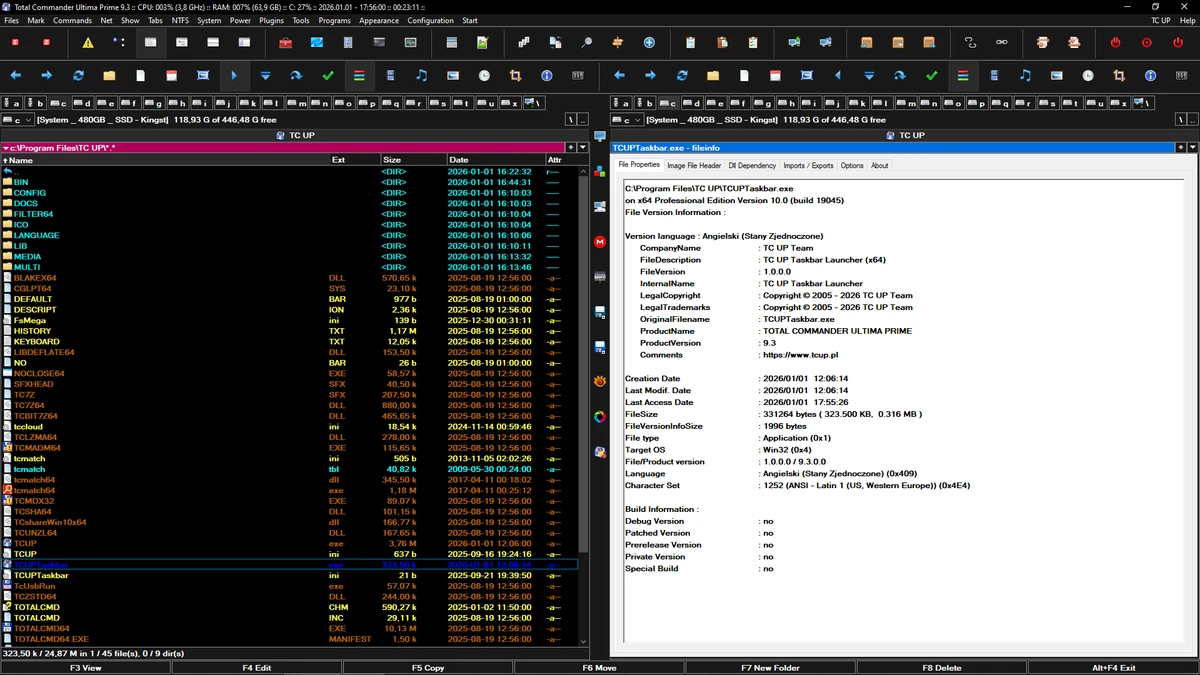
Total Commander Ultima Prime is an enhanced software package built around the popular file manager Total Commander. It combines the core file management capabilities of Total Commander with a collection of additional tools, plugins, and preconfigured settings, all bundled into a single installation. The goal of the package is to improve file and system management efficiency by extending traditional file browsing with extra utilities. Instead of relying solely on Windows Explorer or a basic file manager, users gain access to a more powerful environment designed for faster navigation, organization, and system operations.

The package also includes optional configuration steps during installation, allowing users to adjust certain aspects of the setup before use. Once installed, it provides a unified workspace where file management and system tools are accessible from a single interface.

Features of Total Commander Ultima Prime

  • Built on the Total Commander dual-pane file manager
  • Enhanced interface with additional toolbars and shortcuts
  • Preconfigured plugins and utilities included in one package
  • File and folder management with faster navigation workflow
  • Integrated tools for system and application handling
  • Access to utilities such as archiving, burning, and file extraction tools
  • Includes optional integration of external tools (e.g., Notepad++, TeamViewer, uTorrent, VirtualDub)
  • Support for virtual disks and additional system functions
  • Custom installation process with configurable options
  • Lightweight performance with low CPU and memory usage

Interface and Usability

Total Commander Ultima Prime retains the classic dual-pane interface of Total Commander, which is designed for efficient file transfer and organization between directories. The layout remains familiar to users of traditional file managers but adds extended toolbars and shortcut buttons for quicker access to additional functions.

During installation, users can select certain configuration options that affect how the interface and tools are set up. Once installed, most features are accessible through menus or toolbar buttons, reducing the need to search through multiple separate applications. While the interface is functional and efficient, it focuses more on productivity and control rather than modern visual design.

Who Should Use Total Commander Ultima Prime?

  • Advanced Windows users who manage large amounts of files
  • Users who prefer dual-pane file management over Windows Explorer
  • IT professionals needing quick access to system tools and utilities
  • Users who want an all-in-one file management and utility environment
  • People who regularly work with archives, disks, and system-level tools

Conclusion

Total Commander Ultima Prime expands the capabilities of a traditional file manager by combining Total Commander with a wide set of integrated tools and utilities. It is designed for users who want more control and efficiency when managing files and system tasks.

Pros & Cons

✓

Pros

  • Powerful dual-pane file management system
  • Includes multiple preinstalled utilities and plugins
  • Efficient workflow for file operations
  • Low system resource usage
  • Highly functional for advanced users
✕

Cons

  • Installation includes many bundled tools (less selective setup)
  • Interface is functional but not modern-looking
  • Can be complex for casual users

Frequently Asked Questions

What is Total Commander Ultima Prime used for?

Total Commander Ultima Prime is used for advanced file management on Windows. It extends the capabilities of Total Commander with additional tools and plugins for handling files, folders, and system tasks.

How is it different from Total Commander?

It is built on Total Commander but includes extra preinstalled plugins, utilities, and configuration settings, making it a more complete all-in-one file management package.

Does it include other software tools?

Yes. It can include tools such as file archivers, CD/DVD utilities, system tools, and external applications like Notepad++, TeamViewer, and VirtualDub, depending on the installation setup.

Is Total Commander Ultima Prime suitable for beginners?

It can be used by beginners, but it is mainly designed for advanced users due to its wide range of tools and configuration options.

Does it affect system performance?

It is generally lightweight and uses low CPU and memory, similar to Total Commander itself, despite including many additional utilities.

Recommended apps [Freeware]:
  • AOMEI Backupper 8.4.0 AOMEI Backupper logo easy-to-use Windows backup software for system imaging, disk cloning, and file restoration
  • QueueExplorer 5.0.88 QueueExplorer logo helps developers and admins manage, test, troubleshoot, and monitor message queues across platforms
  • WinBin2Iso 6.77 WinBin2Iso logo a free, portable utility that quickly converts BIN CD and DVD image files to ISO format on Windows.
  • Jubler Subtitle Εditor 9.0.1 / 10.0.0 Jubler Subtitle Εditor logo edit, sync, translate, and correct subtitles with real-time video preview
  • Display Driver Uninstaller (DDU) 18.1.5.6 Display Driver Uninstaller (DDU) logo Completely remove AMD, NVIDIA, and Intel GPU drivers with DDU for clean installs and troubleshooting Windows issues
  • qBittorrent 5.2.3 qBittorrent logo Manage torrent downloads efficiently with a free, open-source client featuring search tools, remote control, scheduling, and customization.
Recommended apps [Shareware]:
  • Disk Savvy 18.2.36 Disk Savvy logo analyze disk space usage, network shares, NAS storage, and generate detailed reports on Windows
  • GetFLV 32.2606.25 GetFLV logo combines video downloading, conversion, audio extraction, and basic editing tools in one Windows application
  • SyncBackPro 12.0.17 SyncBackPro logo advanced backup, restore, synchronization, encryption, FTP support, and automation tools
  • Cubase Pro 15.0.30 Cubase Pro logo a professional DAW for recording, composing, editing, mixing, and music production
  • DBF Viewer 2000 9.24 DBF Viewer 2000 logo a lightweight Windows tool to view, edit, filter and export DBF files from dBase and FoxPro
  • pdfFactory Pro 9.31 pdfFactory Pro logo creates, combines, previews, and prints PDFs easily with advanced tools like bookmarks, email export, and job control