n-Track Studio logo

n-Track Studio 10.3.1.10917

  • User Rating:
    ★★★★★
    ★★★★★
    0.0 0Votes
  • Requirements:
    Windows
  • Version: 10.3.1.10917
  • Latest updated: 4 days ago
  • License: Free Trial  
  • Publisher: Flavio Antonioli
  • Size: 238 MB
× app stores

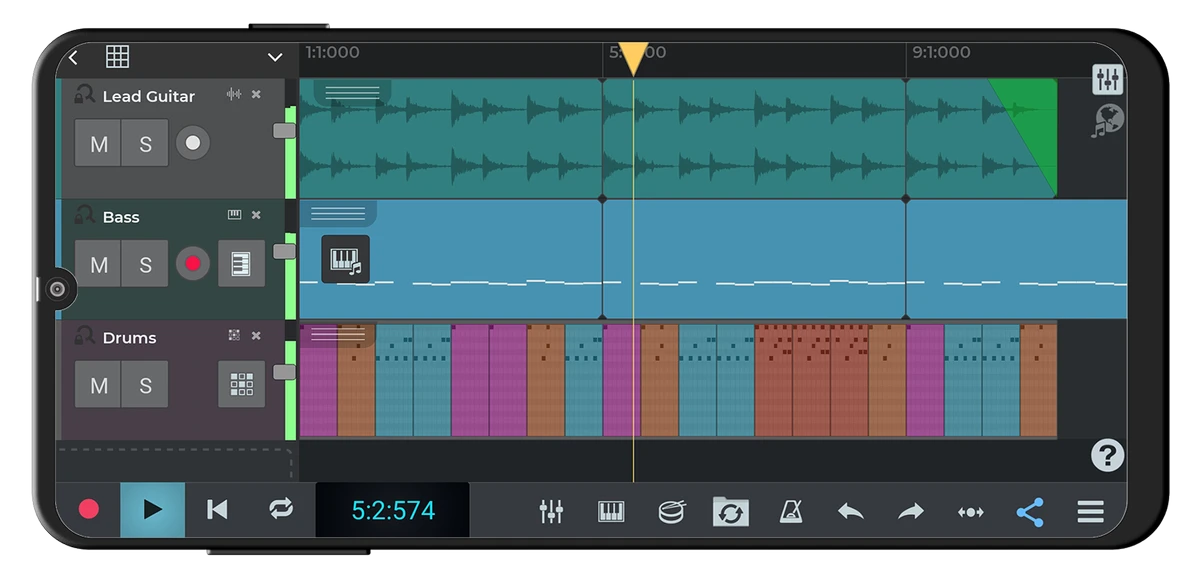
n-Track Studio is a feature-rich digital audio workstation (DAW) that transforms a Windows PC into a professional multitrack recording studio. Designed for musicians, podcasters, producers, and audio enthusiasts, it combines recording, editing, mixing, MIDI sequencing, and audio mastering tools in a single application. With support for high-resolution audio recording, real-time effects processing, VST instruments, and surround sound mixing, n-Track Studio offers an impressive set of tools suitable for both home studios and professional production environments.

Features of n-Track Studio

  • Record and play back virtually unlimited audio and MIDI tracks
  • Multitrack audio recording and overdubbing
  • 24-bit/192 kHz audio recording support
  • 64-bit audio mixing engine
  • Non-destructive and destructive audio editing
  • Real-time audio input processing
  • VST Instruments and DirectX Instruments support
  • DirectX, VST, and ReWire plugin compatibility
  • Built-in audio effects:
    • Reverb
    • Compression
    • Parametric EQ
    • Graphic EQ
    • Echo
    • Auto-volume
    • Pitch Shift
    • Chorus
    • Multiband Compression
    • Spectrum Analyzer
  • Adjustable effects with real-time monitoring
  • Surround sound mixing support (5.1, 6.1, and 7.1)
  • 20-band parametric EQ on every audio track
  • Automatic instrument tuner
  • Up to 32 auxiliary channels with automated sends and returns
  • Multiple soundcard support
  • Low-latency ASIO, WaveRT, WDM, MME, and DirectSound compatibility
  • Import and export:
    • WAV
    • MP3
    • WMA
    • MIDI
    • OGG
    • FLAC
    • AIFF
    • CDA
  • CD burning capabilities
  • MP3 encoding support
  • MIDI synchronization and clock support
  • Video playback synchronized with projects
  • Automated volume, pan, effects, and channel controls

User Experience

During testing, n-Track Studio delivers a surprisingly comprehensive recording and production environment without overwhelming users with unnecessary complexity. The software successfully balances advanced production tools with a workflow that remains accessible to intermediate users. The multitrack recording engine performs reliably, supporting extensive recording sessions and overdubbing workflows. Real-time monitoring and effects processing make it easy to hear changes instantly while recording or mixing.

One of the strongest aspects of n-Track Studio is its broad plugin compatibility. Support for VST, DirectX, and ReWire technologies allows users to integrate a wide range of third-party instruments and effects into their projects.

MIDI functionality is equally impressive, enabling virtual instrument production without requiring dedicated hardware synthesizers. Combined with the built-in effects suite, users can create complete music productions entirely within the application. Advanced users will appreciate the support for surround sound mixing, automation controls, synchronization options, and multiple audio interfaces. Meanwhile, beginners can start with basic recording and gradually explore the software's deeper capabilities.

Who Should Use n-Track Studio?

  • Music producers
  • Home studio owners
  • Recording engineers
  • Podcast creators
  • Voice-over artists
  • Musicians recording demos or albums
  • Audio enthusiasts learning music production
  • Users seeking an affordable DAW with professional features

Conclusion

n-Track Studio successfully combines professional-grade recording, editing, MIDI sequencing, and mixing tools into a flexible digital audio workstation. Its support for high-quality recording, real-time processing, third-party plugins, and surround sound production makes it suitable for a wide range of audio projects.

Pros & Cons

Pros

  • Powerful multitrack recording and editing
  • Audio and MIDI production in one package
  • High-resolution 24-bit/192 kHz recording
  • 64-bit mixing engine
  • Extensive built-in effects collection
  • VST, DirectX, and ReWire support
  • Real-time audio processing
  • Surround sound mixing support
  • Broad file format compatibility
  • Multiple soundcard support

Cons

  • Interface may feel complex for absolute beginners
  • Advanced features require time to master
  • Large projects may demand significant system resources
  • Some competing DAWs offer more modern interface designs

Frequently Asked Questions

What is n-Track Studio?

n-Track Studio is a digital audio workstation (DAW) used for recording, editing, mixing, and producing audio and MIDI projects.

Does n-Track Studio support MIDI?

Yes. It supports MIDI recording, playback, editing, and virtual instruments through VSTi and DirectX instrument plugins.

Can I use VST plugins with n-Track Studio?

Yes. The software supports VST, DirectX, and ReWire plugins.

What audio quality does n-Track Studio support?

It supports recording up to 24-bit/192 kHz and uses a 64-bit mixing engine.

Can n-Track Studio record multiple tracks simultaneously?

Yes. It supports multitrack recording and can work with multiple input and output devices.

Does n-Track Studio support surround sound mixing?

Yes. It supports 5.1, 6.1, and 7.1 surround sound formats.

Who is n-Track Studio best suited for?

It is suitable for musicians, producers, podcasters, recording engineers, and anyone needing advanced audio recording and editing capabilities.

Recommended apps [Freeware]:
  • Process Monitor 4.04 Process Monitor logo a Windows tool that tracks real-time file, registry, and process activity for system troubleshooting and malware analysis
  • KiCad 10.0.4 KiCad logo electronic design tool for creating schematics, PCB layouts, 3D models, and circuit designs on Windows
  • PilotEdit 21.0.0 PilotEdit logo a powerful text and hex editor for large files with FTP support, scripting, encryption, and search tools
  • BitComet 2.21 BitComet logo BitTorrent download manager supporting torrents, HTTP, and FTP with advanced speed and disk optimization tools
  • Quick Clipboard Editor 3.4.0.0 Quick Clipboard Editor logo edit, format, and manage clipboard text with powerful tools for productivity and automation
  • Norton 360 Remover 26.6.11050.2580 Norton 360 Remover logo a utility that completely uninstalls Norton 360 security software, removing leftover files and settings
Recommended apps [Shareware]:
  • Charles 5.2.0 Charles logo HTTP proxy tool for web debugging, allowing developers to inspect, modify, and analyze network traffic in real time
  • Remote Desktop Manager 2026.2.9.0 Remote Desktop Manager logo manage RDP, SSH, VNC, and virtual machines from one secure centralized platform
  • Coolutils Total Doc Converter 5.1.0.394/167 Coolutils Total Doc Converter logo Convert DOC, DOCX, RTF, and TXT files into PDF, HTML, images, and more with fast batch processing
  • Duplicate Photos Fixer Pro 1.3.1086.1158 Duplicate Photos Fixer Pro logo finds and removes duplicate and similar photos to organize your library and save space
  • Royal TS 7.4.50622 Royal TS logo centralizes remote connections, credential management, automation, and secure team collaboration.
  • ON1 Resize AI 2026.4 ON1 Resize AI logo advanced AI upscaling technology to enlarge photos up to 10x while preserving detail, sharpness, and print quality