ezAccounting logo

ezAccounting 3.16.18

  • User Rating:
    ★★★★★
    ★★★★★
    0.0 0Votes
  • Requirements:
    Windows
  • Version: 3.16.18
  • Latest updated: 4 days ago
  • License: Free Trial  
  • Publisher: Halfpricesoft
  • Size: 9 MB
× app stores

ezAccounting is a Windows-based accounting and payroll solution designed for small businesses that prefer owning their software instead of paying ongoing subscription fees. It combines bookkeeping, invoicing, payroll, check printing, and financial reporting in a single desktop application, making it a practical choice for businesses that want full control over their financial data. Unlike many cloud-based accounting platforms, ezAccounting stores your data locally and follows a one-time purchase model rather than requiring monthly payments.

Key Features of ezAccounting

  • One-time purchase with no mandatory subscription
  • Income and expense tracking
  • Customer invoicing, estimates, receipts, and purchase orders
  • Built-in payroll processing
  • Check printing support
  • Support for common tax forms, including 941, 940, W-2, and W-3
  • Financial reports including Profit & Loss and Balance Sheet
  • Job costing and job tracking
  • Preloaded chart of accounts
  • Vendor and payroll data import
  • Export financial data for accountants
  • 30-day free trial
  • Desktop application with local data storage

User Experience

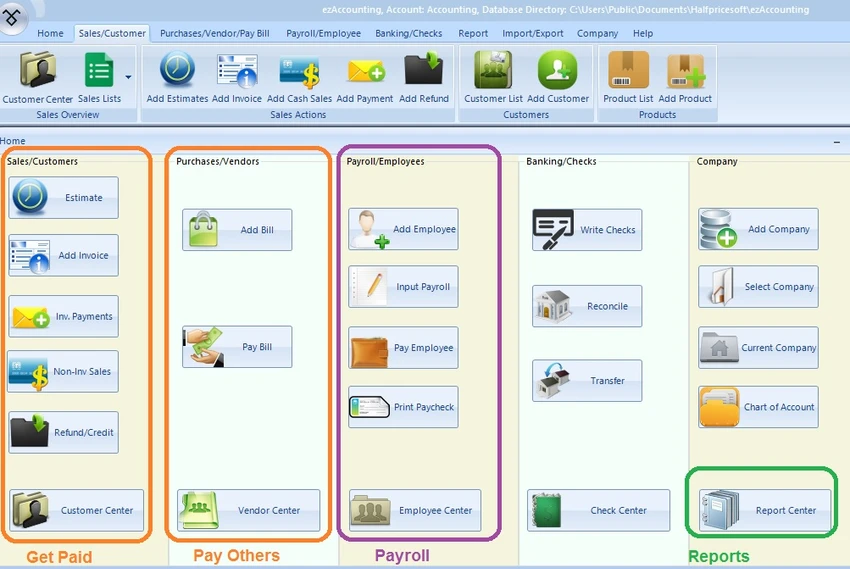
After spending time with ezAccounting, I found the interface different from many modern accounting applications, but surprisingly logical once I became familiar with the layout. The button-based navigation places the most common accounting tasks—including invoicing, payroll, expenses, and reporting—within easy reach. Payroll is clearly one of the strongest parts of the software. Managing employee payments, printing checks, and generating common payroll tax forms can all be handled without relying on an external payroll service. For many small businesses, this alone can reduce ongoing operating costs.

Creating invoices, purchase orders, receipts, and estimates is straightforward, while the included reporting tools provide the essential financial information most businesses need for day-to-day management. The software also includes job tracking, making it useful for businesses that need to associate labor and expenses with individual projects. One limitation is migration from other accounting platforms. While vendor and account imports are supported, complete QuickBooks financial data cannot be imported, so businesses switching platforms may need to start with a fresh accounting period.

Who Should Use ezAccounting?

  • Small business owners
  • Companies handling payroll in-house
  • Businesses requiring job costing
  • Organizations wanting desktop accounting software
  • Users looking to avoid monthly subscription fees

Conclusion

ezAccounting focuses on delivering practical accounting and payroll tools without locking users into recurring subscription costs. Its combination of invoicing, payroll management, financial reporting, and local data storage makes it a dependable solution for small businesses that value ownership and simplicity.

Pros & Cons

Pros

  • One-time purchase without recurring subscription fees
  • Comprehensive built-in payroll features
  • Local desktop data storage
  • Includes invoicing, reporting, and job tracking
  • Supports check printing and tax forms
  • Suitable for businesses wanting long-term ownership

Cons

  • Limited QuickBooks data import
  • Few third-party integrations
  • Some tax forms require preprinted paper
  • Interface may require a short learning period

Frequently Asked Questions

Is ezAccounting subscription-based?

No. ezAccounting uses a one-time purchase model. Updates are optional and do not require a recurring subscription.

Does ezAccounting include payroll?

Yes. The software includes built-in payroll processing, check printing, and support for common payroll tax forms.

Can ezAccounting import QuickBooks data?

Vendor and account imports are supported, but full QuickBooks financial data import is not available.

Is ezAccounting cloud-based?

No. It is a desktop application that stores your accounting data locally.

Who is ezAccounting best suited for?

It is best suited for small businesses that want desktop accounting software with built-in payroll, job tracking, and predictable long-term costs.

Recommended apps [Freeware]:
  • FastCopy 5.11.3 FastCopy logo a lightweight Windows tool for ultra-fast file copying, syncing, and error-resilient data transfer
  • BleachBit 6.0.0 BleachBit logo a free Windows cleaner that removes junk files, protects privacy, and frees disk space with secure wiping.
  • Smart Defrag 11.4.0.508 Smart Defrag logo a fast Windows disk defragmenter that optimizes hard drives, improves speed, and system stability.
  • AOMEI Backupper 8.4.0 AOMEI Backupper logo easy-to-use Windows backup software for system imaging, disk cloning, and file restoration
  • darktable 5.6.0 darktable logo a free open-source RAW photo editor and photography workflow tool for professional image management
  • Jubler Subtitle Εditor 9.0.1 / 10.0.0 Jubler Subtitle Εditor logo edit, sync, translate, and correct subtitles with real-time video preview
Recommended apps [Shareware]:
  • Coolutils Print Maestro 4.2.0.0 Coolutils Print Maestro logo print folder contents, export directory trees, and generate detailed file reports quickly
  • Adobe Acrobat Pro DC 2026 Adobe Acrobat Pro DC logo create, edit, and secure PDFs easily. Professional PDF solution for individuals and businesses.
  • Roboform 9.9.4.6 Roboform logo a secure password manager using AES-256 encryption, autofill, and cross-device sync for safer login management
  • 4K Video Downloader Plus 26.1.5 4K Video Downloader Plus logo Download videos, audio, playlists, and subtitles in high quality with 4K Video Downloader Plus
  • VX Search 18.2.34 VX Search logo a powerful rule-based file search tool with advanced filtering, reporting, and network search capabilities.
  • Smart MindMap 11.6.3 Smart MindMap logo AI-powered Windows tool for mind maps, UML, flowcharts, and professional diagram creation