TeamViewer logo

TeamViewer 15.79.4

  • User Rating:
    ★★★★★
    ★★★★★
    0.0 0Votes
  • Requirements:
    Windows
  • Version: 15.79.4
  • Latest updated: 6 days ago
  • License: Freeware  
  • Publisher: Teamviewer Gmbh
  • Size: 80 MB
× app stores

TeamViewer is a remote desktop application designed to let users access and control computers from anywhere in the world. It enables remote support, desktop sharing, and file transfer through a fast and secure connection, even behind firewalls or NAT networks.

Overview

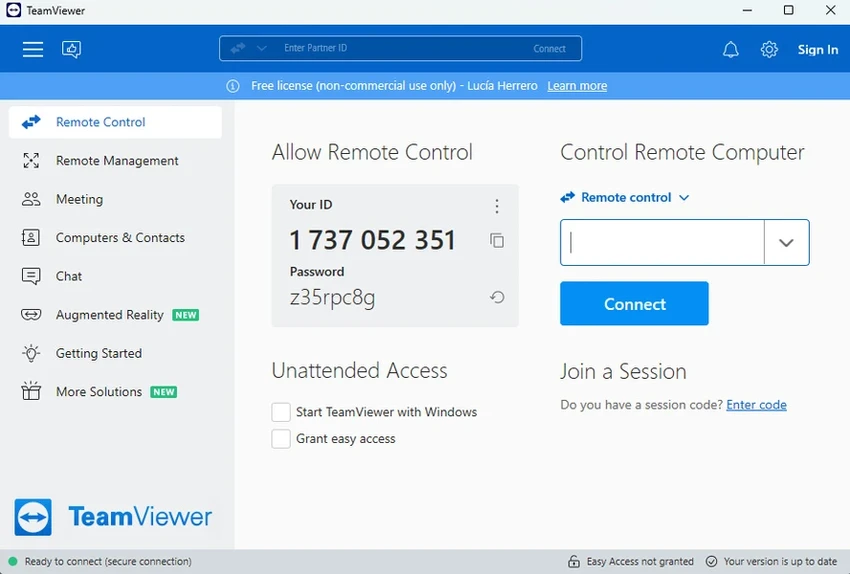
TeamViewer is widely used as a remote access and support tool that connects two computers within seconds. By simply running the software on both devices, users can generate partner IDs and establish a secure connection without complex setup or installation requirements. It is designed for both personal and professional use, supporting IT support, online collaboration, presentations, and unattended system management. The software also includes encrypted data transfer and compatibility with VNC standards, making it a flexible solution for remote operations.

Features of TeamViewer

  • Remote control of computers over the internet or LAN
  • File transfer between connected devices
  • Works without requiring installation or admin rights
  • Secure encrypted connections using key exchange and RC4 encoding
  • Remote access to unattended computers and servers
  • Ability to restart and reconnect to remote systems
  • Desktop sharing for presentations and demonstrations
  • Works behind firewalls and NAT configurations
  • Automatic bandwidth-based performance optimization
  • Global server network for stable connections
  • Compatible with VNC-based systems

User Experience

From a user perspective, TeamViewer is extremely straightforward to use. The connection process is quick: both users open the app, exchange IDs, and connect within seconds. No complicated configuration is required, which makes it especially useful for non-technical users who need remote assistance. Performance is generally smooth, with adaptive quality settings that help maintain stability even on slower internet connections. File transfers are integrated directly into the session, which eliminates the need for third-party tools.

The interface is minimal and functional, focusing on quick access rather than advanced customization. This makes it easy for beginners, though advanced IT users may prefer more configuration options depending on their workflow.

Who Should Use TeamViewer?

  • IT support teams providing remote assistance
  • Businesses managing remote servers or employees
  • Users needing quick help from friends or technicians
  • Presenters and trainers conducting online sessions
  • Anyone who needs secure remote access to another computer

Conclusion

TeamViewer remains one of the most practical and widely used remote desktop solutions thanks to its simplicity, speed, and cross-network compatibility. Its ability to work without installation and function behind firewalls makes it especially valuable for remote support scenarios.

Pros & Cons

Pros

  • Very easy to use with quick setup
  • No installation required for basic use
  • Strong security with encrypted connections
  • Works behind firewalls and NAT networks
  • Supports file transfer and remote reboot
  • Stable global connection infrastructure

Cons

  • May be more feature-rich than casual users need

Frequently Asked Questions

What is TeamViewer used for?

TeamViewer is used for remote access, allowing users to control another computer, transfer files, or provide technical support from anywhere.

Does TeamViewer require installation?

No, basic usage does not require installation or admin rights. You can run it directly on both devices.

Is TeamViewer secure?

Yes, it uses encrypted data channels with key exchange and RC4-based session security.

Can TeamViewer work behind firewalls?

Yes, it is designed to work even behind strict firewalls and NAT configurations.

Can I use TeamViewer for presentations?

Yes, it includes a screen-sharing mode for online presentations and demonstrations.

Recommended apps [Freeware]:
  • Android Studio 2026.1.1.9 Android Studio logo Google’s official IDE for Android, offering intelligent coding, fast emulators, and cloud integration.
  • DriversCloud 12.1.6 DriversCloud logo scan system hardware, update drivers, monitor performance, and analyze blue screen errors (BSODs) on Windows.
  • NirLauncher Package 1.30.24 NirLauncher Package logo a portable Windows utility suite with 180+ NirSoft tools for system, network, and recovery tasks
  • AOMEI Backupper 8.4.0 AOMEI Backupper logo easy-to-use Windows backup software for system imaging, disk cloning, and file restoration
  • CCleaner 7.08.1355 CCleaner logo removes junk files, clears browsing traces, and helps optimize Windows for better performance
  • Blank And Secure 8.41 Blank And Secure logo a portable Windows tool that securely deletes files by overwriting data to prevent recovery.
Recommended apps [Shareware]:
  • Adobe Premiere Pro 2026 Adobe Premiere Pro logo professional 4K video editor with advanced audio, color, and motion graphics tools.
  • Any video Converter 9.2.3 Any video Converter logo video conversion tool that supports multiple formats, editing features, and device-ready output profiles
  • AVG Driver Updater 26.5.10990.0 AVG Driver Updater logo automatically scan and update outdated drivers to improve PC performance and stability on Windows.
  • PowerDirector 2026 v24.6 PowerDirector logo AI-powered video editor offering templates, effects, and tools for fast, professional video creation
  • Disk Savvy 18.2.36 Disk Savvy logo analyze disk space usage, network shares, NAS storage, and generate detailed reports on Windows
  • TubeDownload Pro 7.5.6 TubeDownload Pro logo a Windows video downloader that supports HD downloads, playlists, speed boosts, and format conversion