VUPlayer logo

VUPlayer 4.24

  • User Rating:
    ★★★★★
    ★★★★★
    0.0 ★ 0Votes
  • Requirements:
    Windows
  • Version: 4.24
  • Latest updated: 2 weeks ago
  • License: Open Source  
  • Publisher: JF Chapman
  • Size: 21 MB
× app stores

VUPlayer is a free, lightweight audio player for Windows designed for users who want a simple and efficient way to manage and listen to their music collections. The software focuses on reliable playback, broad audio format compatibility, and low resource usage, making it suitable for users who prefer a straightforward music player without unnecessary complexity.

The application supports a wide range of audio formats, including MP3, OGG, FLAC, WMA, WAV, AAC, and other common file types. This allows users to play different music files without needing additional codec installations.

Beyond basic playback controls, VUPlayer includes playlist management features that help users organize and save music collections. Users can create playlists, manage tracks, and arrange their listening experience according to their preferences. VUPlayer also provides several customization and audio enhancement options. It includes DSP effects, visualization support, customizable keyboard shortcuts, and basic ID3 tag editing tools for managing audio file information. Features such as gapless playback help provide smoother transitions between songs.

With its lightweight design, format support, and practical music management features, VUPlayer is a good option for users looking for a simple desktop audio player that focuses on performance and usability.

Features of VUPlayer

  • Free and lightweight audio player for Windows
  • Supports multiple audio formats including MP3, OGG, FLAC, WMA, WAV, and AAC
  • Creates and manages playlists
  • Customizable interface options
  • Supports DSP audio effects
  • Provides gapless and crossfade-style playback features
  • Includes customizable keyboard shortcuts
  • Allows basic ID3 tag editing
  • Supports audio visualizations
  • Uses minimal system resources

Interface and Usability

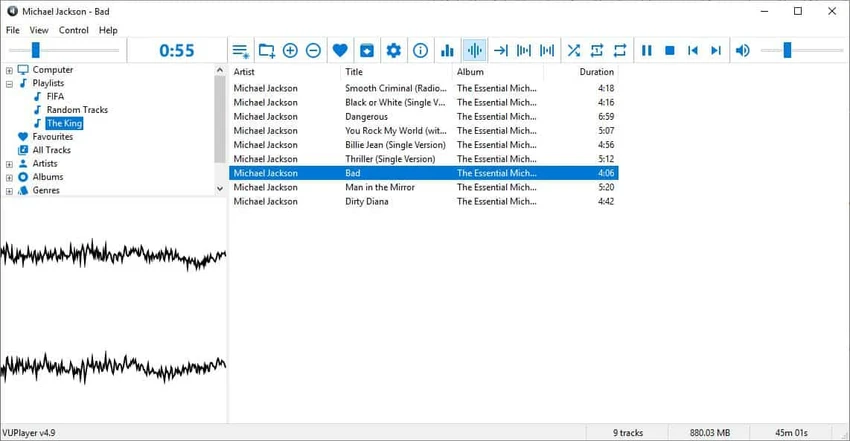
VUPlayer provides a simple interface focused on music playback and library management. The design avoids unnecessary complexity, making it easy for users to access essential functions such as playing tracks, managing playlists, and adjusting playback settings. The playlist tools make organizing music collections straightforward, while the support for keyboard shortcuts provides faster control for users who prefer using the keyboard instead of navigating menus.

Customization options allow users to adjust parts of the interface, although the software remains focused on practicality rather than offering a highly modern visual design. For users who want a lightweight alternative to larger media players, VUPlayer offers a clean and efficient experience.

Who Should Use VUPlayer?

  • Users with large music collections
  • People who need support for various audio formats
  • Users looking for a lightweight Windows media player
  • Listeners who prefer playlist-based music organization
  • Users who want basic audio customization features

Conclusion

VUPlayer is a practical free audio player that delivers essential music playback features without unnecessary extras. Its lightweight design, broad format support, and playlist management tools make it a convenient choice for Windows users who want a simple way to enjoy their music collection. The software is especially appealing for users who value performance and compatibility over complex interfaces. While it does not aim to replace feature-heavy media platforms, it provides a reliable solution for everyday audio playback.

Pros & Cons

✓

Pros

  • Lightweight and uses minimal system resources
  • Supports many popular audio formats
  • Includes playlist management
  • Provides DSP effects and visualization options
  • Offers customizable shortcuts
  • Includes basic tag editing tools
✕

Cons

  • Focused mainly on audio playback rather than full media management
  • Interface may feel basic compared with modern music applications

Frequently Asked Questions

What is VUPlayer used for?

VUPlayer is used for playing audio files on Windows. It supports multiple music formats and includes playlist management and audio playback controls.

Which audio formats does VUPlayer support?

VUPlayer supports various audio formats, including MP3, OGG, FLAC, WMA, WAV, and AAC.

Can VUPlayer create playlists?

Yes. VUPlayer allows users to create, manage, and save playlists to organize their music collections.

Does VUPlayer support audio effects?

Yes. VUPlayer includes DSP effects that allow users to apply audio processing features to improve playback.

Can VUPlayer edit music information?

Yes. VUPlayer includes basic ID3 tag editing features for managing metadata stored in audio files.

Is VUPlayer suitable for older computers?

Yes. VUPlayer is designed as a lightweight audio player with minimal resource usage, making it suitable for systems where performance efficiency is important.

Recommended apps [Freeware]:
  • 3D Youtube Downloader 1.26.7 3D Youtube Downloader logo download videos, playlists, and subtitles from YouTube and other sites
  • BitComet 2.21 BitComet logo BitTorrent download manager supporting torrents, HTTP, and FTP with advanced speed and disk optimization tools
  • PDF Shaper 15.6 PDF Shaper logo Windows PDF utility for splitting, merging, converting, encrypting, and editing PDF documents with powerful tools
  • RSS Guard 5.2.2 RSS Guard logo Read RSS, RDF, and Atom feeds with RSS Guard, an open-source feed reader featuring online synchronization and podcast support.
  • Microsoft Safety Scanner 1.453.370 Microsoft Safety Scanner logo removes viruses, spyware, and unwanted software with quick, full, or custom on-demand scans
  • Minimal Image Viewer 2.0.3 Minimal Image Viewer logo A lightweight Windows image viewer with fast startup, wide format support, GPU rendering, and portable privacy-focused design.
Recommended apps [Shareware]:
  • R-Wipe & Clean 20.0 Build 2567 R-Wipe & Clean logo a privacy and disk cleanup tool with secure file wiping, scheduling, and SSD support
  • TapinRadio 2.17.00 TapinRadio logo simple internet radio player for Windows with recording, equalizer, search and alarms and sleep timer
  • CyberLink PhotoDirector 2026 v17.6.1826.0 CyberLink PhotoDirector logo Edit, retouch, and enhance photos with CyberLink PhotoDirector, featuring AI tools, layer editing, and professional effects
  • Google Maps Downloader 8.890 Google Maps Downloader logo saves map tiles from Google Maps for offline viewing, combining, and exporting into MBTiles format
  • Windscribe 2.23.12 Windscribe logo Browse privately with encrypted connections, ad and tracker blocking, malware protection, and free monthly data across multiple server locations.
  • Batch It Ultra 6.77 Batch It Ultra logo Process thousands of images with batch resizing, conversion, effects, watermarking, captions, and advanced automation tools.