



Softros LAN Messenger is a secure local area network (LAN) messaging application designed for private and efficient communication within organizations. It enables employees to exchange messages, share files, and broadcast notifications without requiring an external server or internet connection.
Overview
Softros LAN Messenger is built for businesses that need a reliable and secure internal communication system. Operating entirely within a company’s local network, it ensures that all messages and file transfers remain private and encrypted using AES-256 encryption. The software uses a serverless peer-to-peer architecture, simplifying deployment and reducing infrastructure requirements. Once installed on networked computers, users can immediately begin communicating through one-on-one chats, group conversations, or broadcast messages. Its design focuses on ease of use, security, and minimal IT maintenance, making it suitable for both small offices and large enterprise environments.
Features of Softros LAN Messenger
- Secure LAN-based messaging system
- AES-256 encryption for all communications
- Serverless peer-to-peer architecture
- Individual and group chat functionality
- Broadcast messaging for announcements
- Offline messaging support
- Drag-and-drop file and folder transfer
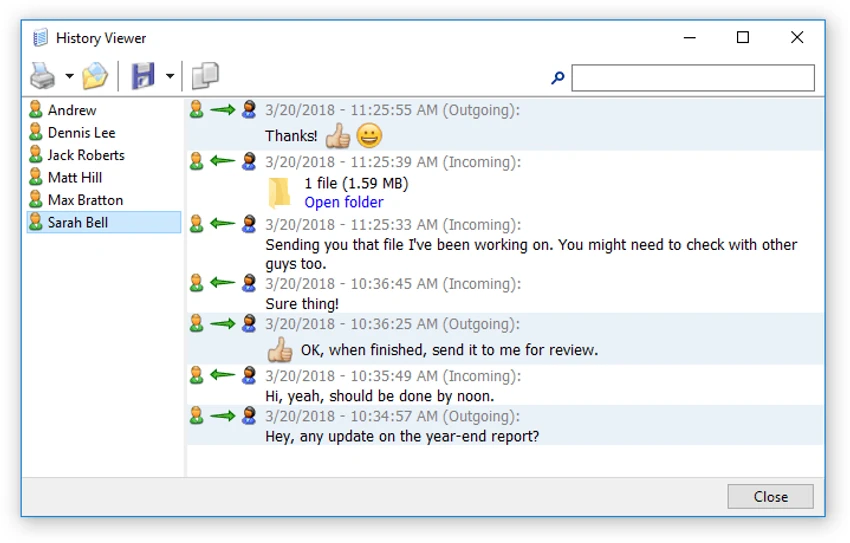
- Message history tracking and search
- User grouping by department or role
- Active Directory integration support
- Windows domain environment compatibility
- Group Policy deployment support
- WAN, VPN, and VLAN network support
- Terminal Services and Citrix support
- Administrative restrictions and access control
- Local or network-based settings management
User Experience
Softros LAN Messenger offers a straightforward and familiar chat-style interface that requires little to no training. Once installed, users can immediately see other online users within the network and begin communicating.
The messaging system is responsive and supports both private and group conversations. Broadcast messaging is particularly useful in office environments where quick announcements need to reach multiple users simultaneously. File sharing is integrated directly into the chat interface, allowing users to drag and drop files or folders without switching applications. Offline messaging ensures that communication is not interrupted when recipients are temporarily unavailable.
From an administrative perspective, the software provides strong control options, including user restrictions, centralized deployment via Group Policy, and integration with Active Directory for easier user management in enterprise environments. The emphasis on local network communication ensures that all data remains within the organization, improving both security and performance while reducing reliance on external services.
Who Should Use Softros LAN Messenger?
- Office and corporate teams
- IT administrators managing internal communication
- Organizations requiring secure messaging
- Businesses with multiple departments or branches
- Environments without internet-based messaging tools
- Companies needing encrypted internal chat systems
Supported Operating Systems
- Windows XP
- Windows Vista
- Windows 7
- Windows 8
- Windows 10
- Windows 11
- Windows Server editions (2003–2022)
Conclusion
Softros LAN Messenger is a secure, efficient, and easy-to-deploy internal messaging solution for organizations that prioritize privacy and network-controlled communication. Its combination of encryption, serverless architecture, and enterprise integration makes it a dependable choice for workplace collaboration.


