Awesome Miner logo

Awesome Miner 11.5.5

  • User Rating:
    ★★★★★
    ★★★★★
    0.0 0Votes
  • Requirements:
    Windows
  • Version: 11.5.5
  • Latest updated: 3 days ago
  • License: Freeware  
  • Publisher: IntelliBreeze Software AB
  • Size: 102 MB
×

Awesome Miner is a Windows-based mining management and monitoring solution designed for users who operate multiple cryptocurrency mining devices. It focuses on centralized control, profitability optimization, and real-time monitoring of mining hardware such as ASIC, GPU, and FPGA systems. With support for large-scale deployments, it is built for both individual miners and professional mining farms.

Overview

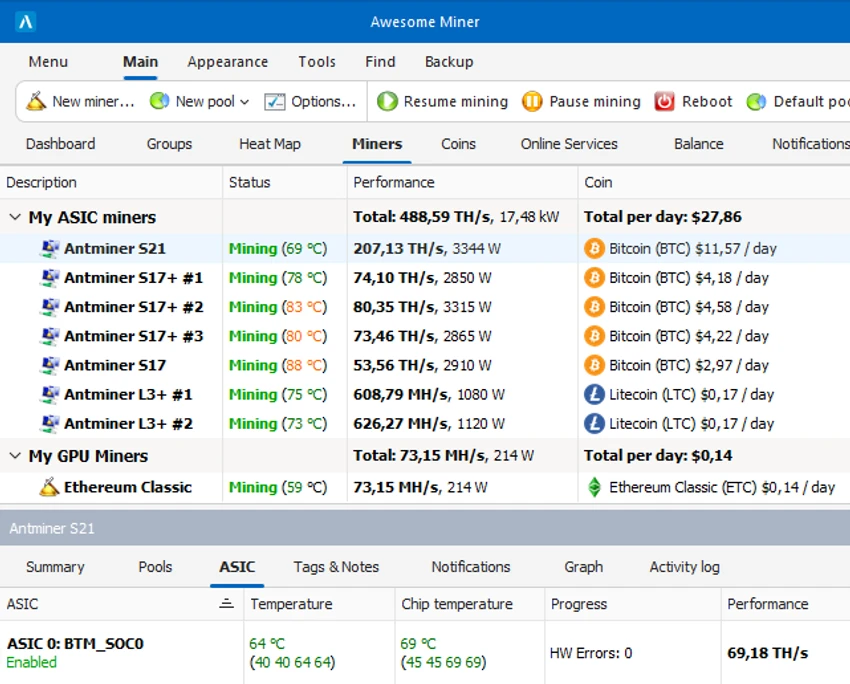
Awesome Miner provides a centralized dashboard for managing mining operations across multiple devices and locations. It supports monitoring of Bitcoin, Litecoin, Ethereum, and other cryptocurrencies while offering tools to analyze profitability, manage mining pools, and optimize mining performance. The software is designed to handle large-scale environments, supporting up to thousands of miners under a single interface. It also includes automation features such as automatic pool switching, device recovery actions, and performance-based triggers to maintain efficient mining operations.

Features of Awesome Miner

  • Centralized management for up to 5000 mining devices
  • Profitability switching based on real-time pool and coin statistics
  • Monitoring of mining hardware performance, temperature, and status
  • Automatic detection of failed, slow, or disconnected miners
  • Notification system via desktop alerts and email
  • Support for 11 mining engines including CGMiner and BFGMiner
  • Compatibility with 26 mining algorithms (e.g., SHA-256, Scrypt, X11)
  • Pool management with batch switching across multiple miners
  • GPU, FPGA, and ASIC monitoring and overclocking controls
  • Built-in web interface for remote access from any device
  • C# scripting engine for automation and custom triggers
  • HTTP API for external integrations
  • SSH management for Bitmain Antminer devices
  • Multi-user access with permission control
  • Dashboard with performance charts and revenue tracking
  • Long-term statistics export to CSV for analysis

Conclusion

Awesome Miner is a powerful solution for users who need full control over large-scale cryptocurrency mining operations. Its combination of monitoring tools, automation features, and profitability optimization makes it a strong choice for professional mining environments.

Pros & Cons

Pros

    • Strong centralized management for large mining setups
    • Extensive hardware and algorithm support
    • Advanced automation with scripting and triggers
    • Real-time monitoring and profitability switching
    • Web-based remote access included
    • Supports multiple mining engines

Cons

    • Requires technical knowledge of mining systems
    • Windows-only application
    • Setup complexity for beginners
    • No official rating provided in the source data

Frequently Asked Questions

What is Awesome Miner used for?

Awesome Miner is used to centrally manage, monitor, and optimize cryptocurrency mining operations across multiple devices.

Does Awesome Miner support automatic switching between mining pools?

Yes, it includes profitability-based switching that automatically selects pools and algorithms based on real-time data.

Can I monitor my miners remotely?

Yes, it offers a built-in web interface that allows remote monitoring from browsers on different devices.

Does Awesome Miner support ASIC and GPU mining?

Yes, it supports ASIC, GPU, and FPGA devices with detailed monitoring and configuration options.

Is Awesome Miner beginner-friendly?

It is primarily designed for advanced users and mining operators, so beginners may need time to learn its features.

Recommended apps [Freeware]:
  • DirPrintOK 7.61 DirPrintOK logo fast and portable tool to print or export directory contents in XLS, HTML, CSV, or TXT formats.
  • WSCC - Windows System Control Center 10.0.3.8 WSCC - Windows System Control Center logo Windows utility manager that installs, organizes, and runs Sysinternals and system tools from one central interface
  • BitTorrent 7.11.0.47255 BitTorrent logo peer-to-peer file sharing client for fast, decentralized downloads with bandwidth control and resume support
  • CalendarTask 3.29.287.9038 CalendarTask logo lightweight desktop calendar with note-taking, cloud sync, reminders, and desktop scheduling tools
  • AnyTXT Searcher 1.3.3173 AnyTXT Searcher logo fast desktop search tool that indexes and searches full-text content across documents, PDFs, emails, and more
  • NewFileTime 8.28 NewFileTime logo a lightweight Windows utility that lets users change file creation, modification, and access timestamps easily
Recommended apps [Shareware]:
  • Quick Heal AntiVirus Pro 26.1.0.2 Quick Heal AntiVirus Pro logo real-time malware protection, ransomware defense, and email security
  • Typing Instructor Platinum 21.1 Typing Instructor Platinum logo improve typing speed and accuracy through interactive lessons, games, and 10-finger typing practice.
  • WinRAR 7.22 WinRAR logo Windows tool for compressing, decompressing, and managing RAR, ZIP, and many other archive formats.
  • Screenpresso 2.2.13 Screenpresso logo a versatile screen capture and video recording tool with editing and annotation features.
  • EF Commander 26.06 EF Commander logo a feature-rich Windows file manager with FTP, media tools, archiving, and advanced file control
  • Bandizip 7.44 Bandizip logo Fast and intuitive file compression software supporting ZIP, RAR, 7Z, and more with high-speed archiving features