



Internet Download Manager (IDM) is a powerful Windows utility designed to accelerate downloads, resume interrupted files, and schedule tasks for efficient file management. With its advanced technology, IDM can increase download speeds up to five times while supporting a wide range of browsers and protocols.
Overview
IDM is one of the most widely used download managers for Windows. It integrates seamlessly with popular browsers like Google Chrome, Mozilla Firefox, Opera, and Internet Explorer. When you click a download link, IDM automatically intercepts it, optimizing the process for maximum speed and reliability. Its dynamic file segmentation technology allows files to be split into smaller parts during download and reuses existing connections, eliminating extra login or handshake steps for faster performance.
Besides speed, IDM offers robust features including protocol support for HTTP, FTP, HTTPS, and MMS, automatic antivirus checking, video capture from websites like YouTube, and drag-and-drop functionality. Its intuitive interface and multi-language support make it accessible to users around the world.
Features of Internet Download Manager (IDM)
- Accelerates downloads up to 5x with smart file segmentation
- Resume and schedule downloads for convenience
- Supports HTTP, FTP, HTTPS, and MMS protocols
- Integrates with all popular browsers
- One-click download functionality
- FLV and video downloads from sites like YouTube and Google Video
- Automatic antivirus checking for downloaded files
- Drag-and-drop links into IDM for quick downloads
- Customizable interface with multi-language support
- Supports multiple proxy servers
- Includes website grabber and content crawler
- Simple installation and user-friendly setup
User Experience
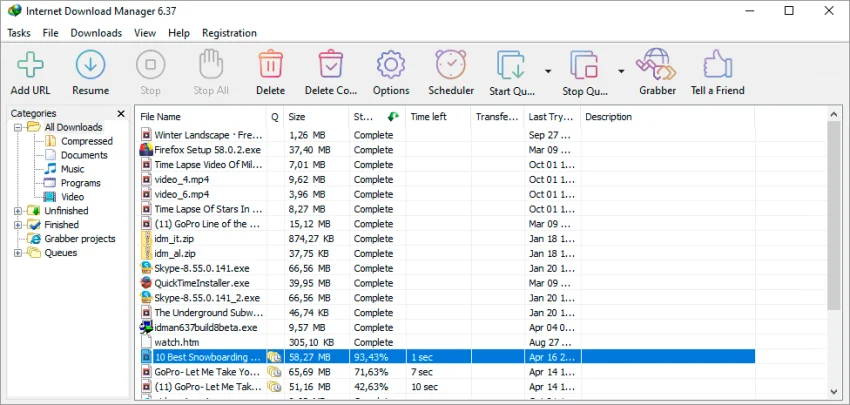
Using IDM is seamless. Once installed, it automatically integrates with your browser and begins monitoring downloads. Clicking a file link triggers IDM to take over the download, speeding it up significantly. Pausing and resuming downloads is straightforward, and the scheduler allows users to queue files for off-peak hours. The interface, though simple, is functional, allowing easy access to advanced features like video grabbing and proxy setup. Multi-language support ensures a comfortable experience for users globally.
Who Should Use Internet Download Manager?
- Users who frequently download large files or multiple files
- Professionals needing efficient file management
- Anyone looking to accelerate downloads and manage tasks efficiently
- Users seeking reliable browser integration and protocol support
Conclusion
Internet Download Manager (IDM) is a robust and reliable download manager for Windows. Its speed, scheduler, and browser integration make it an indispensable tool for anyone managing frequent downloads. For users seeking efficiency, control, and performance in file downloads, IDM is the top choice.


