


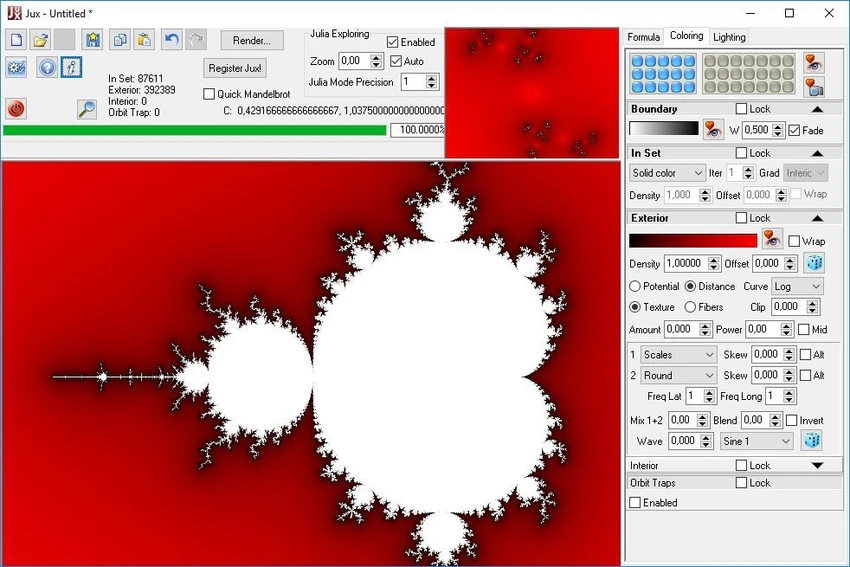

Jux by XenoDream is a specialized fractal exploration tool designed for visualizing and rendering Mandelbrot and Julia sets. It allows users to explore complex mathematical fractals through an interactive interface featuring real-time previews, advanced coloring systems, and high-quality rendering capabilities. The software focuses on visual creativity and mathematical exploration, offering a range of formulas and visual effects that help users generate highly detailed fractal images. It is designed to be easy to use while still supporting advanced rendering features for high-resolution output.
Key Features of Jux
Fractal Exploration
- Switch easily between Mandelbrot and Julia sets
- Interactive Julia explorer with live thumbnail preview
- Mouse-based navigation for real-time fractal exploration
- Multiple built-in fractal formulas with adjustable parameters
Rendering & Performance
- Fully multi-core processing for preview and rendering
- High-resolution image rendering with anti-aliasing (registered version)
- Batch rendering support (registered version)
- Supports large output images up to ~20K × 15K pixels
- 8-bit depth map rendering for post-processing workflows
Coloring & Visualization
- Advanced coloring based on potential, distance estimation, and orbit traps
- Multiple rendering modes including textures, fibers, and field lines
- Gradient editor with linear and randomized gradient generation
- One-click switching between 15 color schemes
- Real-time preview of color and lighting adjustments
Lighting & Effects
- Powerful lighting system with heightfield effects
- Materials with reflection, refraction, and displacement mapping
- Use of panoramic or standard images as environment maps
- Orbit trap and basin-based visual effects
- Adjustable lighting controls with real-time feedback
Usability Features
- Numeric controls behave like sliders for intuitive adjustment
- Undo/redo support (12 steps)
- Preset system for saving formulas, colors, and lighting setups
- Memory slots for temporary storage of configurations
- Easy parameter sharing via clipboard
- Hundreds of built-in system presets
User Experience
After using Jux, the most striking aspect is its ability to turn mathematical fractals into visually rich artwork. The real-time preview system makes exploration intuitive, allowing users to navigate fractal structures smoothly without requiring deep technical knowledge. Switching between Mandelbrot and Julia sets is seamless, and the interactive Julia preview linked to mouse position provides an engaging way to explore variations instantly. This makes experimentation feel dynamic and responsive.
The rendering quality is one of Jux’s strongest points. High-resolution output combined with anti-aliasing and multi-core processing allows for extremely detailed fractal images suitable for artistic or scientific use. The coloring system is particularly powerful, offering multiple rendering styles and fine control over gradients and lighting. Real-time updates help users immediately see the effect of adjustments, which encourages experimentation.
Overall, Jux provides a balance between accessibility and advanced fractal rendering capabilities, making it suitable for both hobbyists and users interested in mathematical visualization.
Who Should Use Jux?
- Fractal art enthusiasts
- Digital artists exploring mathematical visuals
- Users interested in Mandelbrot and Julia set visualization
- Designers creating abstract or generative artwork
- Hobbyists exploring mathematical patterns
Conclusion
Jux is a powerful and visually rich fractal explorer that transforms mathematical equations into intricate digital artwork. With advanced coloring, lighting effects, and high-resolution rendering capabilities, it offers a strong creative toolset for fractal enthusiasts and generative artists.


