PrintFab logo

PrintFab 3.0.7

  • User Rating:
    ★★★★★
    ★★★★★
    0.0 ★ 0Votes
  • Requirements:
    Windows
  • Version: 3.0.7
  • Latest updated: 3 weeks ago
  • License: Free Trial  
  • Publisher: ZEDOnet GmbH
  • Size: 43 MB
× app stores

PrintFab is a professional printer driver suite designed for users who require advanced control over printing quality, color accuracy, and ink usage. The software provides independent printer drivers with RIP (Raster Image Processor) functionality, allowing users to achieve more precise results than standard printer drivers. PrintFab includes dynamic color profiles, advanced color management, ICC profile support, print preview tools, layout editing, and intelligent ink-saving features. It supports more than 300 printer models from brands such as Canon, Epson, and HP, making it suitable for professional printing environments and demanding users. The software also provides specialized printing modes, including support for dye sublimation transfer and screen film printing, while offering cross-platform availability for Windows, macOS, and Linux.

Features of PrintFab

  • Advanced printer drivers: Provides independent printer drivers designed for improved performance and printing control.
  • RIP functionality: PrintFab Pro can operate as CMYK RIP software for professional printing workflows.
  • Color management: Offers powerful color control with dynamic profiles and precise color mixing.
  • ICC profile support: Supports ICC profiles for printers and documents to improve color accuracy.
  • Ink optimization: Includes an intelligent ink-saving system to help manage ink consumption.
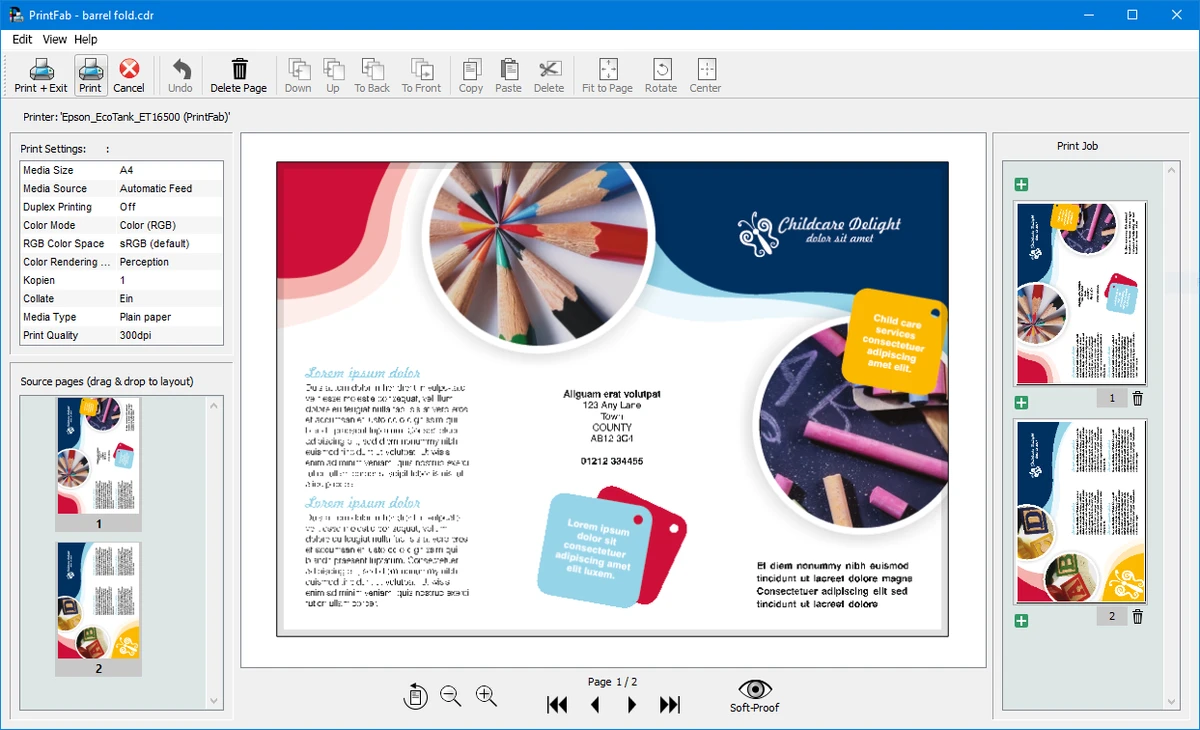
  • Print preview and layout editor: Allows users to review and adjust print layouts before printing.
  • High-quality printing support: Delivers accurate colors with different ink and paper combinations.
  • Special printing modes: Includes features for dye sublimation transfer and screen film printing.
  • Wide printer compatibility: Supports over 300 printer models from major brands including Canon, Epson, and HP.
  • Cross-platform support: Available for Windows, macOS, and Linux.

Interface and Usability

PrintFab is designed for users who need more control over the printing process than standard printer drivers provide. The software focuses on detailed print management, allowing users to adjust color settings, manage profiles, preview layouts, and optimize ink usage.

The available tools are aimed at users who prioritize print quality and consistency. Features such as ICC profile support and color management options provide greater control over professional printing tasks, while the layout editor helps users prepare documents before output. For photographers, designers, and professional printers, PrintFab offers a more advanced printing workflow compared with basic manufacturer drivers.

Who Should Use PrintFab?

PrintFab is suitable for professional photographers, designers, print specialists, and businesses that require accurate color reproduction and better control over printer output. It can also benefit users working with specialized printing processes, such as dye sublimation transfer or screen film printing, who need more advanced printer management features.

Conclusion

PrintFab is a powerful printer driver solution for users who need precise control over print quality, color accuracy, and ink management. With RIP capabilities, advanced color profiles, and broad printer compatibility, it provides a professional alternative to standard printer drivers.

Pros & Cons

✓

Pros

  • Provides professional printer driver functionality
  • Includes RIP support for advanced printing workflows
  • Offers detailed color management tools
  • Supports ICC profiles and third-party ink and paper combinations
  • Compatible with more than 300 printer models
  • Includes ink-saving and layout editing features
✕

Cons

  • Designed mainly for advanced printing needs rather than casual home printing

Frequently Asked Questions

What is PrintFab?

PrintFab is a professional printer driver suite that provides advanced printing controls, color management, and RIP functionality for supported printers.

What is RIP functionality in PrintFab?

RIP (Raster Image Processor) functionality allows PrintFab Pro to process print data with advanced control, making it suitable for professional printing workflows.

Which printers does PrintFab support?

PrintFab supports more than 300 printer models from brands including Canon, Epson, and HP.

Does PrintFab support ICC color profiles?

Yes. PrintFab supports ICC profiles for printers and documents to help improve color accuracy and consistency.

Can PrintFab reduce ink usage?

Yes. PrintFab includes an intelligent ink-saving system designed to help optimize ink consumption during printing.

Which operating systems support PrintFab?

According to the available system requirements, PrintFab supports Windows Vista, Windows 7, Windows 8, Windows 10, and Windows 11. It is also available for macOS and Linux.

Recommended apps [Freeware]:
  • MakeMKV 1.18.4 MakeMKV logo disc ripper that converts DVD and Blu-ray discs into MKV files while preserving audio, video, subtitles, and metadata
  • WinBin2Iso 6.77 WinBin2Iso logo a free, portable utility that quickly converts BIN CD and DVD image files to ISO format on Windows.
  • Media Player Codec Pack 5.1.2.625 Media Player Codec Pack logo enables smooth playback of audio and video formats on Windows by adding essential codecs and filters.
  • DoesNotBelong 11.8.3 DoesNotBelong logo free malware removal and Windows repair tool that complements antivirus software with on-demand scanning and system cleanup
  • SecretDNS 3.9.2 SecretDNS logo Improve online privacy with encrypted DNS requests and SNI protection while reducing access issues through secure network features.
  • Alternate Textbrowser 4.520 Alternate Textbrowser logo View and edit source code with syntax highlighting, binary viewing, search tools, and built-in utilities in a lightweight editor.
Recommended apps [Shareware]:
  • Quick Heal AntiVirus Pro 26.1.0.2 Quick Heal AntiVirus Pro logo real-time malware protection, ransomware defense, and email security
  • Pano2VR 8.0.4 Pano2VR logo powerful software for building interactive panoramic images and virtual tours for desktop and mobile platforms
  • DroidKit 2.3.9.20260625 DroidKit logo Recover data, unlock Android devices, repair system issues, and manage phone content with DroidKit for Windows
  • EaseUS Data Recovery Wizard 20.5.0 EaseUS Data Recovery Wizard logo Recover deleted or lost files with EaseUS Data Recovery Wizard using quick and deep scans for hard drives
  • TapinRadio 2.17.00 TapinRadio logo simple internet radio player for Windows with recording, equalizer, search and alarms and sleep timer
  • Actual Window Minimizer 8.15.4 Actual Window Minimizer logo adds minimize-to-tray functionality to Windows, letting you hide applications in the system tray with one click