FileLegit Windows Internet & Network Network Monitoring Net Monitor for Employees Professional
Net Monitor for Employees Professional logo

Net Monitor for Employees Professional 6.6.6

  • User Rating:
    ★★★★★
    ★★★★★
    0.0 0Votes
  • Requirements:
    Windows
  • Version: 6.6.6
  • Latest updated: 6 days ago
  • License: Free Trial  
  • Publisher: EduIQ
  • Size: 46.3 MB
× app stores

Net Monitor for Employees Professional is an employee monitoring software designed to help businesses, teachers, and supervisors track computer activity and improve workplace productivity. It provides tools for screen recording, internet usage monitoring, application tracking, and remote control of connected systems.

Overview

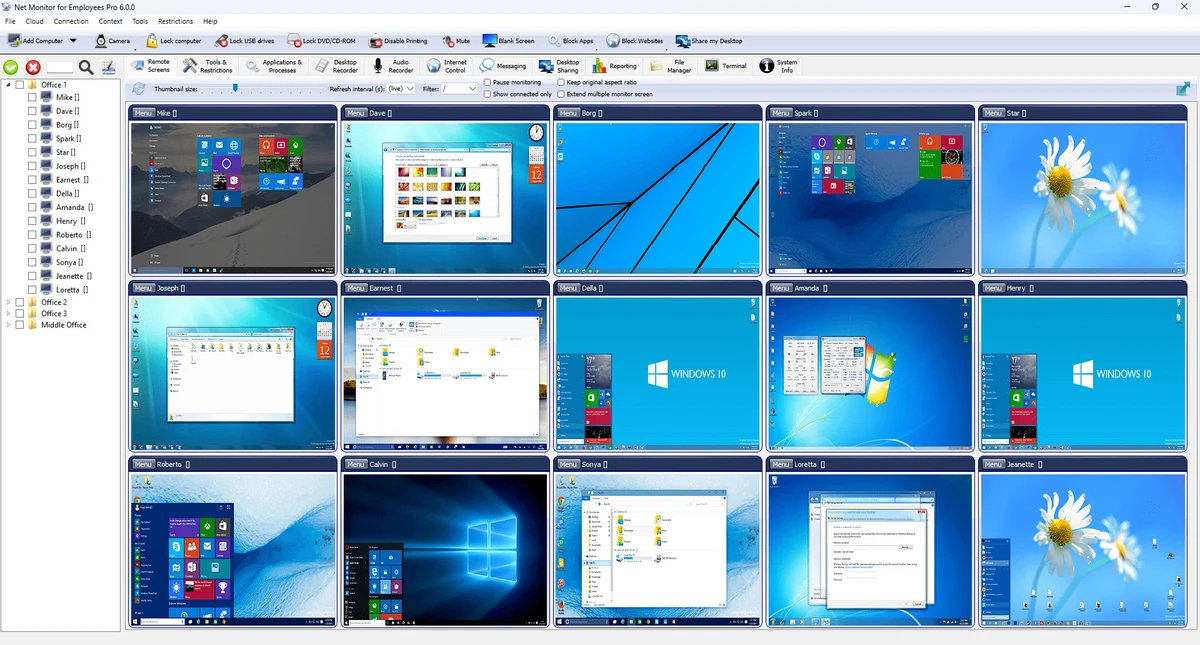
This software focuses on workplace supervision and productivity management. It allows administrators to observe employee or student activity in real time or through recorded sessions. The tool is commonly positioned for organizations that need visibility into how computers are being used during working or learning hours. The application includes monitoring features such as desktop recording, keystroke logging, internet control, and application tracking. It also supports remote control capabilities and system restrictions, helping organizations enforce usage policies and reduce unauthorized activity.

Features of Net Monitor for Employees Professional

  • Desktop activity recording (screenshots or video export in MPEG4/JPEG formats)
  • Internet usage monitoring and reporting
  • Application usage tracking and reporting
  • Keystroke logging for detailed input tracking
  • Remote control of computers, including mobile access
  • Ability to block websites and restrict internet access
  • Application and process control (viewing and blocking programs)
  • USB and device restrictions to prevent data transfers
  • Remote system commands (shutdown, open websites, execute tasks)
  • Built-in messaging, file sharing, and desktop sharing tools

User Experience

From a usability perspective, Net Monitor for Employees Professional is designed with administrative control in mind. The interface is structured around monitoring multiple computers, making it more suitable for IT administrators or supervisors rather than casual users. Setup typically involves installing the software on all monitored machines and configuring access permissions. Once running, the system allows centralized viewing of activity, including screen feeds and usage logs. While the monitoring tools are extensive, the experience may feel complex for beginners due to the number of controls and settings involved. However, for structured environments such as offices or classrooms, it provides a centralized way to observe and manage system usage.

Who Should Use Net Monitor for Employees Professional?

  • Business owners managing employee productivity
  • IT administrators supervising office networks
  • Teachers monitoring student computer activity
  • Project managers overseeing remote teams
  • Organizations needing usage control and reporting

Conclusion

Net Monitor for Employees Professional is a feature-rich monitoring solution aimed at improving productivity and enforcing digital workplace policies. It combines tracking, control, and reporting tools into a single platform, making it useful for structured environments where oversight is required.

Pros & Cons

Pros

  • Comprehensive monitoring features (screen, apps, web activity)
  • Supports remote control and system management
  • USB and application restrictions available
  • Useful reporting tools for productivity tracking
  • Centralized monitoring of multiple systems

Cons

  • Can feel complex for beginners
  • Focused heavily on surveillance use cases
  • Requires installation across monitored systems

Frequently Asked Questions

What is Net Monitor for Employees Professional used for?

It is used to monitor employee or student computer activity, including screen usage, internet browsing, and application activity.

Can it record screens?

Yes, it includes a desktop recorder that captures activity as video or image files.

Does it support remote control?

Yes, it allows remote control of connected computers, including from mobile devices.

Can it block websites or applications?

Yes, it includes internet control and application blocking features.

Is it suitable for home use?

It is mainly designed for business, education, and organizational environments rather than casual personal use.

Recommended apps [Freeware]:
  • Adobe DNG Converter 18.4 Adobe DNG Converter logo Convert camera-specific RAW files to Adobe DNG format for improved compatibility and flexible photo workflows
  • XMedia Recode 3.6.3.1 XMedia Recode logo Free video and audio converter with GPU acceleration, batch conversion, editing tools, and subtitle support
  • Windows 11 Debloater 2.1.3 Windows 11 Debloater logo remove unwanted features, adjust privacy settings, and personalize Windows 11
  • Tixati 3.43 Tixati logo a fast, ad-free BitTorrent client offering advanced peer control, bandwidth management, and detailed swarm analysis
  • QueueExplorer 5.0.84 QueueExplorer logo helps developers and admins manage, test, troubleshoot, and monitor message queues across platforms
  • Daum PotPlayer 1.7.22960 Daum PotPlayer logo a free media player for Windows with broad format support, built-in codecs, subtitles, and customization
Recommended apps [Shareware]:
  • Audio Transcoder 2.12.24 Audio Transcoder logo all-in-one audio converter and CD ripper supporting MP3, FLAC, AAC, WMA, and more
  • DSLR Remote Pro 3.31.5 DSLR Remote Pro logo Windows software for Canon DSLR control, photo booth creation, live view, HDR capture via USB connection
  • Screenpresso 2.2.13 Screenpresso logo a versatile screen capture and video recording tool with editing and annotation features.
  • Teorex FolderIco 9.3.0 Teorex FolderIco logo Change folder colors or icons in one click and organize your files visually, so you can find everything instantly
  • GiliSoft Private Disk 11.8 GiliSoft Private Disk logo Protect sensitive files with AES 256-bit encryption, hidden disk images, and portable encrypted storage
  • EF Duplicate MP3 Finder 26.05 EF Duplicate MP3 Finder logo Find and remove duplicate MP3, FLAC, WMA, and OGG audio files using tag-based and similarity analysis