Text Edit Plus logo

Text Edit Plus 16.5

  • User Rating:
    ★★★★★
    ★★★★★
    0.0 0Votes
  • Requirements:
    Windows
  • Version: 16.5
  • Latest updated: 1 week ago
  • License: Free Trial  
  • Publisher: VovSoft
  • Size: 5 MB
× app stores

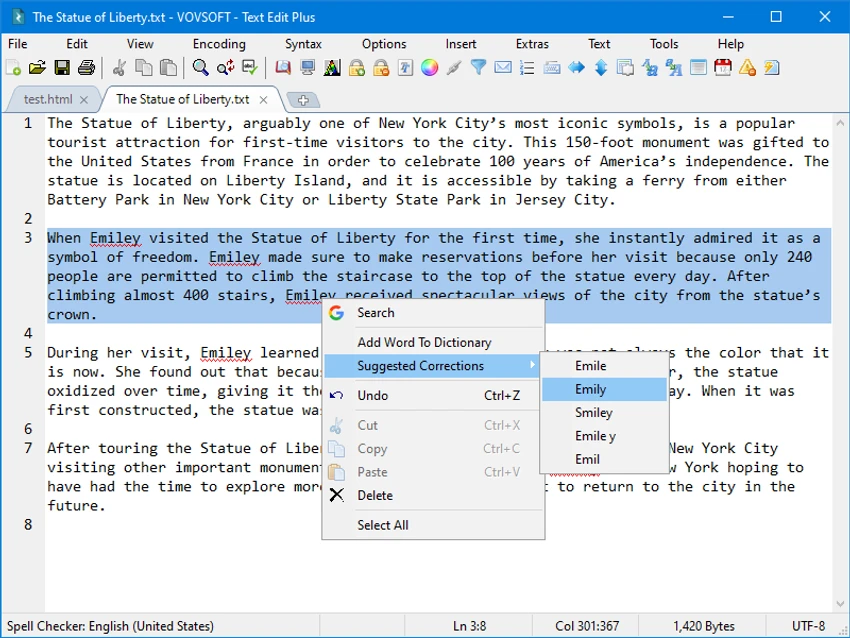
Text Edit Plus is a lightweight plain text editor designed as an enhanced alternative to Windows Notepad. It offers a broader collection of editing and text manipulation tools while maintaining a simple and accessible interface. Built for users who regularly work with text files, the application supports creating new documents, editing existing content, and performing basic text analysis. Its combination of editing functions and document statistics makes it useful for writers, students, developers, and anyone who frequently handles text-based files.

Features of VovSoft Text Edit Plus

Text Editing

  • Create new text documents
  • Edit existing text files
  • Lightweight and responsive design
  • Simple user interface
  • General-purpose text editing

File Support

  • Open TXT files
  • Open CSV files
  • Open HTML files
  • Work with multiple text-based formats

Text Analysis Tools

  • Document analysis module
  • Text statistics generation
  • Word frequency calculation
  • Repetition identification and quantification

Text Manipulation

  • Multiple quick-edit functions
  • Text modification tools
  • Fine-tuning and formatting assistance
  • Efficient editing workflow

User Experience

Text Edit Plus focuses on delivering a cleaner and more capable editing experience than basic text editors while remaining lightweight and easy to use. The interface is straightforward and approachable. New users can quickly begin editing documents without navigating complex menus or advanced configuration options. This simplicity makes the software suitable for both casual and regular text-editing tasks.

One of the application's standout features is its text analysis capability. While many lightweight editors focus solely on editing, Text Edit Plus provides useful document statistics and word frequency calculations. These tools can help users identify repeated words, analyze writing patterns, or review text content more efficiently.

Support for TXT, CSV, and HTML files adds flexibility for users who work with different text formats. The quick-edit functions further enhance productivity by allowing small modifications to be performed quickly without switching to larger editing applications. Because the software is designed as a lightweight alternative to Notepad, it launches quickly and remains responsive even when handling routine editing tasks. It strikes a balance between simplicity and functionality, offering more tools than a basic editor without becoming overly complex.

Who Should Use Text Edit Plus?

  • Writers and content creators
  • Students
  • Office users
  • Developers working with simple text files
  • Users seeking a Notepad alternative
  • Anyone needing quick text analysis tools
  • Users who frequently edit TXT, CSV, or HTML files

Conclusion

Text Edit Plus offers a simple yet capable text-editing experience for users who want additional functionality beyond what Notepad provides. With support for common text formats, built-in text analysis, word frequency statistics, and practical editing tools, it serves as a useful everyday editor.

Pros & Cons

Pros

  • Lightweight and fast performance
  • Easy-to-use interface
  • Useful alternative to Windows Notepad
  • Includes text analysis tools
  • Word frequency calculation feature
  • Supports TXT, CSV, and HTML files
  • Multiple text manipulation functions
  • Suitable for everyday editing tasks
  • Low system resource usage

Cons

  • Focused on plain text editing rather than advanced document formatting
  • Limited information about programming-specific features
  • May not replace full-featured word processors for complex documents

Frequently Asked Questions

What is Text Edit Plus?

Text Edit Plus is a lightweight plain text editor that provides document editing, text manipulation, and text analysis features.

Is Text Edit Plus a replacement for Notepad?

Yes. The software is designed as an alternative to Windows Notepad while offering additional functionality.

Which file formats does Text Edit Plus support?

According to the provided information, Text Edit Plus can open and edit TXT, CSV, and HTML files.

Does Text Edit Plus include text analysis features?

Yes. It includes an analysis module that provides document statistics and word frequency calculations.

Can Text Edit Plus identify repeated words?

Yes. The word frequency feature helps users identify and quantify repeated words within a document.

Is Text Edit Plus suitable for beginners?

Yes. The application features a clean and simple interface that is easy for new users to understand.

Which Windows versions are supported?

Text Edit Plus supports Windows Vista, Windows 7, Windows 8/8.1, Windows 10, and Windows 11 in both 32-bit and 64-bit environments where applicable.

Recommended apps [Freeware]:
  • CrossFTP 2.00.1 CrossFTP logo a multi-protocol FTP client for Windows supporting SFTP, WebDAV, S3, Azure, and secure file transfers
  • HeidiSQL 12.20 HeidiSQL logo manage MySQL, MSSQL, and databases, run queries, edit tables, and export data on Windows
  • QueueExplorer 5.0.84 QueueExplorer logo helps developers and admins manage, test, troubleshoot, and monitor message queues across platforms
  • WAU Manager 3.8.7.0 WAU Manager logo Provides complete control over Windows Updates, including scheduling, installing, hiding, and uninstalling updates on Windows 10/11
  • Media Player Codec Pack Plus 5.1.2.625 Media Player Codec Pack Plus logo Windows codec bundle that enhances video and audio playback with broad format support and advanced filters
  • SponsorBlock 6.1.6 SponsorBlock logo browser extension that automatically skips YouTube sponsorships, intros, outros, and other non-essential video segments
Recommended apps [Shareware]:
  • Topaz Photo 1.6.1 Topaz Photo logo advanced AI to sharpen photos, remove noise, and enhance image quality with ease
  • Digimizer 6.5.4 Digimizer logo image analysis tool for precise measurements, object detection, and scientific image processing
  • O&O SafeErase 21.3.26142 O&O SafeErase logo securely deletes files, drives, and internet traces using certified methods to prevent data recovery on Windows
  • reaConverter Pro 8.0.229 reaConverter Pro logo batch image converter and editor supporting 700+ formats with automation and advanced processing tools
  • Cubase Pro 15.0.30 Cubase Pro logo a professional DAW for recording, composing, editing, mixing, and music production
  • priPrinter Server 7.0.1.2625 priPrinter Server logo virtual printer driver that lets users preview, edit, and optimize print jobs before printing or exporting to PDF and image formats