Alternate Textbrowser logo

Alternate Textbrowser 4.520

  • User Rating:
    ★★★★★
    ★★★★★
    0.0 ★ 0Votes
  • Requirements:
    Windows
  • Version: 4.520
  • Latest updated: 1 week ago
  • License: Freeware  
  • Publisher: Alternate Tools
  • Size: 3 MB
× app stores

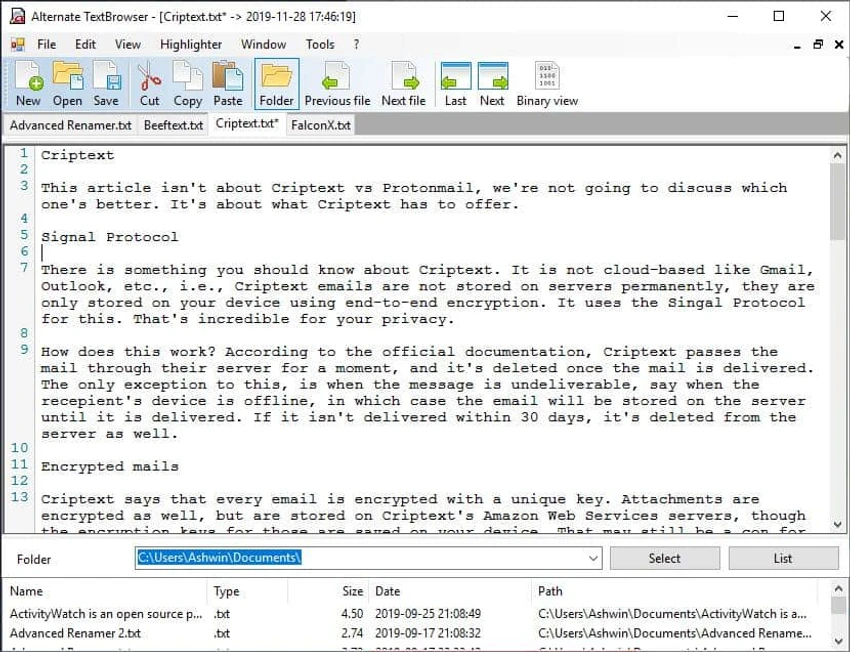
Alternate Textbrowser is a lightweight text and source code editor designed to make reading and editing plain text files and programming code more efficient. Unlike the standard Windows Notepad, it provides syntax highlighting for numerous programming languages, making source code easier to read, understand, and navigate without the complexity of a full integrated development environment (IDE).

The application supports a wide range of programming and scripting languages, including C++, Pascal, PHP, Perl, ASM, JScript, HTML, and XML. Its syntax highlighting helps improve code readability, making it useful for reviewing scripts, configuration files, or existing projects. In addition to standard text editing, Alternate Textbrowser can display binary data in raw form, offering added flexibility when working with different file types.

Beyond editing capabilities, the software includes several built-in utilities such as Alternate Memo for note-taking, a calculator, and a math solver. Additional productivity features include automatic file reloading, configurable search options, an ASCII table for quick reference, print preview, and file property viewing. Designed for Windows Vista and later, Alternate Textbrowser requires the Microsoft .NET Framework to run. Its lightweight design and practical feature set make it a useful utility for programmers, students, and anyone who regularly works with source code or structured text files.

Features of Alternate Textbrowser

  • Syntax highlighting for multiple programming languages
  • Read and edit plain text files
  • Support for C++, Pascal, PHP, Perl, ASM, JScript, HTML, XML, and more
  • Display binary data in raw format
  • Configurable search functions
  • Automatic file reloading
  • Built-in ASCII table
  • Print preview
  • File property viewer
  • Includes Alternate Memo for note-taking
  • Built-in calculator
  • Built-in MathSolver utility
  • Lightweight interface
  • Requires .NET Framework

Interface and Usability

Alternate Textbrowser offers a clean, straightforward interface that focuses on code readability and quick access to essential editing tools. Syntax highlighting makes supported programming languages much easier to review than in a basic text editor, while the uncluttered layout keeps commonly used functions readily accessible.

Navigation is simple, and features such as automatic file reloading and configurable search options help streamline editing workflows. The additional built-in utilities are integrated without overwhelming the interface, making the application practical for both quick edits and routine code inspection. Although it is not intended to replace a full-featured IDE, its lightweight design makes it an efficient choice for opening, reviewing, and making changes to source code.

Who Should Use Alternate Textbrowser?

  • Programmers reviewing source code
  • Web developers working with HTML, XML, PHP, or JavaScript
  • Students learning programming languages
  • Users who need a lightweight alternative to Notepad
  • Anyone editing plain text or configuration files

Conclusion

Alternate Textbrowser is a practical code editor for users who need more than a basic text editor without the complexity of a full development environment. Its syntax highlighting, binary viewing capabilities, and collection of built-in utilities make it well suited for reading, editing, and reviewing source code across multiple programming languages.

Pros & Cons

✓

Pros

  • Supports syntax highlighting for many programming languages
  • Lightweight and easy to use
  • Can display binary data
  • Includes useful built-in utilities
  • Automatic file reloading
  • Search and print preview features
✕

Cons

  • Requires the Microsoft .NET Framework
  • Not intended to replace a full IDE
  • Advanced debugging and development features are not included

Frequently Asked Questions

What is Alternate Textbrowser used for?

Alternate Textbrowser is used to view and edit plain text files and source code with syntax highlighting for multiple programming languages.

Which programming languages does Alternate Textbrowser support?

The editor supports syntax highlighting for several languages, including C++, Pascal, PHP, Perl, ASM, JScript, HTML, XML, and others.

Can Alternate Textbrowser display binary files?

Yes. The application can display binary data in its raw format, making it useful for examining different types of files.

Does Alternate Textbrowser include additional utilities?

Yes. It includes Alternate Memo for note-taking, a calculator, and a MathSolver utility alongside its text editing features.

Is Alternate Textbrowser a full IDE?

No. It is a lightweight code editor designed for reading and editing source code rather than providing advanced development, debugging, or project management features.

Does Alternate Textbrowser require additional software?

Yes. The application requires the Microsoft .NET Framework to be installed before it can run.

Recommended apps [Freeware]:
  • BitTorrent 7.11.0.47255 BitTorrent logo peer-to-peer file sharing client for fast, decentralized downloads with bandwidth control and resume support
  • Prevent Restore 2026 v123 Prevent Restore logo securely wipes deleted files, blocks data recovery, and protects sensitive information on Windows
  • Q-Dir 12.71 Q-Dir logo a lightweight quad-pane file manager for Windows, offering fast navigation, drag-and-drop, and portable access
  • LDPlayer 9.5.27.0 LDPlayer logo Android 5.1 emulator for Windows that lets you run mobile apps and games with keyboard control
  • Intel Graphics Driver 32.0.101.8860 Intel Graphics Driver logo Download the latest Intel Graphics Driver for improved graphics performance, security updates, and Windows compatibility
  • Revo Uninstaller Free 2.7.0 Revo Uninstaller Free logo Remove unwanted programs, clean leftover files, and manage Windows apps with a free uninstall utility designed for easier system maintenance.
Recommended apps [Shareware]:
  • GiliSoft Private Disk 11.8 GiliSoft Private Disk logo Protect sensitive files with AES 256-bit encryption, hidden disk images, and portable encrypted storage
  • LINQPad 9.9.10 LINQPad logo .NET development environment for C#, F#, and VB with database querying, scripting, debugging, and AI-assisted coding tools
  • Agisoft Metashape Professional 2.3.2 Build 22626 Agisoft Metashape Professional logo photogrammetry software that generates accurate 3D models, orthomosaics, and spatial data from digital images
  • TapinRadio 2.17.00 TapinRadio logo simple internet radio player for Windows with recording, equalizer, search and alarms and sleep timer
  • Chris-PC RAM Booster 7.26.0706 Chris-PC RAM Booster logo manages Windows memory usage, optimizes RAM performance, and helps improve application responsiveness
  • Neo Lighting Control 4.3.0 Neo Lighting Control logo Manage LED and architectural lighting systems with flexible control software designed for scalable production and professional environments.